Google December 2026 Core Update: What’s Coming and How to Prep
The Solo Toolbox · Software Help for One-Person Businesses
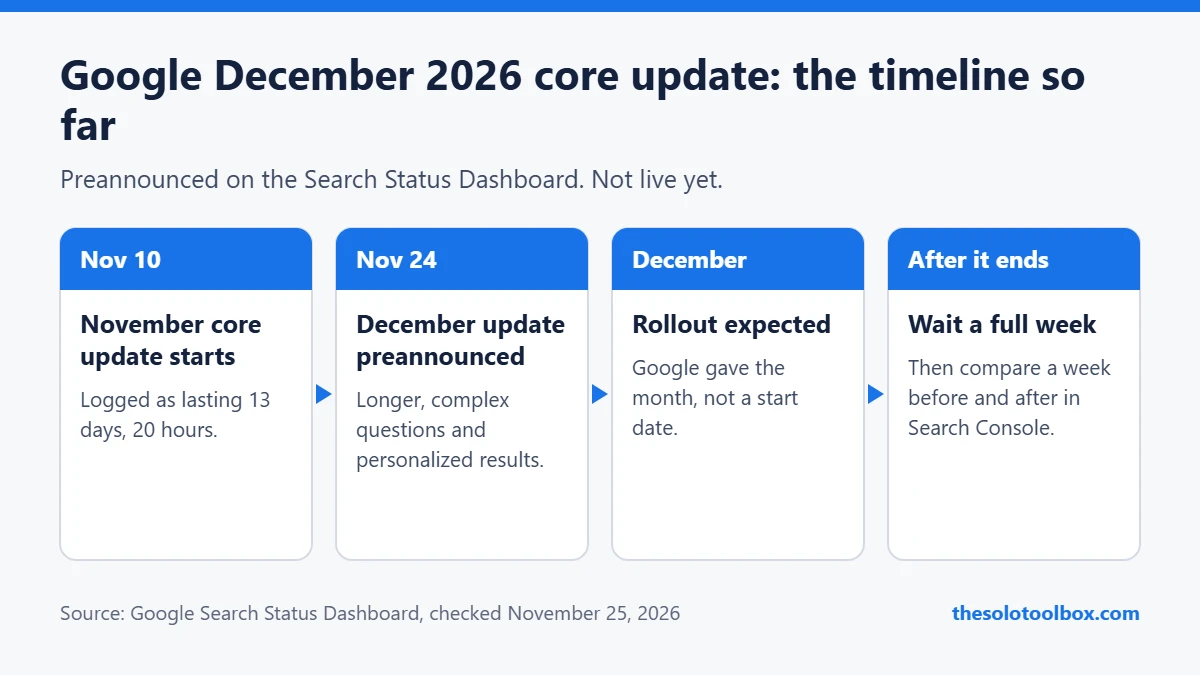
Google has preannounced the December 2026 core update but has not started it. On November 24, 2026, Google posted on its Search Status Dashboard that the update will improve how its systems understand and rank content, including for longer and more complex questions, and improve personalized results for people who have personalization turned on. Google says it is scheduled for December 2026 and gave no start date.
This guide covers what Google actually said, how this update fits right after the November 2026 core update, what site owners should do before it starts, and how to check or switch off the personalization setting the update mentions.
Before you start
- Who this is for: website owners, bloggers and small businesses that get traffic from Google, plus anyone curious why their own search results may change.
- Time needed: about 20 minutes to save a Search Console baseline; 2 minutes to check your personalization setting.
- How we checked this: on November 25, 2026 we read Google’s Search Status Dashboard entry and ranking history, Google’s core updates documentation and two Google Search Help articles on personalization. Google has not published a blog post with more detail, so anything beyond its one-paragraph notice is marked as our reading, not Google’s.
What Google said about the December 2026 core update
The dashboard entry is dated November 24, 2026 at 07:03 PST and is filed under Ranking with an “Information” status rather than a duration. In short, it says the update:
- Focuses on “multiple improvements” to how Google’s systems understand and rank relevant content.
- Specifically includes longer and more complex questions.
- Improves personalized results for people who have personalization turned on.
- Applies to all locations and languages where Google Search is available.
- Follows Google’s existing guidance for core updates.
- Is scheduled for release in December 2026.
That is the whole announcement. Google did not give a start date, a rollout length, or examples of which kinds of queries or sites it expects to move.
Is the December core update live yet?
No. As of November 25, 2026 the entry is a preannouncement only. In the dashboard’s ranking history, past core updates appear with a start date and a duration once they roll out; this one has neither. Ranking changes you see this week are more likely to be the tail of the November 2026 core update, which started on November 10 and is logged as lasting 13 days and 20 hours, so it finished on or around November 24.
Google’s December updates in the last two years started in the second week of the month. That is a pattern, not a promise:
| Core update | Started | Rollout length (per Google) |
|---|---|---|
| November 2026 | Nov 10, 2026 | 13 days, 20 hours |
| May 2026 | May 21, 2026 | 11 days, 21 hours |
| March 2026 | Mar 27, 2026 | 12 days, 4 hours |
| December 2025 | Dec 11, 2025 | 18 days, 2 hours |
| December 2024 | Dec 12, 2024 | 6 days, 4 hours |
| December 2026 | Not started | Scheduled for December 2026 |
What “longer and more complex questions” could mean for your site
Google did not explain this part, so treat what follows as our reading. Searches are getting longer as people type full questions into Google and AI Mode, for example “best invoicing app for a freelancer who bills in two currencies” instead of “invoicing app”. An update aimed at those queries could reward pages that answer a specific, multi-part question directly and could move pages that only match the short head term.
Practical checks that line up with Google’s own core update guidance:
- Open your top 10 landing pages and read the first two paragraphs. Do they answer the question the page ranks for, with specifics such as versions, prices, dates or steps?
- In Search Console, filter queries containing words like “how”, “why”, “vs” or “for” and look at which pages Google already shows for them. Those are the queries this update is most likely to touch.
- Look for pages that cover the same question twice. Two thin pages on one topic tend to compete with each other; one complete page is easier for Google to match to a detailed question.
What to do before the December 2026 core update starts
Google’s documentation says most sites don’t need to do anything for a core update, and it warns against quick fixes. The useful work now is preparation, so you can tell later what the update changed.
- Save a baseline. In Search Console, open Performance > Search results, set the date range to the last 3 months and click Export. Keep the file; Search Console only keeps 16 months of data.
- Write down the November dates. Note November 10 to November 24 as the November core update window, so you don’t blame December for a drop that started earlier.
- Finish your November review first. Google recommends waiting at least a full week after an update completes before analyzing it. For November, that means from about December 1, which may overlap with the December rollout. Compare a week before November 10 with the week of December 1 to 7 if the December update hasn’t started by then.
- Pause big site changes during the rollout. Redesigns, URL changes or mass content deletions during a core update make it hard to tell what caused a traffic change.
- Watch the dashboard. The December 2026 core update entry will be updated when the rollout starts and when it ends.
If you saw movement this month, our guide to what to check now that the November 2026 core update is done walks through that analysis step by step.
How to read a drop after the update ends
Google’s core updates page gives two examples that help set expectations. A small drop, such as moving from position 2 to 4, usually needs no action, and Google recommends not changing content that already performs well. A large drop, such as from position 4 to 29, calls for a deeper look using Google’s self-assessment questions about helpful, people-first content.
Google also suggests analyzing Web Search, Images, Video and News separately in Search Console, because a drop in one search type can hide inside a total that looks stable. And it lists deleting content as a last resort, not a first move.
How to check or turn off personalized Google results
The update’s personalization changes only apply to people who have personalization on. Google calls the setting Personalized Recommendations. When it is on, Google can use your activity, saves, profile info and linked services to reorder results, feeds and AI responses.
- Go to your Google Account at myaccount.google.com and sign in.
- Click Data & privacy.
- Click Personalization settings.
- Turn Personalized Recommendations in Search services on or off. You can also go straight to google.com/search-personalization.
Google says these settings are rolling out gradually. If you don’t see this option yet, personalization for Search is still controlled by Web & App Activity. To check a single search without changing anything, scroll to the bottom of the results page: Google shows “Results are personalized” with a Try without link, or “Results are not personalized”.
Turning personalization off does not make results identical for everyone. Google still uses your location, language, device type and current searches. Site owners checking their own rankings should click Try without or use a signed-out browser window, because your own logged-in results can differ from what a new visitor sees. If you also want plain links without AI features, see three ways to get plain web results in Google.
Frequently asked questions
When will the December 2026 core update start?
Google only said December 2026. The 2024 and 2025 December core updates started on December 12 and December 11, but Google hasn’t confirmed a date for this one.
Should I change my content before the update?
Only if the change helps readers anyway, such as fixing outdated steps or merging duplicate pages. Google’s guidance is to avoid quick fixes made for the algorithm, and there is no way to “pre-optimize” for an update whose details Google hasn’t published.
Does turning off personalization affect my website’s rankings?
No. The setting changes the results you see in your own account. It doesn’t change how Google ranks your site for other people.
Will this update affect AI Overviews or AI Mode?
Google’s notice doesn’t mention AI Overviews or AI Mode by name. It refers to Google Search and to personalized results, so we can’t confirm either way.
Next step
Export your Search Console performance data today, before the December rollout starts, and check google.com/search-personalization so you know which version of Google you are looking at when you test your own pages.
Related guides
Sources
- Google Search Status Dashboard: December 2026 core update (November 24, 2026)
- Google Search Status Dashboard: Ranking update history
- Google Search Central: Google Search’s core updates and your website
- Google Search Help: Manage Personalized Recommendations in Search services
- Google Search Help: Personalization & Google Search results
Last checked: November 25, 2026. If something here is out of date, let us know.