Exchange Web Services Retirement: Fix Apps Before April 2027
The Solo Toolbox · Software Help for One-Person Businesses
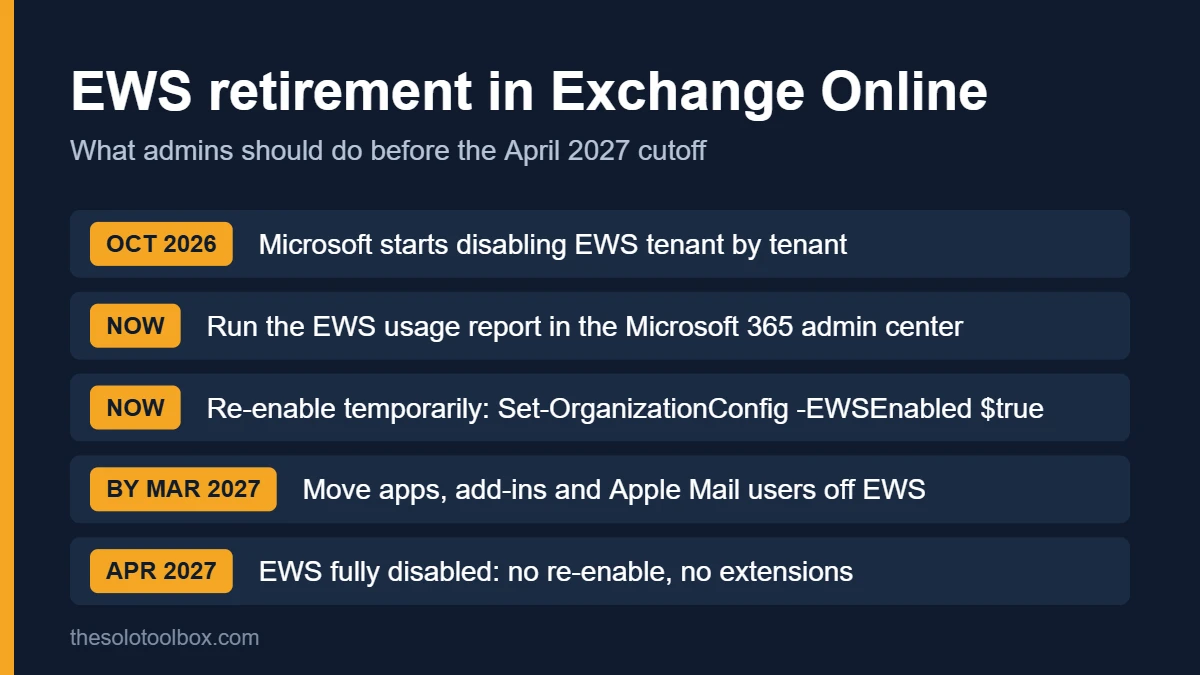
Exchange Web Services (EWS) retirement in Exchange Online is already under way: Microsoft began switching EWS off tenant by tenant on October 1, 2026, and it will be fully disabled in April 2027. Until then, an admin can turn EWS back on to fix a broken app. After that, apps still using EWS stop connecting to Microsoft 365 mailboxes for good.
This guide covers the timeline, which apps break and what the errors look like, how to find what still uses EWS in your tenant, the temporary re-enable switch, and what to replace those apps with.
Before you start
- Who this is for: small businesses, freelancers and IT admins who run Microsoft 365 mail, especially if someone uses Apple Mail on a Mac, an Outlook add-in, or a third-party backup or CRM tool.
- What you need: a Microsoft 365 admin account. For the PowerShell steps, the Exchange Online PowerShell module.
- How we checked this: on November 25, 2026 we read Microsoft Learn’s EWS deprecation page, Microsoft 365 message center post MC1227454 (February 5, 2026), BleepingComputer’s October 22, 2026 report on Microsoft’s fix guidance, and analysis from Office 365 for IT Pros and Neowin. Sources differ slightly on whether the April 2027 date is the start or end of the final shutdown, and we note where we couldn’t confirm a cmdlet name or menu path.
EWS retirement timeline
| Date | What happens |
|---|---|
| July 2018 | Microsoft announces EWS will stop getting feature updates |
| 2023 | Microsoft sets October 2026 as the date to start disabling EWS |
| February 5, 2026 | MC1227454 confirms the final plan and asks admins who still need EWS to opt in before October |
| October 1, 2026 | Phased disablement starts; tenants that didn’t act get EWS turned off |
| October 22, 2026 | Microsoft says the first stage still lets customers re-enable EWS |
| April 2027 | EWS fully and permanently disabled in Exchange Online; no re-enable option |
MC1227454 calls April 1, 2027 the full and permanent retirement. Office 365 for IT Pros reads Microsoft’s plan as a process that starts April 1 and finishes in May 2027. Plan around April 1. Neowin, summarizing Microsoft’s guidance, reported there will be no extensions.
This applies only to Exchange Online. Exchange Server on-premises is not affected, per MC1227454. The deadline is drawing attention again this week: the open-source Stalwart mail server’s 1.2 release on November 23 added an optional Exchange-compatible module and pointed to the April 2027 EWS cutoff.
What breaks, and what the errors look like
Microsoft’s guidance, as reported by BleepingComputer, names Outlook desktop add-ins, older versions of Outlook for Windows, and Apple Mail and Calendar on macOS among the apps that use EWS. Office 365 for IT Pros adds backup products and mailbox import and export tools, which have used EWS for years. Microsoft says it is removing EWS dependencies from its own Outlook, Office, Teams and Dynamics 365, and also lists the Power BI Outlook mail connector and the Excel Power Query Exchange connector.
When EWS is blocked, users typically see a message that the EWS protocol is unavailable, or repeated prompts for a username and password that never succeed. The second symptom is easy to mistake for a password problem, so check EWS before resetting anyone’s credentials.
| Who uses it | Likely symptom | Fix before April 2027 |
|---|---|---|
| Mac users with Apple Mail or Calendar on a Microsoft 365 account | Account stops syncing, password prompts loop | Test Outlook for Mac, which Microsoft is updating to drop EWS, or a client whose vendor confirms it doesn’t use EWS |
| Outlook add-ins (CRM, scheduling, signatures) | Add-in fails or shows connection errors | Update to the vendor’s Microsoft Graph version |
| Backup and archiving tools | Backups fail silently or report auth errors | Confirm the vendor has a Graph-based connector and test a restore |
| Custom scripts and in-house apps | API calls fail | Rewrite against Microsoft Graph |
| Exchange Server on-premises | Nothing changes | No action for this retirement |
Step 1: Find what still uses EWS in your tenant
- Sign in to the Microsoft 365 admin center and open the EWS usage report. Microsoft’s direct link is admin.cloud.microsoft/?#/reportsUsage/EWSWeeklyUsage, which opens it from the admin center’s usage reports.
- Note each app and user listed. Microsoft’s identification guidance for third-party apps is at aka.ms/ewsIdentifyApps.
- For a deeper look, Microsoft Learn also points to the EWS Usage Reporting tool and the EWS Analyzer tool.
- Ask each vendor directly whether its current version still uses EWS, and get a date if it does.
Step 2: Check your tenant’s EWS setting
The organization-wide switch is the EWSEnabled property. Connect to Exchange Online PowerShell and read it:
Install-Module ExchangeOnlineManagement -Scope CurrentUser
Connect-ExchangeOnline
Get-OrganizationConfig | Format-List EWSEnabled| EWSEnabled value | Effect from October 2026 |
|---|---|
| True | Only apps on your tenant’s allow list can use EWS |
| False | All EWS is blocked |
| Empty (null, the old default) | All EWS allowed and the allow list is ignored, until Microsoft sets it to False during the phased disablement |
Microsoft builds each tenant’s app allow list from the apps it sees using EWS, and admins can adjust it until April 2027. Office 365 for IT Pros notes this allow list takes precedence over the older EWSApplicationAccessPolicy setting. We couldn’t confirm the exact cmdlet Microsoft uses for editing the allow list in the pages we read, so follow Microsoft’s instructions at aka.ms/EWSEnabledChange for that step.
Step 3: Turn EWS back on temporarily
If a critical app broke after October 1, Microsoft gives two ways to switch EWS back on while you move off it:
- Admin center: on the Baseline Security Mode page in the Microsoft 365 admin center, clear the checkbox Block your entire organization from using EWS.
- PowerShell: run
Set-OrganizationConfig -EWSEnabled $true. Microsoft says the change takes effect within about four hours.
This buys time only. Microsoft says re-enabling will stop working in April 2027, and its long-term advice is to update to app versions that don’t use EWS. Keep EWS off for anyone who doesn’t need it. Microsoft’s own timeline lists the January 2024 Midnight Blizzard attack on its corporate email among the milestones that led to the shutdown.
Step 4: Replace EWS apps before April 2027
Microsoft Graph is the replacement. Microsoft says Graph offers near-complete parity with EWS for most scenarios. The gaps matter if you rely on them: Office 365 for IT Pros points out that archive mailboxes and public folders are missing, and some newer Graph APIs are still only on the beta endpoint, which Microsoft can change without notice.
- Mac users: test the account in Outlook for Mac now (Microsoft lists Outlook among the products it is removing EWS dependencies from), before Apple Mail stops syncing, so calendars and contacts move over on your schedule.
- Vendors: ask for the Graph version, its release date, and whether it covers archive mailboxes or public folders if you use them.
- Your own code: developers who also support on-premises Exchange will need two code paths, since Exchange Server doesn’t offer a Graph equivalent.
If you’re cleaning up old Exchange PowerShell scripts at the same time, our guide to installing PowerShell 7 covers the current shell, which the Exchange Online module supports.
FAQ
When is EWS turned off in Exchange Online?
Microsoft started disabling EWS tenant by tenant on October 1, 2026. It will be fully and permanently disabled in April 2027, with April 1, 2027 given as the retirement date in message center post MC1227454.
Does the EWS retirement affect Exchange Server on-premises?
No. Microsoft says the change applies to Exchange Online only.
Can I get an extension past April 2027?
Plan as if not. Neowin’s summary of Microsoft’s guidance says there will be no extensions, and BleepingComputer reports that the re-enable option stops working in April 2027.
Why does Outlook or Apple Mail keep asking for my password?
If your organization’s EWS access was turned off, apps that rely on EWS can loop on password prompts. Ask your admin to check the EWS usage report and the EWSEnabled setting before resetting the password.
What replaces EWS?
Microsoft Graph. It covers most EWS scenarios, but archive mailboxes and public folders are not fully supported yet.
What to do next
Run the EWS usage report this week and list every app on it with an owner and a replacement date before March 2027. If you manage on-premises Exchange as well, our guide to OWA problems after the October 2026 Windows update covers that separate issue, and our SkyKick breach guide shows how to review third-party apps that have access to your Microsoft 365 tenant.
Related guides
Sources
- Microsoft Learn: Deprecation of Exchange Web Services in Exchange Online
- Microsoft 365 message center MC1227454: Exchange Web Services retirement update (February 5, 2026), via mc.merill.net
- Microsoft Learn: EWS usage reports
- BleepingComputer: Microsoft shares how to fix broken Exchange Online EWS apps (October 22, 2026)
- Office 365 for IT Pros: The final countdown to remove EWS from Exchange Online begins (February 6, 2026)
- Neowin: Exchange Online EWS is dying, here is what IT admins can do to prepare
- Stalwart: Microsoft Exchange replacement announcement (November 23, 2026)
Last checked: November 25, 2026. If something here is out of date, let us know.