iPhone Handoff Carriers: Who Supports It and What It Costs
The Solo Toolbox · Software Help for One-Person Businesses
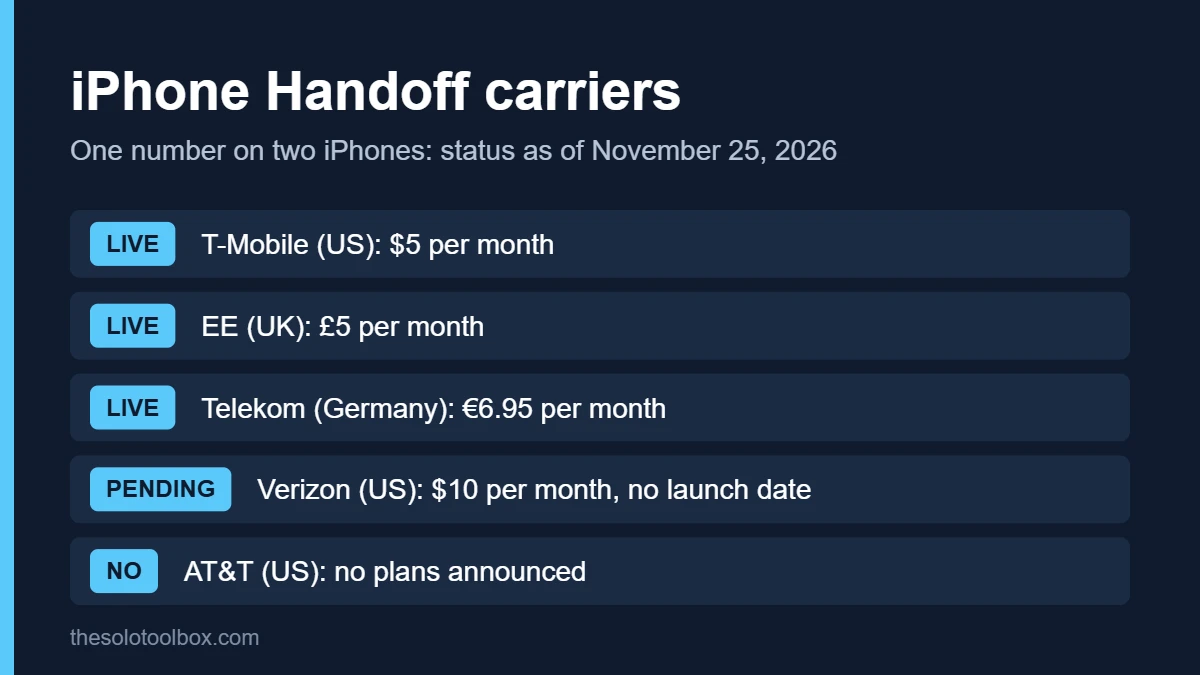
As of November 25, 2026, iPhone Handoff works with three carriers: T-Mobile in the US ($5 a month), Telekom in Germany (€6.95 a month) and EE in the UK (£5 a month). Verizon has announced a $10 monthly price but no launch date, and AT&T has no plans to support it. Without one of those carriers, the feature won’t appear on your iPhone, even on iOS 27.
This guide lists each carrier’s status and price, what Handoff needs on both phones, Apple’s setup steps, and the limits worth knowing before you add a monthly fee.
Before you start
- Who this is for: anyone with two iPhones, such as an iPhone Duo plus another iPhone, or separate work and personal phones, who wants one number on both.
- What you need: two iPhones on iOS 27 or later, one Apple Account signed in on both, and an eSIM line from a supported carrier.
- How we checked this: on November 25, 2026 we read Apple’s iPhone Handoff support article (published November 3, 2026), 9to5Mac’s November 24 carrier roundup, and MacRumors’ reports on Verizon pricing and plan inclusions. We have not tested Handoff ourselves, and Apple does not publish a list of supported iPhone models.
iPhone Handoff carriers and prices
| Carrier | Country | Status (Nov 25, 2026) | Price |
|---|---|---|---|
| T-Mobile | US | Live | $5/month |
| Telekom | Germany | Live | €6.95/month; included in MagentaMobil L and XL, per MacRumors |
| EE | UK | Live | £5/month; free on Full Works Plus, per MacRumors |
| Verizon | US | Announced, no date | $10/month |
| AT&T | US | No plans announced | n/a |
Apple’s own article lists only T-Mobile, Telekom and EE as supported carriers. 9to5Mac’s November 24 roundup confirms the same three are live and says no other carrier has announced support. Verizon announced its $10 price on October 16 alongside its iPhone Duo offers, and earlier reports said Apple expected Verizon to launch before the end of 2026, but Verizon still hasn’t given a date. AT&T said in September that its focus is elsewhere and has given no timeline, and its NumberSync service is not the same feature.
Over a year, the fee adds up to $60 on T-Mobile and would be $120 on Verizon. EE’s free inclusion is described differently by different outlets (Forbes says the Full Works plan, MacRumors says Full Works Plus), so check your plan page before you sign up.
What iPhone Handoff does
Handoff puts the same phone number on two iPhones, but only one is active on the cellular network at a time. Whichever iPhone you unlock becomes the active one: calls, voicemail, SMS, MMS, RCS, iMessage and Find My location move to it. Apple says the phone you leave shows an arrow icon and the one you pick up shows Switched to this iPhone.
That makes it different from Dual SIM, which puts two numbers on one phone, and from carrier “multi-SIM” or number-sharing plans that ring several devices at once. With Handoff, both phones never ring together.
What you need on both iPhones
- iOS 27 or later on both devices.
- Both iPhones connected to Wi-Fi.
- The same Apple Account on both, with Messages in iCloud turned on and FaceTime and iMessage signed in to that account.
- An eSIM for each line from a supported carrier. A physical SIM won’t work, so UK and German users on a SIM card need to switch to eSIM first. iPhones sold in the US are already eSIM-only.
- A passcode on both phones, which Apple says to keep turned on.
Apple doesn’t publish a model list. Verizon confirmed support for the iPhone Duo and iPhone 18 Pro, and 9to5Mac tested the feature on that pair. If your carrier supports Handoff but the option doesn’t appear, ask the carrier whether your model and plan are eligible.
How to set up iPhone Handoff
On a new iPhone during setup
- On the Set Up Cellular screen, choose Use Number on This iPhone and Another.
- Tap Continue and follow the prompts on both iPhones.
On an iPhone you already use
- Open Settings > Cellular and tap Set Up Cellular or Add eSIM.
- Choose Use Number on This iPhone and Another, then tap Continue twice.
- Select the other iPhone and tap Continue.
- Pick where the main eSIM lives: Other iPhone keeps it on the phone you’re holding, This iPhone moves it to the new one.
- Tap Continue and finish the prompts on both devices. Your carrier may ask you to confirm the add-on and its fee.
Make a test call from each phone after setup. To replace one of the two iPhones later, Apple’s steps are Settings > Cellular > Set Up Cellular or Add eSIM on the new phone, select an iPhone, tap Continue, then tap Transfer. The eSIM then stops working on the old phone.
Limits to know before you pay
| What | How it works with Handoff |
|---|---|
| Call Forwarding, Caller ID, carrier account settings | Stay on the main iPhone only |
| Apple Watch | Stays paired to one iPhone; it doesn’t switch when the number moves |
| Wallet | Some items work on only one device; reports name transit passes and work badges |
| Dual SIM | Supported if both eSIMs come from supported carriers |
| Turning it off | Contact your carrier; Apple warns that deleting the eSIM may not stop the charge |
The Apple Watch limit matters most in practice: pair the watch with the iPhone you carry most, because it won’t follow the number when you switch phones.
FAQ
Can both iPhones ring at the same time with iPhone Handoff?
No. Only one iPhone is active on the network at a time. Unlocking the other iPhone moves calls and messages to it.
Does iPhone Handoff work on AT&T?
No. As of November 24, 2026, AT&T has not announced plans to support it. In the US, only T-Mobile offers it today, and Verizon has announced it without a date.
How much does iPhone Handoff cost?
T-Mobile charges $5 a month, Verizon has announced $10 a month, Telekom charges €6.95 a month unless your MagentaMobil L or XL plan includes it, and EE charges £5 a month unless your plan includes it.
How do I turn off iPhone Handoff?
Apple says to contact your carrier. Deleting the eSIM from the phone may not end the monthly fee.
What to do next
If you’re on T-Mobile, EE or Telekom, update both iPhones and check Settings > Cellular for Use Number on This iPhone and Another. On Verizon, wait for a launch date before paying for a second line you can’t use yet. If you’re weighing an iPhone Duo as the second phone, our look at iPhone Duo screen durability covers what’s known so far, and our iOS 27.3 beta guide lists the next update’s changes. If you add Handoff and later drop it, remember it’s billed by the carrier, not through your Apple subscriptions; our guide to cancelling iPhone subscriptions covers the Apple side.
Related guides
Sources
- Apple Support: iPhone Handoff (published November 3, 2026)
- 9to5Mac: iPhone Handoff carrier availability and pricing (November 24, 2026)
- MacRumors: Verizon will charge $10 a month for iPhone Handoff (October 16, 2026)
- MacRumors: iPhone Handoff guide
- Forbes: iOS 27 iPhone Handoff guide (October 17, 2026)
Last checked: November 25, 2026. If something here is out of date, let us know.