Pinterest Parental Controls: How to Limit AI Content for Teens
The Solo Toolbox · Software Help for One-Person Businesses
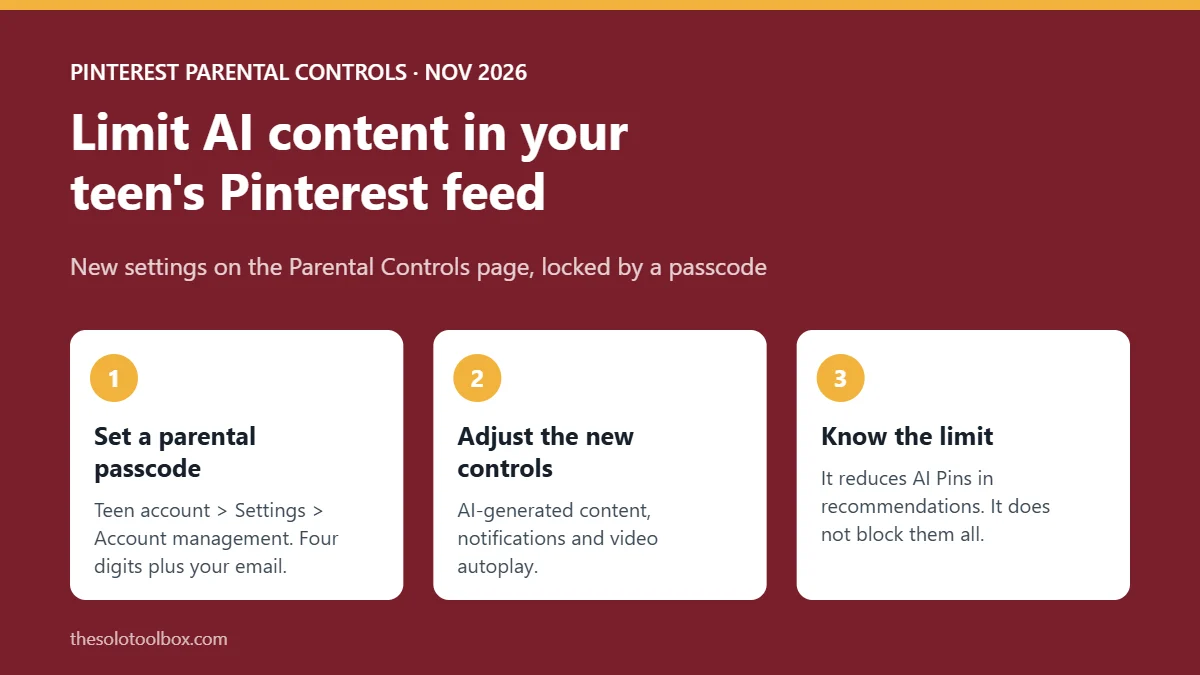
Pinterest now lets parents adjust how much AI-generated content appears in a teen’s recommendations. The setting sits on a new Parental Controls page that Pinterest announced on November 23, 2026, alongside new controls for notifications and video autoplay. To stop your teen changing it back, set a four-digit parental passcode on their account; every setting on the new page is locked by it.
Below: what the new page includes, how to set the passcode step by step, what the AI setting can and can’t do, and how to cut AI Pins in your own feed.
Before you start
- What you need: your teen’s Pinterest login (you set the controls from inside their account) and an email address you can check, because the passcode setup sends a confirmation link.
- Time: about five minutes, plus a quick email confirmation.
- Talk first: your teen gets an email when a passcode is turned on, so it won’t be a secret.
- How we checked this: on November 25, 2026 we read Pinterest’s Newsroom announcement, its Help Center articles on the parental passcode and AI Pins, and TechCrunch’s report from November 24. Pinterest had not yet published a Help Center walkthrough for the new Parental Controls page, so we can’t confirm its exact menu location in every version of the app.
What changed on November 23
Pinterest moved its teen settings onto one Parental Controls page and added three new controls there:
- AI-generated content: adjust the amount of AI-generated content in a teen’s recommendations.
- Notifications: adjust the volume of push, browser, email and in-app notifications.
- Video autoplay: choose whether videos play automatically.
The same page gathers existing protections: private-by-default profiles, limits on ads personalization, and controls for social features such as comments and @mentions. On iOS and Android it also links straight to the phone’s own Screen Time and Location settings, so you can tighten device-level limits from the same place.
TechCrunch called Pinterest one of the first major social platforms to give parents a say over how much AI content fills a feed. Most rivals focus on limiting teens’ access to AI chat features instead.
How to set a parental passcode on Pinterest
Without a passcode, a teen can undo any setting you change. Pinterest’s Help Center lists these steps, written for the website:
- Log in to your teen’s Pinterest account.
- Click the more options icon at the bottom left of the screen.
- Click Settings.
- Select Account management from the left-side navigation.
- Follow the prompts to create a four-digit passcode and add your email address.
- Open the confirmation email from Pinterest and click the link. The link only works for 24 hours.
You and your teen both receive an email confirming the passcode is on. It expires automatically when your teen turns 18, based on the birth date on their account, and Pinterest deletes your email address once the passcode is off or expired.
Adjust the AI content setting
With the passcode in place, open the Parental Controls page from your teen’s settings and set the AI-generated content control to the level you want. Pinterest describes it as adjusting the amount of AI content, not switching it off, so expect fewer AI Pins rather than none.
While you are there, check the two other new controls. Turning off video autoplay removes one of the easiest ways to keep scrolling, and lowering notification volume cuts the pings that pull a teen back into the app. Pinterest already switches notifications off late at night for teens by default.
What the passcode locks, and what it doesn’t
| Setting | Needs passcode to loosen? | Source |
|---|---|---|
| AI-generated content, notifications, video autoplay | Yes | Pinterest Newsroom, Nov 23, 2026 |
| Email and password | Yes | Pinterest Help Center |
| Profile visibility | Yes | Pinterest Help Center |
| Messaging, @mentions, comments | Yes | Pinterest Help Center |
| Ads personalization, shopping and video recommendations | Yes (options vary by country) | Pinterest Help Center |
| Any change that makes the account more private | No | Pinterest Help Center |
The last row matters: a teen can always make their own account stricter without asking. They need you, and the passcode, only to make it less restrictive.
Limits you should know about
- It relies on detection. Pinterest labels Pins as AI-modified using image metadata and its own systems. Images that slip past detection won’t be filtered, and TechCrunch reports AI content still reaches feeds even with Pinterest’s earlier AI filters switched on.
- It covers Pinterest only. Teens who see AI images on Instagram, TikTok or YouTube need separate settings there. In April, more than 200 organizations and experts asked YouTube to keep AI-generated videos out of recommendations for under-18s, which shows how rare feed-level controls like this still are.
- The teen’s age must be right. Teen protections, including private-only accounts for under-16s, depend on the birth date on the account.
How to see less AI on your own Pinterest feed
Adults don’t get a parental page, but two tools from Pinterest’s October 2025 update still work:
- Go to Settings > Refine your recommendations and choose to see less AI-generated content in categories prone to it, such as beauty, art, fashion and home décor.
- When an AI Pin appears in your feed, tap the … (ellipsis) icon at the bottom right of the Pin and choose the “see fewer” AI Pins option. That sends a signal to recommend less of that type.
FAQ
Does this block all AI images for my teen?
No. Pinterest says the control adjusts how much AI-generated content appears in recommendations. Some will still show up, especially images Pinterest’s systems don’t recognise as AI-made.
Can my teen turn the setting off?
Not if a parental passcode is set. Every setting on the Parental Controls page is locked, and the teen needs the passcode to make any of them less restrictive.
What happens to the passcode when my teen turns 18?
It expires automatically based on the date of birth on the account, and Pinterest deletes the email address you registered with it.
Is the new page available in every country?
Pinterest’s announcement doesn’t list regions. Its Help Center says some privacy and data settings, including ads personalization and video recommendations, depend on where the teen lives.
What to do next
Set the passcode tonight while the controls are fresh, then sit with your teen for two minutes and show them what you changed. If they also use Instagram, read our check of Meta Muse’s settings, since Meta’s AI assistant now sits inside Instagram DMs, and our guide to stopping Facebook accessing your photo gallery applies to family phones too. Pinterest isn’t the only service pushing back on AI-made content: Tidal is removing fully AI-generated tracks next month.
Related guides
Sources
- Pinterest Newsroom: Helping families navigate controls for teens on Pinterest (November 23, 2026)
- Pinterest Help Center: Manage a parental passcode
- Pinterest Help Center: See fewer AI Pins
- TechCrunch: Pinterest will now let parents limit the AI-generated content their teens see (November 24, 2026)
- TechCrunch: Pinterest adds controls to let you limit AI content in your feed (October 16, 2025)
Last checked: November 25, 2026. If something here is out of date, let us know.