How to Check Price History Before You Buy on Black Friday
The Solo Toolbox · Software Help for One-Person Businesses
To check price history before you buy on Black Friday, paste the product’s Amazon link into CamelCamelCamel or Keepa, or open Chrome’s Shopping Insights panel on any store’s product page. Then compare today’s price with the lowest price in the past 30 and 90 days. If the product was this cheap or cheaper a few weeks ago, the “deal” isn’t one.
This matters this week because a deal badge doesn’t tell you that. Below are five free ways to see a product’s price history, how they compare, and how to read the chart in under a minute.
Before you start
- Who this is for: anyone shopping Black Friday (November 27, 2026) or Cyber Monday (November 30, 2026) sales, especially on items over $50.
- What you need: the product’s page link. For Chrome Shopping Insights, a Chrome browser signed in to a Google Account.
- How we checked this: on November 25, 2026 we read Google’s help pages for Chrome Shopping Insights and Google Shopping price insights, and Techlicious’ November 16 report on the Groundwork Collaborative study and Amazon’s response. Tool features change; menu labels below are from Google’s current help pages.
Why a Black Friday deal badge isn’t enough
On November 16, 2026, the Groundwork Collaborative, an economic policy group, published an analysis of 351 products featured on Amazon’s Black Friday and Cyber Monday deal pages in 2024 and 2025. Using price histories from Keepa, it compared each item’s lowest sale price with its lowest price in the 30 days before the event.
- 29.1% of the products were the same price or cheaper in the 30 days before the sale.
- 9.4% cost more during the sale.
- Over a 90-day look-back, 57.3% offered no savings over their recent low.
Amazon called the analysis flawed. Its rule is that a product with a deal badge must be priced at or below its lowest price over the prior 30 days, and it says 98% of Groundwork’s sample met that test in 2024 and 99% in 2025.
Both claims can be true. If a price drops two weeks before Black Friday and stays there, Amazon’s rule still calls it a deal, while you could have paid the same price earlier. A badge tells you the price is not above its recent low. It doesn’t tell you the price dropped for the sale. Amazon’s Black Friday Week sale started on November 19, so many prices have already been at “deal” levels for a week.
5 free ways to check price history
| Tool | Stores covered | History shown | Price alerts | Cost |
|---|---|---|---|---|
| CamelCamelCamel | Amazon | Product’s lifetime on Amazon | Yes, by email | Free |
| Keepa | Amazon | Product’s lifetime on Amazon | Yes | Free; paid plan adds more data |
| Alexa for Shopping | Amazon | Up to 365 days, when you ask | Not covered here | Free |
| Chrome Shopping Insights | Many retailers | Price history and price range | Yes, through Chrome’s Shopping list | Free; needs Google sign-in and sync |
| Google Shopping price insights | Sellers across the web (US) | Recent months, plus a 30-day-low label | Not covered here | Free |
1. CamelCamelCamel (Amazon)
- Copy the product link from the Amazon app or website.
- Go to camelcamelcamel.com and paste the link into the search box.
- Read the price chart. It shows separate lines for Amazon’s own price and for third-party sellers, so check you are looking at the seller you would actually buy from.
- To get an email when the price drops, set a desired price in the price watch box on the product page and add your email address.
2. Keepa (Amazon)
- Go to keepa.com and paste the Amazon link, or install Keepa’s browser extension.
- With the extension, a price chart appears directly on Amazon product pages.
- Change the date range on the chart to compare the last month with the last three months or the past year.
Keepa is the tracker the Groundwork study used. Both Keepa and CamelCamelCamel keep data for as long as a product has been listed, not just one year.
3. Ask Amazon’s shopping assistant
Techlicious reports that Amazon’s Alexa for Shopping assistant can show up to 365 days of a product’s price history if you ask it. Ask from the product page, for example: “Show me the price history for this item.”
4. Chrome Shopping Insights (most stores)
Chrome shows price history for products across many retailers, not just Amazon. Google says you need to live in Australia, Canada, India, Japan or the US, be signed in to Chrome, sync your tabs and history, and have “Make searches and browsing better” turned on.
- Open the product page in Chrome on your computer.
- In the address bar, at the top right, select Shopping Insights. A side panel opens with the price history and price range.
- To get alerts, turn on Save and Track Price in the side panel.
- To review tracked items later, open More > Bookmarks and lists > Show all bookmarks > Shopping list.
Email alerts are controlled under More > Settings > Google services > Get price tracking notifications.
5. Google Shopping price insights (US)
- Go to shopping.google.com and search for the product.
- Select the product to open its page.
- Scroll to the price insights section. It labels the current price as low, typical or high, and shows how it changed in recent months.
Google bases the “typical” price on sellers across the web. Search results and product pages also flag when a total price, including shipping, has dropped to its 30-day low. Google notes that this doesn’t predict future prices.
How to read a price history chart
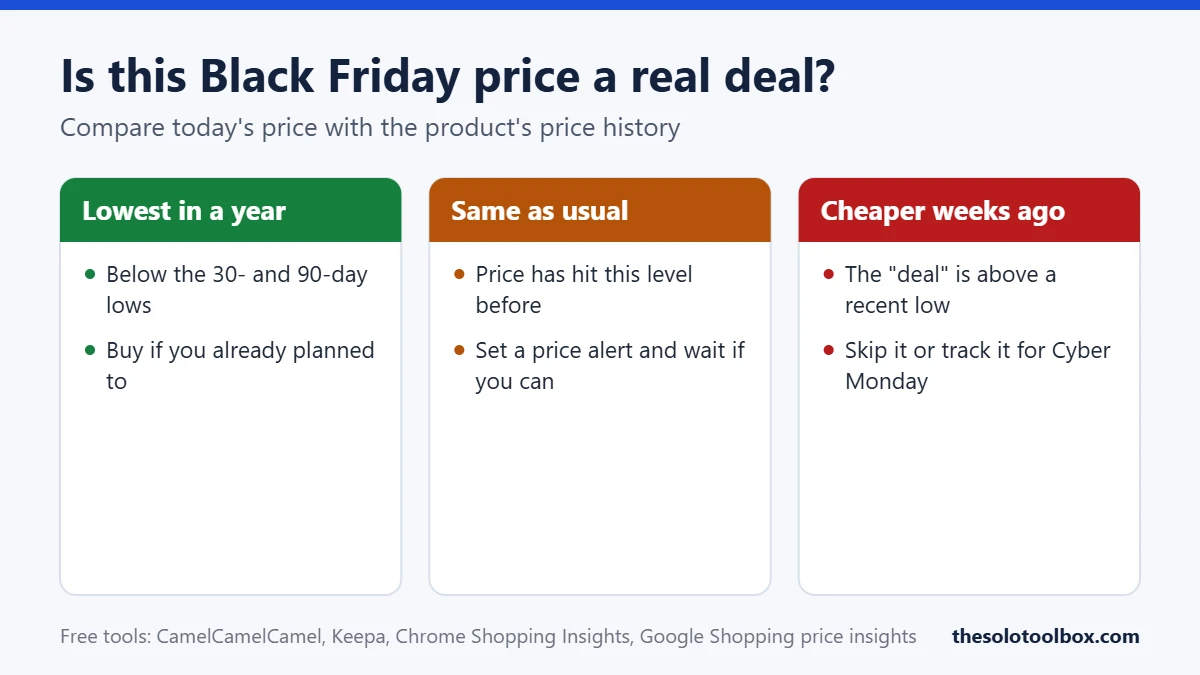
Look at two numbers: the lowest price in the past 30 days and the lowest in the past 90 days. Then match what you see to one of three cases.
| What the chart shows | What it means | What to do |
|---|---|---|
| Today’s price is the lowest in a year | A real drop | Buy if you were already planning to |
| The price has hit this level several times | A routine sale price | Set an alert and wait if you don’t need it now |
| It was cheaper a few weeks ago | The “deal” is above a recent low | Skip it, or track it through Cyber Monday |
Four things that throw people off:
- The strikethrough price isn’t history. A “List price” or “Was” price is the seller’s reference, not what the item usually sold for.
- Variants have separate prices. A different color or storage size can have a different history. Check the exact version you are buying.
- Amazon and third-party sellers differ. Compare the same seller line on the chart.
- Shipping counts. Compare total prices, especially for items from third-party sellers.
Frequently asked questions
Does Amazon show price history?
Not on the product page. Techlicious reports that Amazon’s Alexa for Shopping assistant can show up to a year of history if you ask, and CamelCamelCamel and Keepa chart it for free.
Are price tracker extensions safe?
Any shopping extension can read the pages you visit. Install only the ones you need, from the official Chrome Web Store, and check their permissions. Our guide on checking Chrome extension permissions walks through it.
Is it better to wait for Cyber Monday?
Not by default. If the chart shows today’s price is the lowest in a year, waiting risks the price going back up. If it shows a routine sale price, set an alert and see what happens by November 30.
What to do next
Pick the two or three items on your list that cost the most and check their history today, before Friday. Set alerts for anything that isn’t at a yearly low. For deals we have already checked, see today’s tech deals, and before you click any deal link in an email, read our guide to Black Friday scam emails and texts.
Related guides
Sources
- Techlicious via Yahoo: Amazon fires back at study calling its Black Friday deals fake (November 16, 2026)
- Google Chrome Help: Shopping insights and price tracking in Chrome
- Google Help: Get price insights
- CamelCamelCamel
- Keepa
Last checked: November 25, 2026. If something here is out of date, let us know.