PHP2Shell: how to check your WordPress site is patched (PHP 8.3.36, 8.4.27 and up)
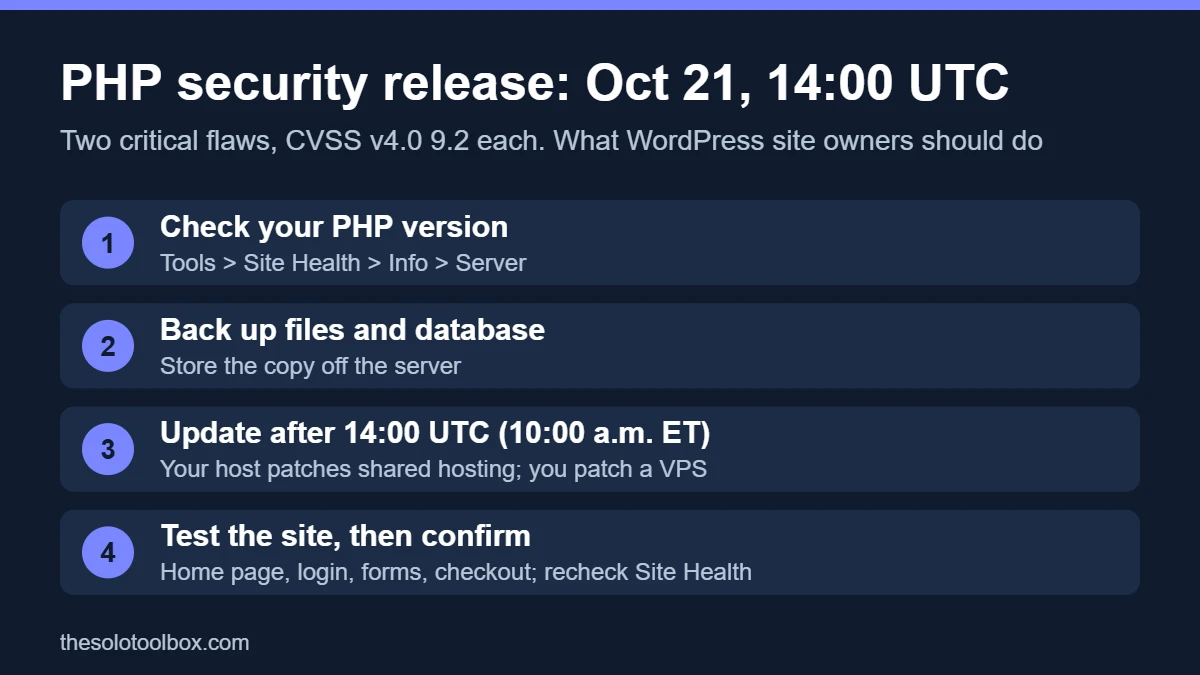
PHP shipped fixes for two critical remote code execution flaws on October 21, 2026, nicknamed PHP2Shell (CVE-2026-109618 and CVE-2026-109619). If your WordPress site runs on PHP 8.2 or newer, it is patched once Site Health shows 8.5.12, 8.4.27, 8.3.36 or 8.2.35 or later. Anything below that on the same branch still needs the update, and PHP 8.1 or older needs either a host-supplied backport or a move to a supported branch.
This is more urgent than a routine PHP update. An attacker doesn’t need a login, and on some server setups a single web request is enough. Here’s how to check your version in two minutes, what to ask your host, and what to do on a server you manage yourself.
Patched versions at a glance
| Your PHP branch | Safe from PHP2Shell at | Branch support ends |
|---|---|---|
| 8.5 | 8.5.12 | Supported |
| 8.4 | 8.4.27 | Supported |
| 8.3 | 8.3.36 | Supported |
| 8.2 | 8.2.35 | December 31, 2026 |
| 8.1, 8.0, 7.4 and older | No official release. Host backport, or upgrade | Already ended |
How to check your PHP version in WordPress
- Sign in to WordPress as an administrator.
- Go to Tools > Site Health and open the Info tab.
- Expand Server and read the PHP version line.
- Compare it with the table above. 8.3.36 is fine; 8.3.35 is not.
Your hosting control panel shows the same number, usually under a heading like PHP Configuration, Select PHP Version or MultiPHP Manager. Don’t rely on php -v over SSH: the command-line PHP can be a different build from the one serving your site. Site Health reports the one that matters.
One catch: many hosts patch old branches by backporting the fix without changing the version number. If you’re on 8.1 or older, or on an 8.x number below the table, Site Health alone can’t tell you whether you’re protected. Ask your host directly (see below).
What PHP2Shell is, in plain terms
Both bugs are in PHP itself, not in WordPress, a plugin or a theme. The php.net security advisory describes them like this:
- CVE-2026-109618: when PHP runs out of memory partway through setting up a request, the cleanup code can treat half-built data as valid. An attacker can steer that into running their own code.
- CVE-2026-109619: internal data from one request can survive after its memory is freed, and the next request handled by the same PHP worker can pick it up before it’s reset.
Remote code execution means an attacker can run commands on your server. On a WordPress site, that usually ends with a backdoor, injected spam or redirects, or stolen database contents, including customer details if you run a store.
PHP says every installation that serves web requests is in scope: PHP-FPM, Apache mod_php, php-cgi, LiteSpeed and FrankenPHP. It rates Apache mod_php as the highest risk, because the demonstrated exploit fires on an unauthenticated request before any application code runs. In other words, a security plugin or firewall rule inside WordPress can’t stop it; only the PHP update can.
Is it being exploited?
Treat it as if it is. Security firm watchTowr says its honeypot network has seen exploitation in the wild since October 21, the day the fix shipped, though it hasn’t published technical evidence. The EU’s computer emergency team, CERT-EU, says proof-of-concept code has started to circulate, which makes attacks more likely. Since then, Recorded Future has reported active exploitation attempts, and VulnCheck says it found a working proof-of-concept in the wild. Severity scores vary by source (9.2 under CVSS v4.0 from PHP, higher under the older v3.1 scale from some databases), but every source rates it critical.
What to do, by hosting type
Shared or managed WordPress hosting
Your host controls the PHP binaries, so the patch is theirs to install. Linux distributions and long-term-support vendors got the fixes in advance, so most hosts should have rolled them out by now. Don’t assume, though. Check Site Health, and if your version is still below the table, open a support ticket with something like this:
“My site is on PHP [your version]. Has this server been patched for CVE-2026-109618 and CVE-2026-109619 (the October 21 PHP security release)? If the fix is a backport, can you confirm it covers both CVEs?”
If your site is on PHP 8.1 or older and the host can’t confirm a backport, switch to 8.3 or 8.4 in the control panel. Back up first, and test the site afterward: jumping branches can break old plugins and themes, while a patch release within one branch rarely does.
VPS, cloud server or your own hardware
- Snapshot or back up the server.
- Install the patched packages from your usual source: your distribution’s repositories, a third-party repository or an official Docker image. CERT-EU noted that the popular Remi repository (rpms.remirepo.net) lagged on release day, so check that the package you get really contains the fix.
- Restart PHP-FPM or Apache so every worker loads the new binary. Until you restart, old workers keep running the vulnerable code.
- Confirm the version in Tools > Site Health > Info > Server.
If you run PHP in containers, pull the updated image and rebuild. A container built from an old image keeps the old PHP no matter what the host has. If you build PHP 7.4, 8.0 or 8.1 from source, the PHP team published minimal backport patches for those branches; that’s the only official route for them.
If you can’t patch today
PHP lists partial mitigations for server admins. They reduce the risk but don’t fix it, and they need server-level access, not a WordPress plugin:
- Set
session.upload_progress.enabled=0in php.ini or the FPM pool config, then restart all workers. Setting it in.user.inior withini_set()doesn’t count. - Cap request sizes:
post_max_size = 8M(or 32M if your site takes uploads), withupload_max_filesizebelow it, plus matching limits at the web server or proxy. - On PHP 8.5, also set
fatal_error_backtraces=0.
PHP’s advisory also mentions a non-overridable memory_limit=-1 for the first bug, combined with a container or cgroup memory limit. Don’t try that on a server without those limits in place; removing PHP’s memory cap without an outer limit can let a single request exhaust the machine.
After updating: check for signs of a break-in
The update stops new attacks, but it doesn’t remove anything an attacker planted before you patched. If your server ran an unpatched version after October 21, spend ten minutes on these checks:
- Users: in Users, look for administrator accounts you don’t recognize.
- Files: in your host’s file manager, sort
wp-contentand the site root by date modified and look for PHP files changed since October 21 that you didn’t update. A.phpfile insidewp-content/uploadsis a red flag; that folder should hold media. - Behavior: visit the site in a private window from a search result. Redirects to unrelated sites, or spam pages appearing in Google for
site:yourdomain.com, mean it’s time to restore from a clean backup.
Then change your WordPress admin, hosting and database passwords. Our Rank Math PRO malware cleanup guide walks through a full clean-up if you do find something.
Follow-up fixes since October 21
Two smaller notices followed the main release. Neither changes what most WordPress owners need to do.
- October 23, CVE-2026-115560: PHP flagged a related, unlikely code execution path through session upload progress. It only applies when an application sets
session.serialize_handlertophp_binaryorphp_serializeand switches it back tophpat runtime. PHP recommendssession.upload_progress.enabled=0until the next regular release, which is the same mitigation listed above. A full advisory comes with that release. - October 26, Windows only: PHP rebuilt its Windows packages (8.5.12-1, 8.4.27-1, 8.3.36-1, 8.2.35-1) to fix a separate Brotli decompression bug, CVE-2026-111497. It matters only if you host on Windows. The PHP version number itself doesn’t change.
What won’t fix it
Updating WordPress core, plugins or themes doesn’t patch PHP. Neither does a security plugin, because the exploit can run before WordPress loads. And don’t install “fixed” PHP builds or patch scripts shared on forums or code-hosting sites: fake security fixes are a common way to spread malware, as the AOMEI Backupper incident showed this month. Get PHP from your host, your distribution or php.net.
FAQ
Is PHP 7.4 affected by PHP2Shell?
Yes. PHP 8.1 and older are affected and get no official release. The PHP team published source-level backports for 7.4, 8.0 and 8.1, and some hosts and Linux vendors ship patched packages, but the lasting fix is moving to 8.3 or 8.4. PHP 7.4 has been out of official support since November 2022.
Which PHP version should a WordPress site use now?
PHP 8.3 or 8.4, at the patched version or later. Both are fully supported, and most current plugins run on them. PHP 8.2 is patched too, but its security support ends on December 31, 2026, so if you’re changing branches anyway, skip it.
Does a firewall like Cloudflare protect me?
Possibly in part, if your provider has added rules for these CVEs, but don’t count on it. A web application firewall filters known attack patterns; it doesn’t remove the bug. Patch PHP regardless.
My site is on WordPress.com. Do I need to do anything?
No action on PHP. On fully managed platforms such as WordPress.com, the provider runs and patches PHP for you. You still can’t skip the basics: keep plugins updated and check your admin users.
Next step: open Tools > Site Health > Info > Server now. If the PHP version isn’t at or above the number in the table, send your host the message above. And if you run a store, it’s also a good time to review admin accounts and API keys, as covered in our guide to checking a store after the AI agent attacks.
Related guides
Sources
- PHP: news archive, including the October 21 security advisory, the October 23 session upload progress advisory and the October 26 Windows builds
- CERT-EU: Critical Vulnerabilities in PHP, advisory 2026-018 (updated October 23, 2026)
- watchTowr: CVE-2026-109618 FAQ (updated October 26, 2026)
- BleepingComputer: PHP warns admins of two critical flaws (October 20, 2026)
- Recorded Future: PHP2Shell exploitation, two critical PHP flaws explained
- Help Net Security: PHP2Shell vulnerabilities patched (October 21, 2026)
- PHP: Supported versions
- WordPress.org: Site Health screen
Update, October 26, 2026: rewritten after the release with the patched version numbers, PHP’s technical details and mitigations, exploitation reports, the October 23 and October 26 follow-ups, and post-patch checks. The original pre-release version of this guide was published on October 20.
Last checked: October 27, 2026 (patched versions and exploitation reports). If something here no longer matches what you see, let us know.