AI agents hacked 100+ online stores: how to check yours
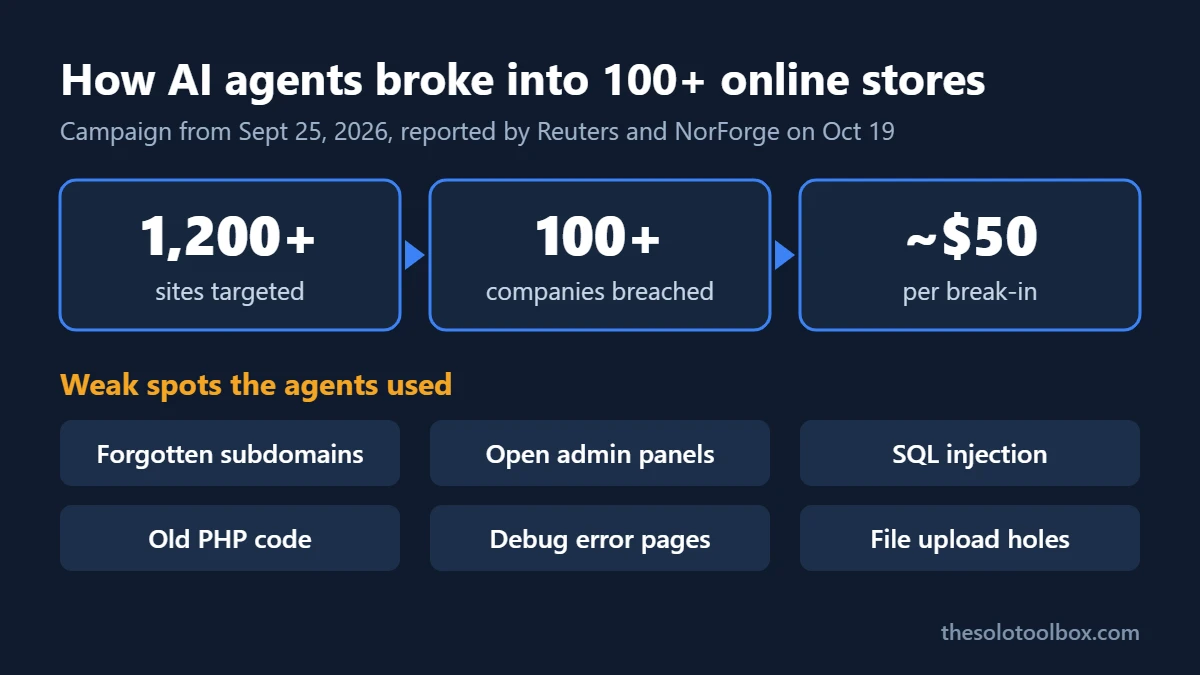
In a campaign Reuters reported on October 19, AI agents hacked online stores at more than 100 companies between September 25 and mid-October 2026, all working for a single hacker. The agents didn’t use new tricks. They found forgotten support sites, exposed control panels, SQL injection and old PHP code, the same gaps a store owner can check for this week.
This article covers what the agents exploited, according to the security firm that watched them work, and a checklist for finding the same weaknesses on your own store before someone else does.
Before you start
- You’ll need: admin access to your store platform and hosting account, and a list of every domain you own.
- Time: 1–2 hours for the full checklist; the first three checks take about 20 minutes.
- Applies to: any online store or customer-facing website, whether self-hosted (WordPress/WooCommerce, Magento, custom PHP) or partly hosted.
What happened
Researcher Snorre Fagerland of the Norwegian firm NorForge spotted the campaign around October 2 through Cairn control panels the attackers had left open on the internet. Cairn is an open-source tool that coordinates AI agents on long tasks; its author has said it wasn’t built for attacks. Because the panels had no login, NorForge could read the agents’ instructions and results. Its report and the Reuters story were both published on October 19, 2026.
- Scale: more than 1,200 sites targeted, more than 100 companies compromised, mostly e-commerce sites in the US, Canada, Australia and Japan.
- Cost: about $5,000 in AI model charges, or roughly $50 per successful break-in.
- Effort: instructions under 100 Chinese characters, some as short as “fetch credit cards.” A successful intrusion took about 23 hours on average.
- Models: NorForge said the agents mainly ran on DeepSeek and Anthropic’s Claude Code.
Reuters named three victims. Deere said it took remedial action and saw no sign that sensitive data was accessed. SharkNinja said the intrusion hit a standalone product-support website and was contained. Cummins was investigating a possible attack on a site run by a third-party vendor. Two smaller businesses also confirmed they were hit. How much customer data was taken across the campaign isn’t known.
What the AI agents actually exploited
NorForge’s write-up lists the weaknesses the agents chained together. None of them is exotic, which is the point: the agents were patient, not clever, and they tried for hours until something worked.
| What the agents found | Example from the report | What to check on your store |
|---|---|---|
| A related site with weaker security | An internet-facing control panel next to a well-defended main store | Support portals, staging sites, old campaign subdomains |
| Account changes without login | An Australian store where account modification led to running commands on the server | Password-reset and profile endpoints; platform and plugin updates |
| SQL injection | Login forms and queries that ran attacker input | Custom code and outdated extensions |
| Old PHP components | Unsafe deserialization in legacy Zend Framework code, plus an open memcached session store | Abandoned libraries; caches reachable from the internet |
| Verbose error pages | A US retailer’s error handling leaked details | Debug mode left on in production |
| File upload holes | Uploader webshells left behind | New .php files in upload folders |
How to check your own store: 8 steps
- List every public site you run. Search your domain at crt.sh, a free certificate-transparency log, to see subdomains that ever had an HTTPS certificate. Old “help.”, “dev.”, “staging.” and “shop2.” entries are exactly what the agents went looking for. Shut down what you don’t use.
- Put admin panels behind a second lock. Store dashboards, hosting control panels, phpMyAdmin and any tool on a port like 8000 shouldn’t be open to the whole internet. Restrict them by IP address in your host or firewall, or put them behind a VPN, and turn on two-factor sign-in.
- Update the platform, theme and every extension. Remove plugins and modules you’ve deactivated; disabled code can still be reachable. If a library hasn’t had a release in years, plan to replace it.
- Turn off public error messages. In WordPress, set
WP_DEBUG_DISPLAYtofalsein wp-config.php. For other PHP sites, make suredisplay_errorsisOffin production. - Look for files that shouldn’t be there. Ask your host, or check over SSH, for PHP files inside upload folders and anything modified in the last 30 days that you didn’t change.
- Close cache and database ports. Memcached (port 11211), Redis (6379) and MySQL (3306) should only accept connections from your own server.
- Rotate secrets on staging and vendor sites. NorForge found SSH logins to staging hosts in the attackers’ task lists. Change passwords and API keys used by staging servers and by vendors who run sites on your domain.
- Keep card data off your server. Use your payment provider’s hosted checkout or payment fields, so card numbers go straight to the processor. Then check your checkout page for scripts you don’t recognize.
For step 5, this command (run from your site’s root folder over SSH) lists PHP files in a WordPress uploads folder, which should normally contain none:
find wp-content/uploads -name "*.php"If you think your store was breached
- Contact your host and ask them to take a snapshot before anything is cleaned, so logs survive.
- Change admin, hosting, database and payment-gateway passwords, and revoke API keys.
- Tell your payment processor if checkout or card data could be involved; they can tell you what they need from you.
- Check whether breach notification rules apply in your state or country before you contact customers.
If attackers had access to a connected email or cloud account, our guide to checking Microsoft 365 for third-party apps shows how to review what’s connected.
FAQ
Were WordPress or Shopify stores targeted?
NorForge’s report doesn’t name a store platform among the victims. Magento appears only as a test lab in the attackers’ toolset. Hosted platforms such as Shopify handle server patching for you, but support sites, apps and subdomains you run separately are still your responsibility.
Is Claude Code or DeepSeek to blame?
The attackers used general-purpose models through their own setup. The weaknesses they exploited existed before the AI arrived; the AI made trying 1,200 sites cheap. Anthropic’s terms prohibit using Claude for unauthorized intrusions.
How would I know if my store was hit?
Signs include unfamiliar admin accounts, PHP files in upload folders, checkout scripts you didn’t add, and customer reports of card fraud after buying from you. Your host’s access logs are the most reliable record.
Do small stores need to worry?
Yes. Cost per attempt fell to a few dollars, so small stores with one forgotten subdomain are now worth an automated try.
How we checked: we read NorForge’s “Inside Cairn” report and Gizmodo’s and WinBuzzer’s summaries of the Reuters story, all dated October 19–20, 2026. Victim statements are as reported by Reuters. The checklist maps each weakness in NorForge’s report to standard hardening steps; we didn’t test any victim sites.
Related guides
Sources
- Reuters: How one hacker used AI agents and a few thousand dollars to break into scores of sites (Oct 19, 2026)
- NorForge: Inside Cairn (Oct 19, 2026)
- Gizmodo: The fear of a one-man band weaponizing AI agents is becoming reality (Oct 19, 2026)
- WinBuzzer: Hacker leverages AI agents to breach more than 100 company websites (Oct 20, 2026)
- crt.sh certificate search
Next step: search your domain on crt.sh now and write down every subdomain it lists. Anything you don’t recognize or no longer use is the first thing to lock down or delete. If you use AI coding tools on your store, also read our guide to replacing exposed AI API keys.