1Password Data Breach: What Was Taken and What to Do Now
The Solo Toolbox · Software Help for One-Person Businesses
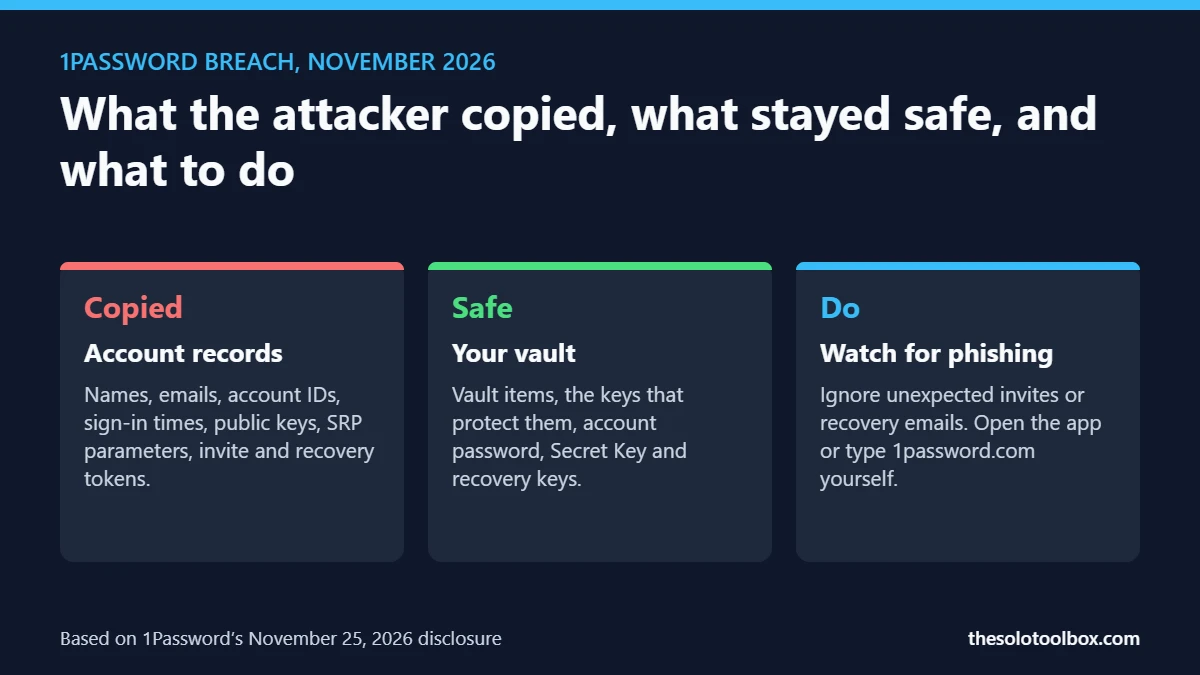
1Password disclosed on November 25, 2026 that an attacker copied account records for a subset of its customers, including names, email addresses and tokens from invitation and recovery emails. Vaults, the items in them and the keys that protect them were not accessed, and 1Password says you do not need to change your account password or Secret Key. The real risk now is phishing aimed at people the attacker knows use 1Password.
Below: what was taken and what wasn’t, when you should change your credentials anyway, how to check which devices are signed in to your account, and what a fake 1Password email built from this data is likely to look like.
Before you start
- Who this is for: anyone with a 1Password account, personal, family or business, and admins who use 1Password’s SCIM Bridge or Hosted Provisioning.
- What you need: your 1Password app, or a browser where you can sign in to 1Password.com yourself.
- How we checked this: on November 25, 2026 we read 1Password’s incident post, its support article on unrecognized devices, and BleepingComputer’s report. 1Password says it will update its post if anything changes, so check it for later details.
What happened in the 1Password breach
On November 19, 2026, 1Password started investigating signs that an attacker had taken over an employee’s corporate GitHub account. According to the company, the attacker used that account to reach private source code and push malicious code to backend services. That code downloaded administrative account records for some customers.
The attacker also copied source code from private repositories and got into 1Password’s CI/CD system, the pipeline that builds and deploys its software. That system holds infrastructure credentials, and 1Password says it has rotated or revoked every credential that may have been exposed. It disclosed the incident publicly on November 25.
1Password has not said how many customers are in the affected subset. BleepingComputer asked the company for more detail and had not received a reply when it published.
What data was taken, and what was not
| Data | Taken? | What it means for you |
|---|---|---|
| Name and email address | Yes | The attacker knows you use 1Password. Expect targeted phishing. |
| Account and user IDs, creation and last sign-in times | Yes | Makes a fake email look more convincing. Cannot be used to sign in. |
| Public keys | Yes | Public by design. 1Password says there is no security impact. |
| Secure Remote Password (SRP) parameters | Yes | 1Password says these cannot be used to access your account. |
| Tokens in invitation, provisioning and recovery emails | Yes | Only useful with an SSO sign-in or the emailed code. Affected users were notified. |
| Vault contents and the keys that protect them | No | Your saved passwords, notes and cards were not accessed. |
| Account password and Secret Key | No | 1Password does not store them, so they could not be copied. |
| Account recovery keys | No | Not affected. |
The tokens are the most sensitive item on the list. They come from links 1Password emails when someone is invited to an account through SCIM Bridge or Hosted Provisioning, or when an account recovery is started. A token alone does not open an account: finishing the process also needs an SSO sign-in or a code sent to the user’s registered email. 1Password says only a small number of users had a pending invite or recovery during the incident, that it contacted them directly, and that it found no evidence of account takeovers. As a precaution it changed that emailed code from six digits to ten letters and numbers, which makes guessing it impractical.
Do you need to change your 1Password password?
1Password says no. Your account password and Secret Key never leave your devices in a form the company can read, so the stolen records do not include them. Changing them would not undo anything the attacker took.
There are two cases where you should change them anyway:
- You find a device or browser linked to your account that you don’t recognize (the check is in the next section).
- You typed your account password or Secret Key into a page you reached from an email, text or ad, now or in the past few weeks.
If either applies, follow the reset steps below. If you sign in with SSO through your employer, talk to your administrator instead.
What to do now: 4 steps
1. Check which devices are linked to your account
On 1Password.com, which you should reach by typing the address yourself:
- Sign in to your account.
- Select your name in the top-right corner, then select Manage Account.
- Find the Linked to your account section.
- If you see an app or browser you don’t recognize, select the gear button next to it, then select Unlink.
In the 1Password app, select your account icon at the top of the window, then Manage Accounts, choose your account and open Linked to your account. Old phones and laptops you have stopped using are worth unlinking too.
2. Reset your Secret Key and password if anything looked wrong
1Password’s support steps, from the Manage Account section on 1Password.com:
- Select Regenerate Secret Key and follow the prompts.
- Download the new Emergency Kit when asked, but leave the password field empty for now.
- Select Change Password and follow the prompts.
- Fill in your new password on one copy of the Emergency Kit and store it somewhere safe.
Every device will then ask you to sign in again with the new credentials.
3. Turn on two-factor authentication
1Password lets you add an authenticator code or a security key on top of your account password and Secret Key. It doesn’t change what was stolen here, but it adds a step an attacker would have to get past if they ever phished your password. If you already use passkeys elsewhere, our guide to setting up passkeys for Google and Microsoft covers the same idea for those accounts.
4. Treat every 1Password email as suspect for a while
Don’t click links in emails about 1Password invitations, account recovery or “securing your account” unless you started that process yourself in the last few minutes. Open the app or type 1password.com instead. Report anything odd to support@1password.com, the address 1Password gives in its post.
What a fake 1Password email will probably look like
This is the practical risk from the breach. Whoever has the data can send an email that uses your real name, goes to the exact address you use for 1Password, and mentions the breach itself. Based on what was stolen, watch for:
- A “breach response” email telling you to reset your password or verify your Secret Key through a link.
- An invitation to join a family or team account you weren’t expecting.
- An account recovery notice you didn’t request, sometimes followed by a call or text asking you to read back a code.
- A message saying your account will be locked unless you act within hours.
Three rules settle all of these. 1Password says it will never contact you to ask for your account password or Secret Key. Your Secret Key is only needed the first time you sign in on a new device or browser, so a request for it on a device you already use is a red flag. And no legitimate support process needs you to read a verification code to someone on the phone.
If you entered details on a fake page, reset your Secret Key and password right away using the steps above. Our guide to spotting scam emails and texts covers the wider tricks being used this week.
Should you stop using 1Password?
That depends on what you weigh more. The part of the design meant to limit a server breach held: vault contents are encrypted with keys only you hold, and the attacker did not get them. The part that failed was internal: one employee’s GitHub account led to source code, backend services and the build pipeline, which is a serious lapse for a security company. 1Password says it has tightened GitHub, CI/CD and device controls and hired outside experts to check its cleanup.
If you move to another password manager, export your vault, check the import, then delete the export file, because it holds every password in plain text. A rushed migration done from a phishing link is far riskier than staying put while you decide.
Frequently asked questions
Were my saved passwords exposed in the 1Password breach?
No. 1Password says the attacker never accessed vault contents or the keys that encrypt them. The stolen data was account information such as your name and email address.
How do I know if I was affected?
1Password individually notified the small number of users who had a pending invitation or recovery token. It hasn’t said whether it will notify everyone whose name and email were in the copied records, so assume your email is known and stay alert for phishing either way.
Do I need a new Secret Key?
Not because of this incident, according to 1Password. Regenerate it only if you see a device you don’t recognize or think you entered it on a fake site.
Was my email address leaked anywhere else?
You can check whether your address appears in other known breaches with the tools in our guide on how to check if your email was in a data breach.
What to do next
Take two minutes now to open Manage Account on 1Password.com and review the linked devices list, then turn on two-factor authentication if it’s off. If you use other password managers or saw a different breach notice recently, our guide on what to do after the mSecure breach and our checklist for when an infostealer takes your passwords walk through the next layer of cleanup.
Related guides
Sources
- 1Password: Update on a security incident involving 1Password’s backend systems (November 25, 2026)
- 1Password Support: If a device you don’t recognize has signed in to your 1Password account
- BleepingComputer: 1Password customer data stolen after employee GitHub account breach (November 25, 2026)
Last checked: November 25, 2026. If something here is out of date, let us know.