Muse in Instagram DMs: What It Can Do and What It Can See
The Solo Toolbox · Software Help for One-Person Businesses
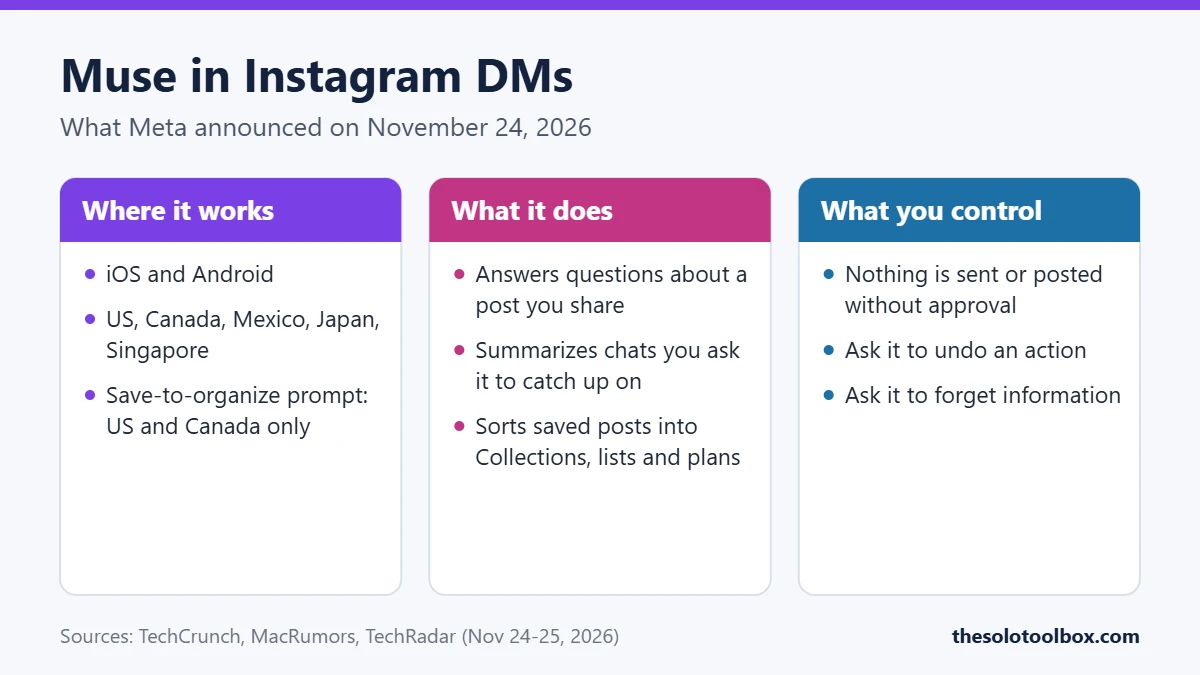
Muse in Instagram DMs is Meta’s AI agent showing up as its own chat in your Instagram inbox. Since November 24, 2026 you can message it like a contact on iOS and Android in the US, Canada, Mexico, Japan and Singapore: ask about a post, have it catch you up on a busy group chat, or get it to sort your saved posts. Meta says it won’t send, share or post anything without your approval.
This guide covers what changed, what Muse works with when you use it in Instagram, how to start a chat, and what you can and can’t control yet.
Before you start
- Who this is for: Instagram users in the five launch countries who have spotted Muse in their messages or a new “organize” prompt when saving a post.
- What you need: the latest Instagram app on iPhone or Android. Muse in DMs was not announced for the web or desktop app.
- How we checked this: on November 25, 2026 we read TechCrunch’s, MacRumors’ and TechRadar’s reports on Meta’s November 24 announcement, plus Digit’s September guide to adding Muse to an Instagram profile. We could not find Meta’s own announcement post or a Help Center page for the DM feature, and we did not test it on an account in a launch country. Menu labels may differ on your phone.
What changed on November 24
Until now, using Muse with Instagram meant switching to the separate Muse app or adding Muse to your profile, an option Meta added in late September. The new update puts Muse inside Instagram’s messaging. Three things launched together:
- A Muse chat in your DMs. It appears as a normal conversation, not as a participant in your existing chats. You message it directly.
- Muse for saved posts. When you save a post or reel, Instagram shows a prompt offering to have Muse organize it. This part is limited to the US and Canada.
- One history across apps. Conversations with Muse in Instagram also appear as a side chat in the Muse app.
| Feature | Where it’s rolling out |
|---|---|
| Muse chat in Instagram DMs | US, Canada, Mexico, Japan, Singapore (iOS and Android) |
| Muse prompt when you save a post | US and Canada |
| Muse standalone app | US since September 2026; UK since November 24, 2026 |
Muse in Instagram DMs is not available in the UK or the EU. TechRadar reports that Meta has given no timeline for those regions.
What Muse can do inside Instagram
Meta’s examples fall into three groups. All of them start with a message from you.
| Task | Example from Meta | What Muse needs to do it |
|---|---|---|
| Explain or act on a post | Share a coffee shop post and ask Muse to add it to a Mexico City itinerary | The post you send it |
| Find something you saw | Describe a Black Friday deal you scrolled past and forgot the brand of | Your Instagram activity history |
| Catch up on a chat | Summarize the important messages in a group chat you missed | The messages in that chat |
| Organize saves | Sort saved posts into Collections, turn a recipe reel into a grocery list, build outfit ideas from fashion reels | Your saved posts and Collections |
Muse is an agent rather than a chatbot, so it can also take actions in services you have connected to it, such as email or bookings. Those actions still go through the approval settings in the Muse app.
What Muse can see when you use it
The examples above tell you what Muse works with: posts you share with it, your saved posts and Collections, your activity history when you ask it to find something, and the full text of a chat when you ask for a summary.
The group chat summary is the part to think about. The other people in that chat wrote those messages, and asking Muse to summarize them passes their words to Meta’s AI. None of the reports say whether other members are told when someone does this. If a group chat holds anything private, scroll back yourself.
What we could not confirm:
- Whether Muse reads any DMs you have not asked it about. The announcement describes it working on request.
- Whether Muse conversations held in Instagram are used to train Meta’s AI. The launch coverage does not say. Our Meta Muse safety guide covers what Meta says about training for Muse in general.
- How long Muse keeps a summary or an organized Collection after you ask for it.
How to start a Muse chat in Instagram
- Update Instagram from the App Store or Google Play. Meta began the rollout on November 24, so it may take days to reach your account.
- Open your messages in Instagram and look for a conversation with Muse. Reports describe it as a standard chat thread.
- To ask about a specific post, tap the share button under the post and send it to Muse, the same way you would send it to a friend.
- Type what you want: “add this to my Lisbon trip”, “what did I miss in the family chat”, or “sort my saved recipes into a Dinners collection”.
- If Muse proposes an action that sends, shares or books something, read it before you approve. Meta says nothing goes out without that approval.
If you don’t see Muse in your messages, check you are in a launch country and on the latest app version. Meta is rolling it out gradually.
How to limit what Muse does
- Ask it to forget. Meta says you can tell Muse to forget information at any time. Do this after you share something you would not want stored, such as an address in a screenshot.
- Ask it to undo. Meta also says you can ask Muse to undo an action, such as moving posts into a Collection.
- Keep approvals strict in the Muse app. Muse’s permissions for connected services are managed in the Muse app, not in Instagram. Leave actions that send or pay on the setting that asks you every time.
- Review the history. Because Instagram chats with Muse show up as a side chat in the Muse app, check there to see everything you have asked it.
- Ignore the save prompt. The organize offer appears when you save a post. Meta describes it as a prompt, not an automatic change to your saves.
We could not confirm a setting that removes the Muse chat from your Instagram inbox. Instagram lets you mute or delete regular conversations, but neither Meta nor the reports we read say whether that works for Muse.
Frequently asked questions
Can Muse read my Instagram DMs?
It works with the messages in a chat when you ask it to summarize or search that chat. The reports we read describe no background reading of your inbox, but Meta has not published detailed documentation for the DM feature yet.
Is Muse in Instagram DMs available in the UK or Europe?
No. It launched in the US, Canada, Mexico, Japan and Singapore. The standalone Muse app reached the UK on November 24, 2026, but the Instagram DM feature did not.
Where do my Muse chats from Instagram go?
They appear as a side chat in the Muse app, alongside your other Muse conversations.
Do I have to use Muse to save posts?
No. Saving works as before. In the US and Canada you will see an extra prompt offering Muse’s help.
What to do next
Before you hand Muse a group chat or connect it to email, spend five minutes in the Muse app’s permission settings. Our Is Meta Muse safe? guide lists which settings to change first and how to delete what Muse stores. If you would rather keep Meta’s apps away from your camera roll as well, see how to stop Facebook accessing your photo gallery.
Related guides
Sources
- TechCrunch: Meta brings its Muse AI assistant directly into Instagram DMs (November 24, 2026)
- MacRumors: Meta’s Muse AI agent comes to Instagram DMs (November 24, 2026)
- TechRadar: Meta slides Muse AI into Instagram direct messages (November 25, 2026)
- Digit: Meta Muse AI agent now available on Instagram (September 28, 2026)
Last checked: November 25, 2026. If something here is out of date, let us know.