Windows 11 26H2 Known Issues: Is It Safe to Update Now?
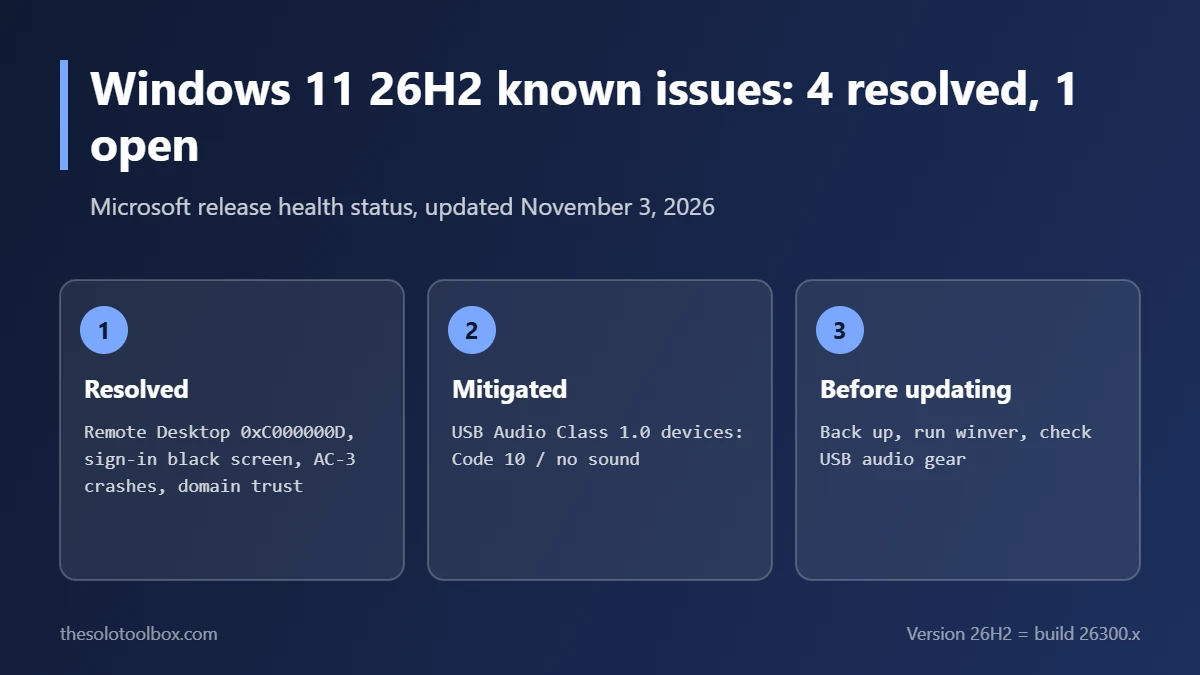
Windows 11 version 26H2 now has one open known issue. As of Microsoft’s release health page updated November 3, 2026, four of its five listed problems are marked Resolved and the fifth, USB Audio Class 1.0 devices failing with Code 10, is Mitigated. That issue also affects every Windows 11 version from 23H2 onward, so staying on 25H2 doesn’t avoid it. For most people still holding back, it’s now reasonable to install 26H2 after a backup.
Below: each known issue with its fix and date, who should still wait, how to install 26H2, and what to do if something breaks. Statuses were checked on November 4, 2026 against Microsoft’s 26H2 and 25H2 release health pages.
Before you start
- Applies to: Windows 11 Home and Pro on 24H2 or 25H2 that haven’t moved to 26H2
- Check your version: press Win + R, type
winver, press Enter. 26H2 shows build 26300.x; 25H2 shows 26200.x - You’ll need: a recent backup and about 20–60 minutes, depending on your version
- Watch out: if you rely on an older USB audio interface, headset or DAC, read the USB audio section first
Windows 11 26H2 known issues and their status
| Issue | Status | Fixed by | Date |
|---|---|---|---|
| Remote Desktop fails for non-admin users (error 0xC000000D) when Administrator protection is on | Resolved | KB5127936 | October 28, 2026 |
| Black screen or desktop not loading after sign-in, mainly Azure Virtual Desktop with FSLogix | Resolved | KB5127648 | October 13, 2026 |
| Apps that need AC-3 audio decoding close unexpectedly | Resolved | KB5127648 | October 13, 2026 |
| Domain-joined PCs lose their secure trust with the domain | Resolved | KB5124010 | September 22, 2026 |
| USB Audio Class 1.0 devices fail to start or play no sound (Code 10) | Mitigated | Partial fix in KB5129195 | Last updated September 29, 2026 |
Three of the four resolved issues mostly hit business setups: Remote Desktop with Administrator protection, virtual desktops, and domain-joined PCs. The AC-3 crash was the one most home users noticed, usually as games or video apps closing when playing surround sound. Our guide to games crashing after a Windows 11 update covers that one in detail.
The one open issue: USB audio Code 10
Some USB audio devices that use the older USB Audio Class 1.0 standard stop working, and Device Manager shows Code 10 (“This device cannot start”). Microsoft’s 25H2 page says the out-of-band update KB5129195 (September 14, 2026) partly fixed it, covering the 8-channel and 3D audio symptoms. The rest is listed as “working to address this issue in a future Windows update,” with no date.
Microsoft lists the issue on 23H2, 24H2, 25H2 and 26H2, so it isn’t a reason to choose one version over another. If your device is affected, our USB headset Code 10 guide has the workarounds that help, such as updating the device driver or firmware from the maker’s site.
Should you install 26H2 now?
Install it if your PC runs 24H2 or 25H2, you’ve backed up, and you don’t depend on a USB Audio Class 1.0 device for work. Microsoft’s 25H2 page now says: “We recommend updating to version 26H2 to stay up to date, secure, and productive.”
Wait if:
- you’re on a work or school PC (your IT team decides when 26H2 lands);
- you use an older USB audio interface or DAC for recording or calls and can’t afford downtime;
- you need a specific app that its developer hasn’t confirmed on 26H2.
If you’re still on 24H2, staying put isn’t a long-term option. See Windows 11 24H2 end of updates for the support dates and how to move up.
How to install Windows 11 26H2
- Back up your files. Our guide to backing up Windows 11 for free covers File History, OneDrive and a full system image.
- Open Settings > Windows Update.
- Optionally, turn on Get the latest updates as soon as they’re available. This makes the 26H2 offer appear sooner.
- Select Check for updates.
- When Windows 11, version 26H2 appears, select Download & install.
- Restart when asked, then run
winverto confirm the 26300 build.
Microsoft says 26H2 is “now available for all eligible devices” and is “delivered using servicing technology, providing a fast installation experience.” Windows Latest reports that the move from 24H2 or 25H2 needs a single restart, because those versions share the same core. We could not confirm the install time on a test PC, so plan for a longer restart if you’re coming from an older version.
If something goes wrong after the update
- No sound from a USB device: open Device Manager and check for Code 10 under Sound, video and game controllers, then follow the USB audio guide linked above.
- Install fails or stops partway: run Settings > System > Troubleshoot > Other troubleshooters > Windows Update, then try again.
- You want to go back: open Settings > System > Recovery and look for Go back. Windows offers it for a limited time after a version upgrade, usually 10 days, and only if the old files haven’t been cleaned up.
What’s next for Windows 11 updates
Microsoft’s next monthly security update is due on Patch Tuesday, the second Tuesday of the month, which falls on November 10, 2026. Check the 26H2 release health page after that date to see whether the USB audio entry changes. Microsoft updates the page when an issue’s status changes.
FAQ
Is Windows 11 26H2 a big upgrade?
It shares its core with 24H2 and 25H2, according to Windows Latest, which is why the update can be quick. The build number moves from 26200.x (25H2) to 26300.x (26H2).
Does 26H2 fix the September update problems?
The September 8 update, KB5124008, caused Remote Desktop, File Explorer and File History problems on earlier versions. Windows Latest reports those were addressed by the emergency update KB5129195 on September 14. The 26H2 page itself lists only the five issues above.
Will 26H2 install on an unsupported PC?
Windows Update only offers it to PCs that meet Windows 11’s hardware requirements. If your PC isn’t offered 26H2 and you’re on a supported version, wait for the offer rather than forcing an install.
Next step
Run winver now. If you’re on 24H2 or 25H2 and don’t depend on an older USB audio device, back up and install 26H2 this week, before the November 10 security update.
Sources
- Microsoft Learn: Windows 11, version 26H2 known issues and notifications (updated November 3, 2026)
- Microsoft Learn: Windows 11, version 25H2 known issues and notifications (updated November 3, 2026)
- Windows Latest: If you skipped Windows 11’s 2026 update over bugs, Microsoft has now fixed all but one (November 4, 2026)