Calendly vs Google Calendar booking pages: which should a freelancer use?
The Solo Toolbox · Software Help for One-Person Businesses
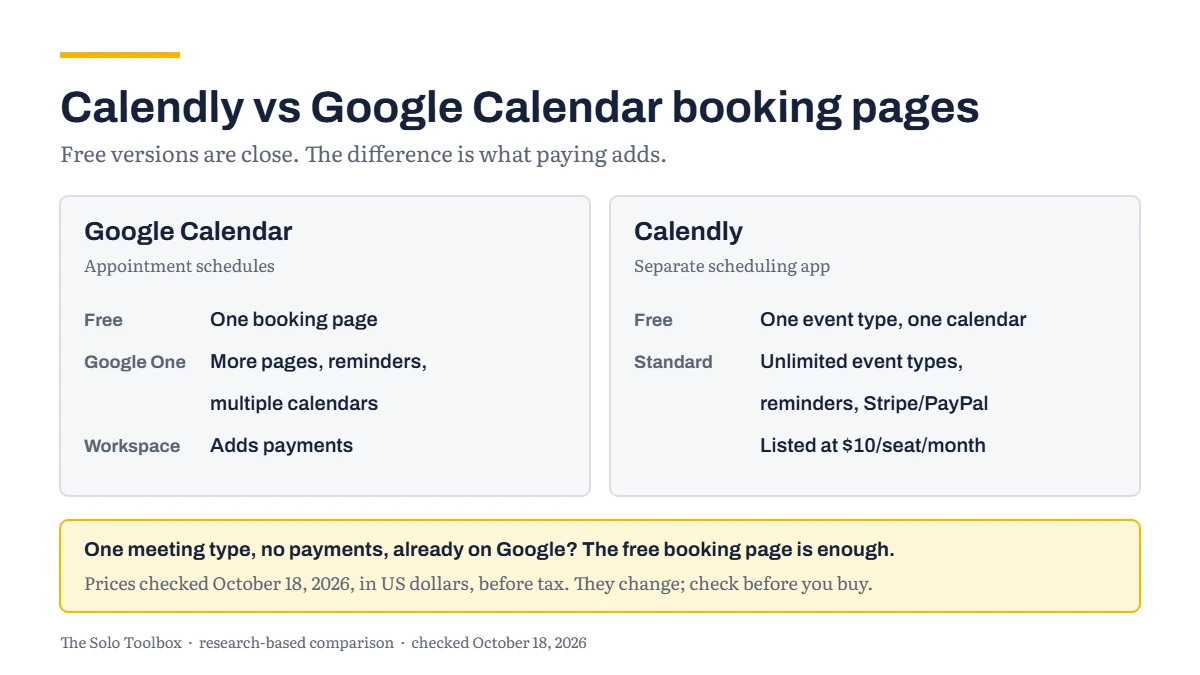
If you already use Google Calendar and take one kind of meeting, such as a 30-minute intro call, Google Calendar’s free booking page is enough: Google gives a free personal account one booking page. Calendly’s free plan is similarly limited, with one event type and one connected calendar. The difference shows up when you pay. Calendly’s Standard plan adds unlimited event types, reminders, and Stripe and PayPal payments. Google adds multiple booking pages and reminders with a Google One Premium or AI plan, but it only takes payments on paid Google Workspace plans. So pick by what you’d pay for: more meeting types and payments points to Calendly; staying inside your Google account points to Google.
Before you start
- Applies to: solo businesses booking client meetings. It compares Calendly with Google Calendar’s appointment schedules; both work with a Google calendar.
- Prices: checked on each company’s own page on October 18, 2026, in US dollars, before tax. Prices and plan contents change, so check before you buy.
- How we checked this: based on Calendly’s pricing page and Google’s Calendar help pages. We haven’t used either service for this comparison.
The short answer
- One type of meeting, no payments, already on Google: use Google Calendar’s free booking page. Our guide to creating a booking page in Google Calendar shows how.
- Several meeting types, reminders, or taking payment at booking, on a budget: Calendly Standard is the more direct route.
- Already paying for Google Workspace (above Business Starter): check what you already have before adding another subscription. Google lists payments and multiple booking pages for Workspace Individual, Business Standard and Business Plus.
Does Calendly work with Google Calendar?
Yes, and that’s how most people use it: you connect your Google calendar to Calendly, Calendly checks it for busy times so clients can only book when you’re free, and new bookings appear on that calendar. The choice in this guide is really about which tool runs your booking page, since both end up putting meetings on your Google calendar. On Calendly’s free plan you can connect one calendar; Standard raises that to six, which matters if you keep a separate personal calendar you also want checked for conflicts.
What the free versions include
Google Calendar. Google says a personal Google account, or Workspace Business Starter, can create a single booking page. Its help page doesn’t say whether these accounts get automatic reminders or availability checks across multiple calendars; it lists those as features of paid plans.
Calendly Free. Calendly’s pricing page lists one event type, one calendar connection, one-on-one scheduling and a customizable booking page. Its comparison table shows reminders, payments, custom branding and integrations such as HubSpot or Zapier as not included on the free plan.
For a single kind of meeting, the two are closer than they look. The choice comes down to whether you want everything inside Google, or a separate tool you might upgrade later.
What paying gets you
Calendly Standard is listed at $10 per seat per month. Calendly says you save 17% with yearly billing, but its page doesn’t make clear which billing period the $10 refers to, so check at checkout. Standard adds:
- unlimited event types;
- up to six connected calendars;
- automated reminders;
- Stripe and PayPal payments;
- connections to HubSpot and Mailchimp.
Google spreads the same features across several plans:
- Google One Premium and Google’s AI plans: multiple booking pages, automatic email reminders, and availability across multiple calendars. No payments.
- Google Workspace Individual, Business Standard and Business Plus: the above, plus accepting payments and verifying guests’ email addresses to stop spam bookings.
Some Workspace plans can’t create appointment schedules at all; Google names Frontline, Essentials and older discontinued subscriptions.
Which costs less for you
If you already pay for a Google Workspace plan that includes payments, adding Calendly means paying twice for a feature you have. If you’re on a free Google account, the cheapest way to get reminders and more than one meeting type depends on current prices for Calendly Standard and Google One, which change; compare them on the day you buy.
Don’t forget the cost of switching later. Clients will have your booking link in old emails and on your website, so changing tools means updating every place you’ve shared it.
Things to check before you choose
- What clients see. Google says your booking page shows your profile photo and account name. Calendly’s free plan shows its own branding; removing it is a paid feature.
- Payments. On Calendly, payments start at Standard. On Google, they need a qualifying Workspace plan, not Google One.
- Where your calendar lives. If your work calendar is in Outlook rather than Google, check each tool’s calendar connections before you commit.
- Your invoicing routine. If you don’t take payment at booking, you’ll still need to invoice; our guide to setting up free invoice reminders in Gmail covers the follow-up.
If it doesn’t work
- Google won’t let you create a second booking page: free accounts and Business Starter are limited to one. Upgrade, or use Calendly for the second meeting type.
- Your Workspace plan has no appointment schedules: Google says Frontline, Essentials and some older plans don’t include them.
- Calendly’s free plan won’t send reminders: reminders start at Standard, according to its pricing page.
- You’re not sure which Google Workspace plan you have: our guide to getting a professional email address on your own domain explains the main plans.
For more comparisons like this one, see our business software guides.
Related guides
Sources
- Calendly: Pricing
- Google: Compare premium features for appointment schedules
- Google: Create an appointment schedule
Last checked: October 18, 2026. Prices and plan features change often. If something here no longer matches what you see, let us know.