Uber Eats on Amazon Prime: How to Order With $0 Delivery
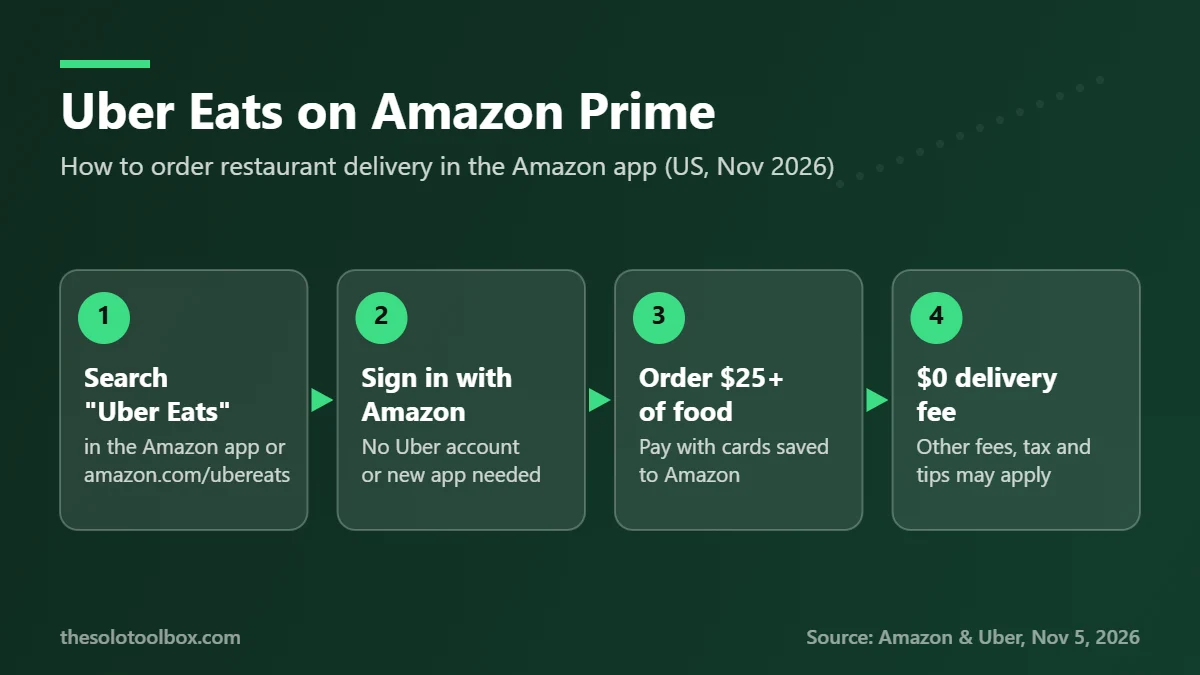
Amazon Prime members in the US can now order Uber Eats restaurant delivery inside the Amazon app or on Amazon.com, with a $0 delivery fee on restaurant orders of $25 or more. You don’t need an Uber account: go to amazon.com/ubereats or search “Uber Eats” in the Amazon Shopping app, pick a restaurant and pay with the card already saved to your Amazon account.
Amazon and Uber announced the benefit on November 5, 2026, and it went live the same day. This guide covers how to place your first order, what the Prime perk does and doesn’t cover, how it compares with ordering in the Uber Eats app, and what the change means if you were using Amazon’s older Grubhub perk.
Before you start
- Who can use it: US Amazon Prime members, including Prime for Young Adults and Prime Access
- What you need: the Amazon Shopping app or a browser signed in to Amazon
- Minimum order for $0 delivery: $25 in restaurant food
- Time needed: about two minutes before your first order
How to order Uber Eats on Amazon
The joint announcement from Amazon and Uber describes a three-step flow. In practice it looks like this:
- Open the Amazon Shopping app and search Uber Eats, or go to amazon.com/ubereats in a browser.
- Sign in with your normal Amazon account if you aren’t already. There is no separate Uber Eats login.
- Check that your delivery address is correct. Restaurants are listed by what Uber Eats can deliver to that address.
- Pick a restaurant and add items. Keep an eye on the subtotal: the $0 delivery fee applies to orders of $25 or more.
- Pay with a payment method already saved in your Amazon account and place the order.
- Track the order through Amazon’s email and push notifications. Uber Eats sends the final order confirmation after delivery.
If you don’t see Uber Eats when you search, make sure you’re signed in to the account that holds the Prime membership. Amazon says the benefit covers nearly ten thousand US cities and towns, so a few rural addresses may still have few or no restaurants.
What the Prime benefit includes
Here is what Amazon and Uber confirmed in the November 5 announcement:
- $0 delivery fee on restaurant orders of $25 or more placed through Amazon.
- $20 off your first two orders of $25 or more, valid during your first 14 days.
- 5% back on Uber Eats orders for Prime Visa cardholders through December 5, 2026.
- Household sharing: one other adult in your Amazon Household can use the waived delivery fee.
- Prime-exclusive promotions that Amazon says only appear when you order through Amazon.
Note what the announcement doesn’t say. It promises a waived delivery fee, not a waived service fee, small-order fee or tip. Those charges were not addressed in the release, so check the order summary before you pay. Amazon’s claim of “more than $175 per year” in savings is its own estimate based on August 2026 order data and is not guaranteed.
Amazon vs the Uber Eats app: which should you use?
Ordering through Amazon and ordering in the Uber Eats app reach the same restaurants and the same couriers. The difference is account, payment and which perks apply.
| Order through Amazon (Prime) | Order in the Uber Eats app | |
|---|---|---|
| — | — | — |
| Account needed | Amazon account with Prime | Uber account |
| Delivery fee | $0 on restaurant orders of $25+ | Standard fees, or $0 with Uber One on eligible orders |
| Payment | Cards saved to Amazon | Cards saved to Uber |
| Order tracking | Amazon email and push alerts | Uber Eats app |
| Launch offer | $20 off first two $25+ orders (14 days) | Varies by account |
| Uber rides | Not included | Same account as Uber rides |
If you already pay for Uber One, compare the totals at checkout for the same restaurant before deciding. If you don’t have an Uber account and don’t want another app on your phone, ordering through Amazon is the simpler path.
What happens to Amazon’s Grubhub perk
Since 2024, Prime members could get Grubhub+ as a Prime benefit. According to the Associated Press, Amazon says that Grubhub offer will wind down as the Uber Eats partnership takes over. Neither company gave an exact end date in the announcement we reviewed.
If you have Grubhub+ through Prime:
- Check the email address on your Grubhub account for a notice from Grubhub or Amazon about the end date.
- Use any Grubhub credits or saved promotions before the perk ends.
- Keep your Grubhub account if you like a restaurant that only lists there. You just won’t get the Prime-linked perks once they end.
Why Amazon is doing this now
The deal lands a week after DoorDash agreed to buy Instacart in a deal valued at about $17 billion, a merger that would put the largest US restaurant delivery company and a major grocery delivery company under one roof. Uber gets access to Amazon’s Prime base without needing those shoppers to download its app. Amazon gets restaurant delivery back on its site years after shutting down its own Amazon Restaurants service, without running its own fleet.
For you, the practical result is one more place to compare prices. The same meal can cost different amounts on Amazon, in the Uber Eats app and directly from the restaurant once fees and promotions are applied.
Watch for scams using the news
New Amazon perks are a common hook for phishing texts and emails. Amazon says the benefit requires no new app, no Uber account and no new credentials. Treat any message asking you to “activate” your Uber Eats Prime benefit, confirm card details or download an app from a link as suspicious. Our guide to spotting fake delivery texts covers the warning signs. Type amazon.com/ubereats yourself instead of tapping a link.
FAQ
Do I need an Uber Eats account to order through Amazon?
No. Amazon says you can order with your existing Amazon login and payment methods. Uber Eats only sends the final order confirmation.
Is delivery free on every Uber Eats order through Amazon?
No. The $0 delivery fee applies to restaurant orders of $25 or more. Other charges, such as service fees, taxes and tips, were not covered in the announcement, so check your order summary.
Is the Uber Eats Prime benefit available outside the US?
Not at launch. The announcement describes it as a benefit for US Prime members in nearly ten thousand US cities and towns.
Can someone else in my household use it?
Yes. Amazon says one adult in your Amazon Household can share the waived delivery fee on Uber Eats orders.
Does Prime still include Grubhub+?
Amazon told the Associated Press the Grubhub offer for Prime members will wind down as the Uber Eats partnership starts. No exact end date was given in the reports we checked.
What to do next
Open the Amazon app, search Uber Eats and compare one order you’d normally place in another delivery app. Use the $20-off launch credit within 14 days if you plan to try it. If you’re comparing restaurant wait times before you order, our guide to Yelp’s Check for Me wait-time feature may help, and our daily tech deals roundup tracks Amazon discounts.
How we checked this: details come from the joint Amazon and Uber press release published on Business Wire on November 5, 2026, cross-checked against reporting by the Associated Press and The Verge the same morning. We could not view the Amazon ordering page or full offer terms ourselves, so fees beyond the delivery fee are unconfirmed.
Sources
- Business Wire: Amazon Launches Partnership with Uber Eats Featuring $0 Delivery Fee for Prime Members (November 5, 2026)
- Associated Press via WTOP: Amazon adds Uber Eats to list of services for Amazon Prime members (November 5, 2026)
- The Verge: Amazon is getting back into restaurant delivery with Uber Eats team-up (November 5, 2026)