Gemini Gems to Skills: Save Your Gems Before December 17
The Solo Toolbox · Software Help for One-Person Businesses
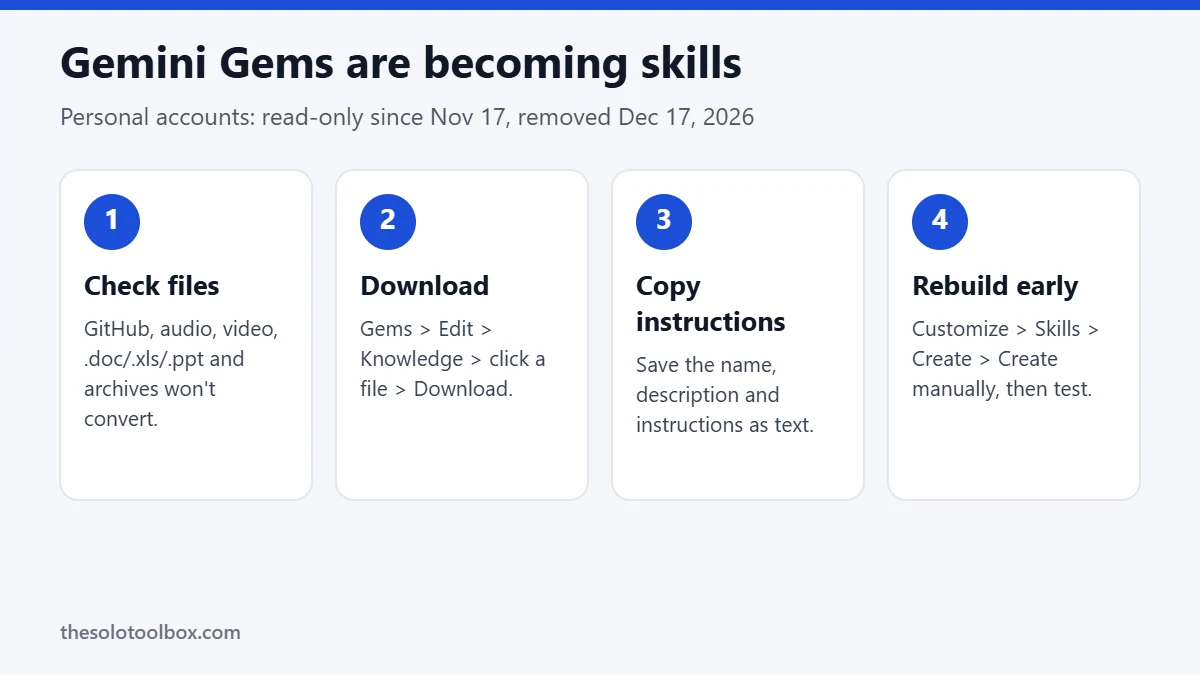
Since November 17, 2026, Gems in personal Gemini accounts are read-only: you can still open them, but you can’t use, edit or create them. On December 17, 2026, Google removes Gems entirely. Google says it will convert your Gems to skills automatically, but some knowledge files won’t carry over, so download any files you care about before December 17 or rebuild the Gem as a skill yourself.
This guide explains what converts, what doesn’t, how to save a Gem’s files, and how to recreate a Gem as a skill by hand.
Before you start
- Who this affects: personal Google accounts for users 18 and over. Under-18 accounts move later. Google Workspace business, enterprise and nonprofit accounts move in March 2027, and education accounts in June 2027.
- You’ll need: a computer with gemini.google.com open, signed in to the account that owns the Gems.
- Time: about 2 minutes per Gem to download files; 5–10 minutes per Gem to rebuild one manually.
- How we checked this: Google’s Gemini Apps Help pages “About the transition from Gems to skills,” “Create & manage skills for Gemini Apps” and “Use Gems in Gemini Apps,” read November 22, 2026. Menu names below are from the computer (web) version of those pages.
The dates that matter
| Account type | Gems become read-only | Gems removed |
|---|---|---|
| Personal, 18+ | November 17, 2026 | December 17, 2026 |
| Personal, under 18 | Later date, not yet announced | Not announced |
| Workspace business, enterprise, nonprofit | March 2027 | Not announced |
| Workspace education | June 2027 | Not announced |
Google’s help page on the transition says that after the first date you can still access your Gems but can’t use or edit them. After December 17, you can no longer access them at all.
What converts to a skill automatically
Google says it will transition your Gems to skills when Gems go away, along with supported knowledge files. Sharing permissions carry over too. If someone shared a Gem with you, the resulting skill shows on your Skills page under All as inactive, and you accept it from a notification.
What won’t carry over
Check this list before December 17. Google says these knowledge file types are not converted:
- Files added from GitHub
- Audio and video files
- Older Office formats: .doc, .xls and .ppt
- Archives: .zip, .tar, .7z, .rar, .gz and .tgz
Skills also have a 100 MB file limit. If a Gem’s files add up to more than that, Google says it removes the largest files first.
Some default Gem tools don’t work with skills: Create video, Create music, Canvas, Deep research and Guided learning. A Gem built around Deep research, for example, becomes a skill that can’t start a Deep research report.
How to download a Gem’s files
Google’s help page says personal accounts can download files from Gems until December 17, 2026. Files download one at a time.
- Go to gemini.google.com on a computer.
- Open the sidebar and click Gems. If you don’t see it, click More first.
- Next to the Gem, click Edit.
- Under Knowledge, click a file, then click Download.
- Repeat for each file.
While the Gem is open, copy its name, description and instructions into a text file. Downloading the knowledge files doesn’t save them, and you’ll need them if you rebuild the Gem or the automatic conversion goes wrong.
How to rebuild a Gem as a skill yourself
Doing it manually means you can check the result now instead of finding problems after December 17. Google’s steps:
- Download the Gem’s knowledge files as above. Put them in a folder named after the skill, in lowercase with hyphens, such as client-email-drafts.
- In a new tab, go to gemini.google.com, open the sidebar and click Customize, then Skills. Click More if you don’t see it.
- Click Create, then Create manually.
- Paste the Gem’s name, description and instructions, then click Create.
- On the Skills page, open More options for the new skill and click Download. You get a .zip containing a SKILL.md file.
- Move SKILL.md into the folder with your knowledge files.
- Back on the Skills page, open More options > Replace skill, choose folder, select your folder and click Upload. The folder name must match the skill name.
File rules for uploaded skills
SKILL.md must be in the root of the folder, and the whole folder must stay under 100 MB. Besides the formats listed above, Google lists several code file types as unsupported for skill uploads, including .ts, .tsx, .jsx, .php, .rb, .swift and .sql. Scripts that need internet access aren’t supported.
How to use a skill once it exists
Type / in a Gemini chat and pick the skill by name. Google says you can use more than one skill in the same chat, and Gemini can also apply an active skill on its own when it fits your request.
You can create as many skills as you want, but only 100 can be active at once. To switch one off, open its More menu on the Skills page and click Deactivate. You can’t activate, deactivate or delete skills from inside a chat.
Skills are available at gemini.google.com, in the Gemini mobile app and in the Gemini Mac app. Sharing a skill works only on the web: More > Share skill, then choose Viewer or Editor access.
Gems vs skills at a glance
| Gems | Skills | |
|---|---|---|
| Minimum age (personal accounts) | 13 or local minimum | 18 |
| How you start one | Open it from the Gems list | Type / in any chat, or Gemini applies it |
| Knowledge files | Upload or add from Drive | Upload with the skill, 100 MB total |
| Canvas and Deep research | Available | Not supported |
| Export | Download files one by one | Download the whole skill as a .zip |
FAQ
Will my Gems disappear if I do nothing?
The Gem itself is removed on December 17, 2026, but Google says it converts Gems to skills automatically. What you can lose are unsupported files, files over the 100 MB limit, and tools such as Canvas that skills don’t support.
Why can’t I see Skills in my account?
Skills require you to be signed in and 18 or older. Google also notes that turning off Keep Activity stops Connected Apps (Workspace) from working in Gemini, which affects skills that rely on them. Work and school accounts don’t switch until 2027.
What happens to a Gem someone shared with me?
It becomes an inactive skill on your Skills page under All. Accept it from the notification Google sends to start using it.
Can I undo deleting a skill?
No. Google says a deleted skill can’t be restored, so download it first with More > Download if you might want it back.
What to do next
Make a list of the Gems you actually use and check each one’s Knowledge section for GitHub files, video, old Office formats or archives. Download those files now, convert any .doc or .xls files to .docx or .xlsx, and rebuild your most important Gem as a skill this week so you can test it before December 17. If you want a copy of your wider Google data as well, our Google Takeout backup guide covers it.
Related guides
Sources
- Gemini Apps Help: About the transition from Gems to skills
- Gemini Apps Help: Create & manage skills for Gemini Apps
- Gemini Apps Help: Use Gems in Gemini Apps
- gHacks: Google will turn Gemini Gems into skills on November 17 and remove the old Gems on December 17 (November 5, 2026)
Last checked: November 22, 2026. Google is still rolling out skills and may change these steps. If something here no longer matches what you see, let us know.