GPT-5.6 Retiring December 23: Who Is Affected and What to Do
The Solo Toolbox · Software Help for One-Person Businesses
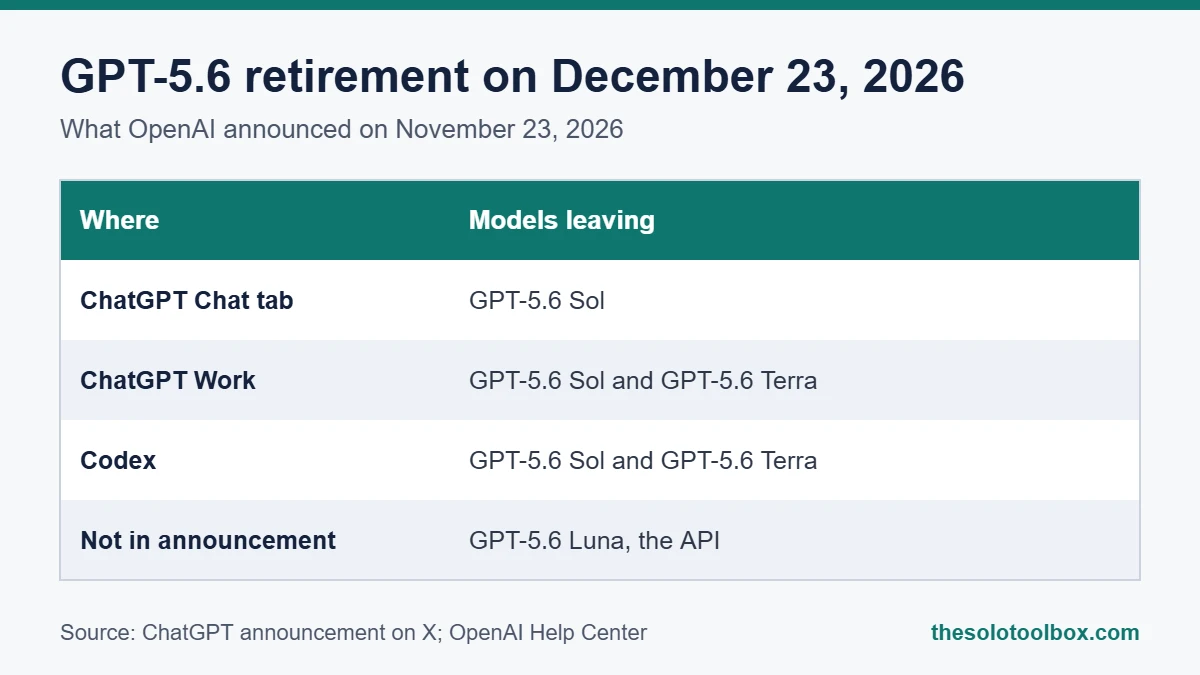
OpenAI will retire GPT-5.6 on December 23, 2026: GPT-5.6 Sol leaves the Chat tab in ChatGPT, and both GPT-5.6 Sol and GPT-5.6 Terra leave ChatGPT Work and Codex that day. If you picked GPT-5.6 Sol on purpose in the model menu, you have until then to test your regular prompts on GPT-6.2, which OpenAI is making the default for paid plans.
Here is who is affected on each plan, what OpenAI has and hasn’t said, and a short checklist for the next four weeks.
Before you start
- Who this is for: Plus, Pro, Business and Enterprise users who chose GPT-5.6 Sol, and anyone using GPT-5.6 Sol or Terra in ChatGPT Work or Codex, including Free and Go users in Codex.
- Probably not you if: you use ChatGPT on a Free or Go plan in the normal Chat tab. Those plans can’t select GPT-5.6 Sol.
- How we checked this: on November 25, 2026 we read the OpenAI Help Center article “GPT-6 and other models in ChatGPT” and coverage from TechRadar and Android Headlines quoting ChatGPT’s November 23 post on X. We could not open the X post or OpenAI’s release notes directly, and OpenAI had not published a separate retirement help article.
What OpenAI announced
On November 23, 2026, the ChatGPT account on X said that on December 23 OpenAI is “deprecating GPT-5.6 Sol in Chat, and GPT-5.6 Sol and Terra in Work and Codex.” A follow-up post set out the policy behind it: as new models launch, OpenAI will generally retire models that are two generations back, to free up computing capacity for newer ones.
The announcement came the same day GPT-6.2 started rolling out as the Latest model in the Chat tab for paid plans, a change we cover in GPT-6.2 in ChatGPT: who gets it and how to check. GPT-6.2 Sol and GPT-6.2 Astra had already arrived in Work and Codex on November 17.
Who is affected, plan by plan
Which GPT-5.6 models you can use today depends on your plan and on where you use ChatGPT. This is how OpenAI’s Help Center listed access on November 25:
| Where | Free and Go | Plus | Pro, Business, Enterprise |
|---|---|---|---|
| Chat tab: GPT-5.6 Sol | Not available | Medium and High | All effort levels |
| Work: GPT-5.6 Sol and Terra | Not available | Yes | Yes |
| Codex: GPT-5.6 Terra | Yes | Yes | Yes |
| Codex: GPT-5.6 Sol | Not available | Yes | Yes |
So the people who lose something on December 23 are paid users who deliberately select GPT-5.6 Sol, anyone who has set GPT-5.6 Sol or Terra in Work, and Codex users on any plan, including Free and Go, who run tasks on GPT-5.6 Terra.
What isn’t changing, as far as we know
- GPT-5.6 Luna: the announcement doesn’t mention it. Luna is the default for Free and Go users in Chat, including the Think option, so the free experience shouldn’t change on December 23.
- The API: OpenAI’s Help Center says the API offers GPT-5.6 Sol, Terra and Luna, and the announcement covers only Chat, Work and Codex. Developers should watch OpenAI’s API deprecations page rather than assume either way.
- Your chat history: OpenAI hasn’t said what happens to old conversations that used GPT-5.6. In earlier model retirements, past chats stayed in the sidebar and continued on a newer model when reopened, but we can’t confirm that will happen here.
One part of OpenAI’s own documentation is now out of step. The Help Center article still says the GPT-6 rollout “does not retire older selectable models,” and that Pro users who hit their weekly GPT-6 Pro limit are moved to GPT-5.6 Thinking at Medium. OpenAI hasn’t said what that fallback becomes after December 23.
What to do before December 23
- Check what you’re using. Open the model menu at the top of a chat. If it shows Latest, you are already on the newest default and don’t need to do anything in Chat. If it shows GPT-5.6 Sol, you picked it manually.
- Rerun your important prompts on Latest. Take two or three prompts you rely on, such as a client email template or a summary format, and run them in a new chat on Latest. Compare the output with an older answer from GPT-5.6 Sol.
- Fix prompts that drift. If GPT-6.2 changes length or tone, add the instruction explicitly, for example “under 150 words” or “no bullet points,” instead of relying on how the old model behaved.
- Update Work and Codex settings. If you or your team set GPT-5.6 Sol or Terra as the model for recurring Work tasks or Codex runs, switch them to a GPT-6.2 model now so nothing fails on December 23. Note that Codex usage limits are also changing, as covered in ChatGPT and Codex will share one usage limit.
- Tell your team. Business and Enterprise admins control which models members can use. If your workspace policy pins GPT-5.6, update it before the date.
Frequently asked questions
Will my old GPT-5.6 chats be deleted?
Nothing in the announcement says chats will be deleted. Retiring a model removes it from the model menu; it is a different thing from deleting conversations.
Can I keep using GPT-5.6 Sol after December 23?
Not in ChatGPT’s Chat tab, Work or Codex, according to the announcement. Whether it stays in the API is a separate question OpenAI hasn’t answered in what we read.
Is GPT-6.2 better than GPT-5.6 Sol?
OpenAI’s published comparisons favor GPT-6.2, but those are its own tests. Rerunning your own prompts, as in the checklist above, is the only way to know for your work.
Why is OpenAI retiring it so soon?
OpenAI says it now retires models two generations back to free computing capacity for newer models. With GPT-6 and GPT-6.2 both out, GPT-5.6 falls into that group.
What to do next
Put a reminder in your calendar for December 22 to check the model menu one last time. If you use the older GPT-6.1 Terra for cheaper or faster tasks, our GPT-6.1 Terra guide covers where it is available and when to pick it.
Related guides
Sources
- ChatGPT on X: GPT-5.6 retirement announcement (November 23, 2026)
- ChatGPT on X: model retirement policy (November 23, 2026)
- OpenAI Help Center: GPT-6 and other models in ChatGPT
- TechRadar: OpenAI confirms GPT-5.6 retirement date (November 24, 2026)
- Android Headlines: OpenAI retires GPT-5.6 as GPT-6.2 Sol takes over (November 24, 2026)
Last checked: November 25, 2026. If something here is out of date, let us know.