UpdraftCentral key compromise: how to check your WordPress site
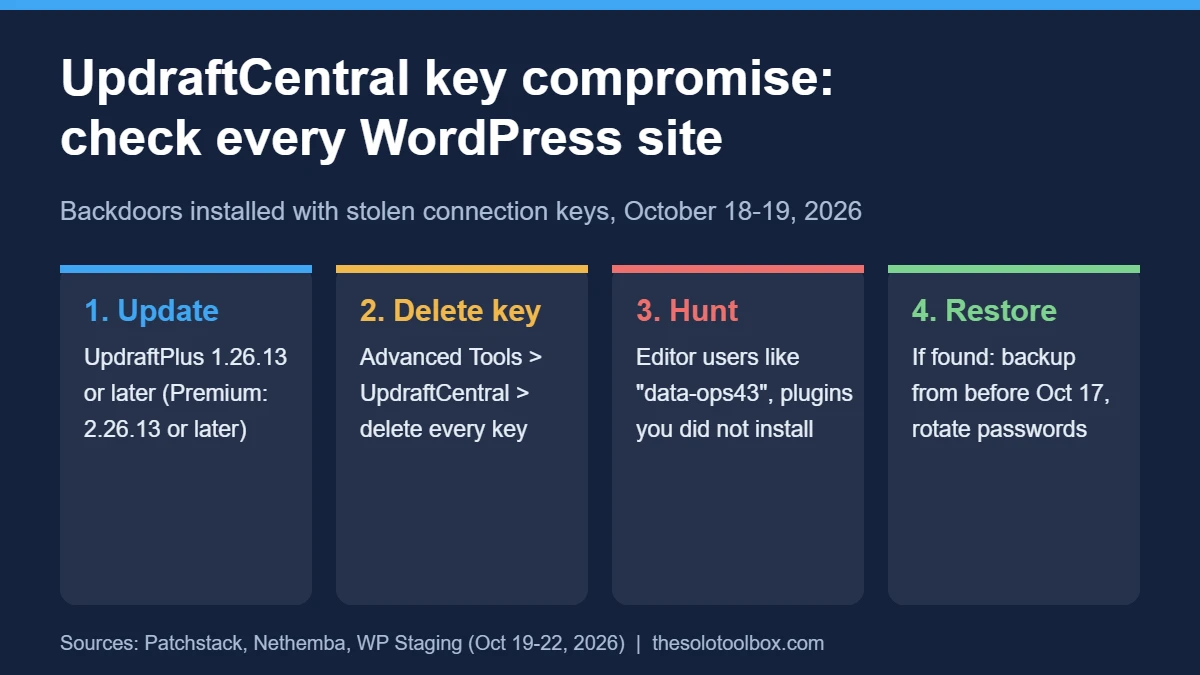
If any of your WordPress sites run UpdraftPlus and you ever connected them to UpdraftCentral Cloud, check them today for signs of the UpdraftCentral key compromise. Attackers who obtained UpdraftCentral connection keys after a breach at TeamUpdraft used them on October 18–19, 2026, to install backdoor plugins and hidden admin-level accounts. Updating the plugin is not enough on its own: you also need to delete the key stored on each site and look for the backdoor.
Below: how to tell whether the attackers could reach a site, the exact steps to close the hole, and what a compromised site looks like. We based it on Nethemba’s and Patchstack’s analyses, TeamUpdraft’s statements through October 22, WP Staging’s response checklist and the UpdraftPlus changelog, checked on October 27, 2026.
Before you start
- You’ll need: Admin access to wp-admin, and ideally SSH with WP-CLI or your host’s file manager
- Time: 10 minutes per site to check; longer if you find a backdoor
- Before you change anything: Take a full backup of the site as it is now, so you keep evidence and a way back.
What happened in the UpdraftCentral key compromise
TeamUpdraft, which makes the UpdraftPlus backup plugin, says it found unauthorized access to teamupdraft.com on October 17–18, 2026, and believes the intruder accessed its customer database. That database held connection keys for UpdraftCentral Cloud, UpdraftVault and UpdraftClone.
UpdraftCentral is the remote dashboard that lets you manage many WordPress sites from one place, including installing plugins. With valid keys, the attacker sent signed commands that the plugin accepted as genuine. Patchstack first saw a backdoor installed at 15:32 UTC on October 18 and the most recent one at 09:23 UTC on October 19. Because the attacker signed the commands properly, this isn’t a code bug and there’s no CVE for it.
| Affected | Not affected (per TeamUpdraft) |
|---|---|
| Sites with an UpdraftCentral Cloud key, on any UpdraftPlus version, free or Premium | Self-hosted UpdraftCentral |
| teamupdraft.com accounts (names, emails, billing addresses, order history, hashed passwords, 2FA settings) | Backups stored in your own remote storage |
| UpdraftVault and UpdraftClone connections (Vault sites were disconnected, Clone keys replaced) | UpdraftPlus plugin code and downloads |
One detail catches people out: connecting a teamupdraft.com account creates an UpdraftCentral key by default, and keys never expired. Patchstack found keys issued in November 2025 still working in October 2026. So check even if you don’t remember using UpdraftCentral.
Step 1: Update UpdraftPlus to 1.26.14
Log in to wp-admin directly (not through UpdraftCentral) and update the plugin from Plugins > Installed Plugins. Version 1.26.12 tried to revoke old keys but didn’t apply the revocation properly; 1.26.13 (free) fixed that on October 19. The current release, 1.26.14 from October 26, also stops the plugin from adding a site to UpdraftCentral automatically when you connect a teamupdraft.com account, so you now have to switch that on yourself. For Premium, install 2.26.14 or the newest version listed in your account.
Even so, updating isn’t a full fix. Nethemba reports 1.26.13 may not remove keys created between 12:07 and 21:00 UTC on October 18, and no release removes a backdoor that’s already on the site.
Step 2: Check for and delete the UpdraftCentral key
In wp-admin go to Settings > UpdraftPlus Backups > Advanced Tools > UpdraftCentral. If you see Manage existing keys, open it and delete every key. With WP-CLI, this shows whether a key exists (any output means it does) and then removes it:
wp option get updraft_central_localkeys --skip-plugins --skip-themes
wp option delete updraft_central_localkeys --skip-plugins --skip-themes
Removing the site from your UpdraftCentral dashboard does not help; the key that matters lives on the site itself. Your scheduled backups keep running after you delete it. Only remote management stops. Don’t reconnect until you’ve finished the checks below.
Step 3: Look for hidden accounts and backdoor plugins
The backdoor creates a user that looks like an Editor but holds the manage_options and install_plugins capabilities, so a quick scan of your Administrators list will miss it. Signs Patchstack and Nethemba documented:
- Usernames made of two words and two digits, such as
data-ops43ormedia-staff96 - An email address ending in
@example.organd the display name Site Tools - A plugin you didn’t install whose description reads “Small maintenance toolkit: keeps option storage tidy.” The name varies; Patchstack counted 99, with “Site Health Cache” the most common
- A database option ending in
_sync_token - Unexplained HTTP 500 errors: some samples crash before their own check runs
To list Editor accounts (check each against the signs above) and search plugin folders for the backdoor’s description line:
wp user list --role=editor --fields=ID,user_login,user_email,user_registered --skip-plugins --skip-themes
grep -rl "Small maintenance toolkit" wp-content/plugins wp-content/mu-plugins
Also run wp plugin list --status=must-use, since a plugin in mu-plugins doesn’t appear on the normal Plugins screen. If your host gives you access logs, look for POST / requests whose user agent ends in class-udrpc.php with no version or URL; Patchstack says genuine UpdraftCentral traffic includes both.
If you find a backdoor
- Delete the UpdraftCentral key first, or the attacker can push a replacement.
- Deactivate the suspicious plugin and move its folder out of the web root. Don’t delete it from wp-admin: its uninstall routine erases its traces. Don’t try to fix its errors either, because a working copy is an active backdoor.
- Delete the hidden account and the
_sync_tokenoption. - If the account existed or your logs show the trigger request, treat the site as fully compromised: restore from a backup taken before October 17, 2026, then repeat Step 2, since an older backup may still contain the old key.
- Change all admin passwords, your hosting and storage credentials, and your teamupdraft.com password. End all sessions with
wp config shuffle-salts.
Two-factor authentication does not stop this backdoor, because it sets a login cookie and skips the login form. Keep 2FA on, but don’t treat it as proof a site is clean. Our Rank Math PRO 3.0.123 malware cleanup guide covers the same restore-and-rotate routine in more detail.
Should you reconnect UpdraftCentral after the key compromise?
Wait until TeamUpdraft publishes a root cause; as of its October 21 update it had said the attacker “used a compromised key to access our site” but had not explained how. If you need remote management before then, Patchstack reports that creating the key under a user without the install_plugins capability stopped the attack on one analyzed site.
FAQ
I use the free UpdraftPlus and never made a teamupdraft.com account. Am I at risk?
TeamUpdraft says free users without a teamupdraft.com account only need to keep the plugin updated. Running the Step 2 check takes a minute and rules it out.
How many sites did the UpdraftCentral key compromise hit?
No one has published a count. Patchstack tracked 99 distinct backdoor plugin names, which is not the same as 99 sites. Nethemba found two of its own three targeted sites backdoored.
Is this related to the PHP vulnerability from the same week?
No. That was a separate server-level flaw. If you haven’t handled it yet, see what WordPress site owners should do about the October 21 PHP release.
Track every site
Open a spreadsheet with one row per site and three columns: UpdraftPlus version, key deleted (yes/no), suspicious users or plugins found. Work through every site before reconnecting anything. If a site starts throwing 500 errors while you check, confirm whether it’s down for everyone before assuming it’s the backdoor.
Related guides
Sources
- Patchstack: Stolen UpdraftCentral keys are backdooring WordPress sites (Oct 19, 2026)
- Nethemba: UpdraftCentral backdoor analysis (Oct 19, 2026)
- WP Staging: UpdraftCentral security incident, how to check and protect your site (Oct 20, 2026)
- BleepingComputer: Stolen UpdraftCentral keys used to backdoor WordPress sites (Oct 2026)
- WordPress.org: UpdraftPlus plugin page and changelog