ChatGPT Limits Running Out Faster? The GPT-6.2 Fix Explained
The Solo Toolbox · Software Help for One-Person Businesses
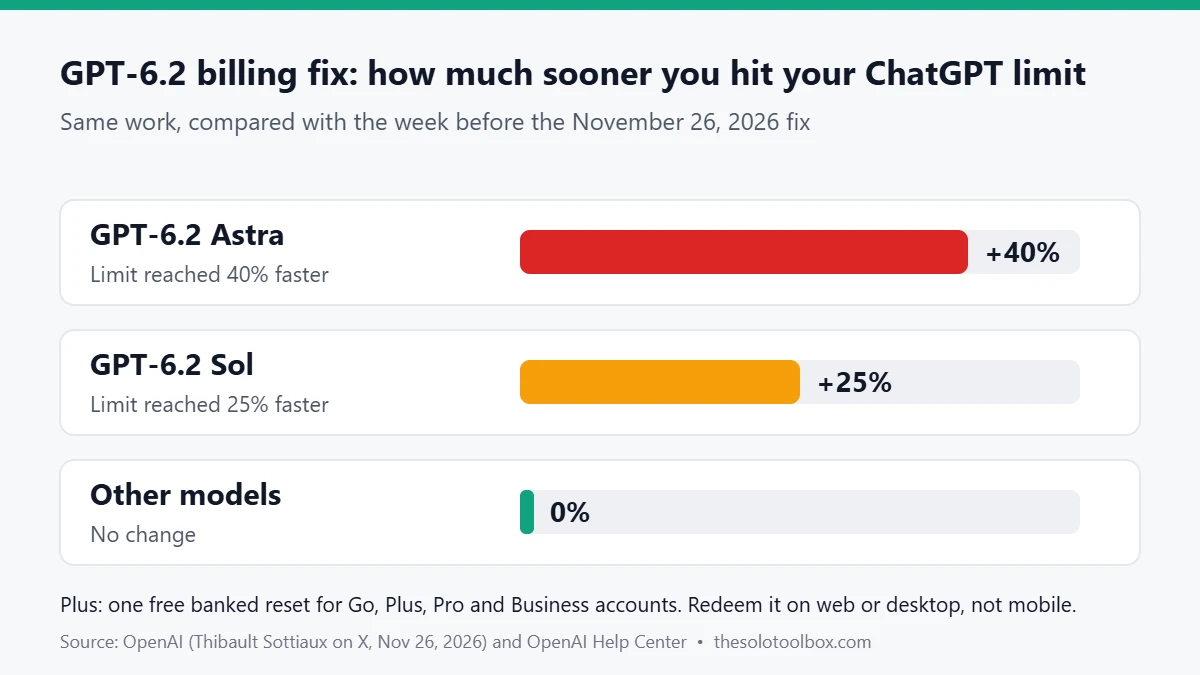
If your ChatGPT limits are running out faster this week, it’s not your imagination. On November 26, 2026, OpenAI said a billing mistake at the launch of GPT-6.2 had undercounted Astra and Sol usage. With the fix, the same work now uses more of your plan’s allowance: you’ll hit your limit 40% sooner on GPT-6.2 Astra and 25% sooner on GPT-6.2 Sol than last week. OpenAI is giving one free banked reset to Go, Plus, Pro and Business accounts to make up for it.
Below: exactly what changed, who is affected, how to find and use the banked reset, and settings that make the allowance last longer.
Before you start
- Who this is for: anyone on ChatGPT Go, Plus, Pro or Business who uses GPT-6.2 Astra or Sol in ChatGPT Work or Codex.
- What you need: the ChatGPT desktop app or chatgpt.com in a browser. The mobile app can’t redeem banked resets.
- How we checked this: on November 26, 2026 we read OpenAI’s Help Center pages “How resets work in Codex” and “Managing usage with GPT-6 Astra in Work and Codex,” plus the announcement from OpenAI’s Thibault Sottiaux as quoted by Neowin and Notebookcheck. We haven’t measured the change on our own account, and OpenAI hasn’t published an expiry date for this reset.
What OpenAI changed on November 26
GPT-6.2 Astra and Sol arrived in ChatGPT Work and Codex on November 17. According to Sottiaux, who leads product for ChatGPT, Codex and the API platform, a billing error at launch “incorrectly discounted” usage of both models for most users. In other words, you were getting more work out of your allowance than OpenAI intended.
That error is now fixed. OpenAI’s comparison against last week:
| Model | Change after the fix | Charged for past usage? |
|---|---|---|
| GPT-6.2 Astra | Limits reached 40% faster | No |
| GPT-6.2 Sol | Limits reached 25% faster | No |
| All other models | No change | Not applicable |
Three things didn’t change. Subscription prices stay the same, OpenAI won’t bill you for the difference on work you already did, and Sottiaux says both models still go further per unit of allowance than the older GPT-6 Astra and GPT-6.1 Sol.
Who is affected
- ChatGPT Work and Codex users on Plus, Pro and Business Standard or Premium seats who pick GPT-6.2 Astra or Sol. Work and Codex share one allowance, so heavy Codex use also drains what you have for Work.
- Chat tab users: unclear. Since November 23, the Chat tab on paid plans has run a version of GPT-6.2 Sol. The announcement talks about your plan’s usage allowance and doesn’t say whether Chat message limits change too.
- Free users: not affected. They don’t have Astra or Sol.
If you set up a workflow around last week’s limits, such as a long Codex session every morning, expect it to stop earlier. On Plus, which has both a five-hour and a weekly window, you need allowance left in both to keep working.
How to find and use your free banked reset
A banked reset is a one-time refresh saved to your account. Receiving it doesn’t change your usage; it waits until you choose to use it or it expires. Here’s how to use one, based on OpenAI’s Help Center:
- Open the ChatGPT desktop app and go to Settings > Usage & billing. On the web, open Usage settings.
- Select the usage summary that shows an available reset, such as 1 reset available or Full reset.
- Check which limits it covers and its expiration date, then confirm.
- In the Codex CLI, type
/usageand choose Redeem reset. If your CLI version doesn’t show it, use the desktop app or web.
On the desktop app, make sure you pick Use reset, not Buy an instant reset. The second option is a separate paid purchase and doesn’t touch your free banked reset.
Why the reset button might not work yet
- You still have plenty left. At least one covered allowance must be below 80% remaining. Otherwise you’ll see “Your usage does not need a reset right now,” and the reset stays saved.
- It hasn’t landed yet. OpenAI says eligible accounts can receive banked resets at different times within a delivery window. Check History under Usage limit resets in the desktop app; “Reset received” means it was added.
- You’re on your phone. The mobile app has no reset controls or history.
What the reset restores on each plan
| Plan | What a full banked reset restores |
|---|---|
| Go | The monthly allowance |
| Plus and Business Standard | The five-hour and weekly allowances |
| Pro 100, Pro 200 and Pro 500 | The weekly allowance |
A reset brings each covered allowance back to 100%. It doesn’t raise your plan’s limits permanently, and it doesn’t touch separate limits such as image generation, file uploads or regular Chat voice. Using it can also move your next scheduled refresh: if a weekly period restarts on a Tuesday, the next refresh is the following Tuesday, not the old date. Check Usage for the new time.
Because you only get one, save it for a day when you’re close to the weekly cap with work still to finish, rather than using it the moment the five-hour window runs low.
How to make your allowance last longer
OpenAI’s own usage guidance points to a few settings that change how fast you burn through the meter:
- Lower the reasoning level first. OpenAI says Astra at Low effort can outperform Sol at High effort, and higher effort uses more allowance without guaranteeing a better answer.
- Pick a lighter model for routine jobs. For extraction, sorting or short edits, OpenAI recommends GPT-5.6 Luna; for everyday drafting, GPT-5.6 Terra.
- Skip Fast mode unless you need it. It returns answers sooner but uses more of your included allowance.
- Run tasks locally where you can. OpenAI says Codex cloud tasks may use more allowance than local messages.
- Check Settings > Usage before a big job. Switching models after you hit a limit doesn’t restore allowance in the shared pool.
Another change is coming in December
This fix lands just before a bigger shift. OpenAI has said that from December, Plus, Pro and Business plans will share one token-based allowance across ChatGPT and Codex, and a small group of Pro users has been on that shared meter since November 24, according to TechCrunch. Our guide to the ChatGPT and Codex shared usage limit covers what to prepare.
FAQ
Will OpenAI charge me for the usage it undercounted?
No. Sottiaux said OpenAI won’t charge customers for the difference in past usage.
Did the price of ChatGPT Plus or Pro change?
No. The fix changes how much allowance GPT-6.2 Astra and Sol use, not what the plans cost. Neowin noted that OpenAI’s pricing pages were unchanged after the announcement.
Does the banked reset give me extra usage every week?
No. It’s a single refresh back to 100% of the allowances it covers. Your regular schedule continues after that.
When does the banked reset expire?
OpenAI hasn’t published the date in its announcement. The expiry appears next to the reset before you confirm it, so check it in Usage settings.
What to do next
Open Usage settings on desktop or web today and confirm the reset has arrived, then note its expiry date. If you mostly use the Chat tab, our explainer on GPT-6.2 in ChatGPT shows which model you’re on. If you use Copilot as well, compare options in GPT-6.2 Sol vs Astra in Copilot.
Related guides
Sources
- Neowin: Paying ChatGPT users will hit GPT-6.2 limits faster after OpenAI fixes a launch mistake (November 26, 2026)
- Notebookcheck: ChatGPT users hit limits up to 40% sooner after OpenAI billing fix (November 26, 2026)
- OpenAI Help Center: How resets work in Codex
- OpenAI Help Center: Managing usage with GPT-6 Astra in Work and Codex
Last checked: November 26, 2026. If something here is out of date, let us know.