Claude Ship: What It Does and How to Turn It On
The Solo Toolbox · Software Help for One-Person Businesses
Claude Ship is Anthropic’s new set of pull-request agents for GitHub: one reviews each PR, one fixes failing checks and review comments, and one applies your team’s approval rules. Anthropic launched it on November 23, 2026 for Claude Team and Enterprise plans, and an admin turns it on at Organization settings > Claude Ship. Developers get a companion command, /ship, in the Claude Code terminal app.
This guide explains what each part does, what it costs, how to switch it on one repo at a time, and what /ship will and won’t do on your machine.
Before you start
- Who this is for: owners of a Claude Team or Enterprise organization with code on GitHub, and developers on those teams who use Claude Code.
- Not available to: organizations using Zero Data Retention, the HIPAA configuration or customer-managed encryption keys, according to Anthropic’s documentation.
- How we checked this: on November 24, 2026 we read Anthropic’s launch post, the Claude Ship product page and the Claude Code docs for Claude Ship, the
/shipcommand and Code Review setup. We did not run Claude Ship on a live repository, and prices are usage-based, so we can’t quote a per-review dollar figure.
What Claude Ship includes
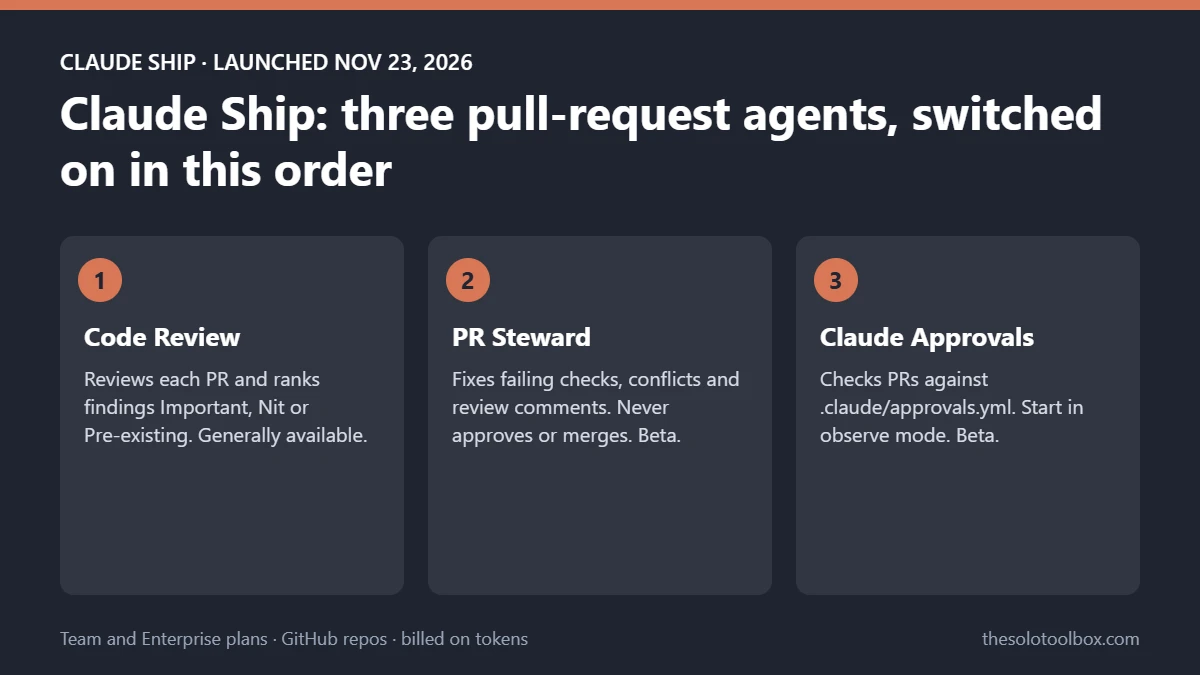
Claude Ship bundles three agents that work on pull requests in GitHub repositories. Their status differs, which matters if you plan to rely on them:
| Agent | What it does | Status (Nov 24, 2026) |
|---|---|---|
| Code Review | Reviews each PR, posts inline comments and ranks findings as Important, Nit or Pre-existing | Generally available |
| PR Steward | Works on failing checks, merge conflicts and review comments, then pushes fixes | Public beta |
| Claude Approvals | Checks a PR against a policy file you write and reports who still has to approve | Public beta |
Anthropic says PR Steward is designed not to approve or merge anything. Claude Approvals reports through a GitHub check named Claude Approvals; it only blocks a merge once you make that check required in your branch rules.
If your organization already used Claude Code Review, its settings now live under Claude Ship. Anthropic’s Code Review setup page still points to Admin settings > Claude Code, so you may see either location while the docs catch up.
What it costs
There is no flat price. Each agent is billed on tokens through your organization’s usage credits, separately from the usage included in your plan. The details that catch people out:
- Admins can set monthly spend limits for Code Review and PR Steward. PR Steward has no limit of its own until you set one.
- Claude Approvals has no base charge, but any classifiers in your policy are billed, and a policy that asks for Claude’s review triggers a billed Code Review even in observe mode.
- Turning off usage credits does not stop an agent that is already on. To stop charges, turn the agents off.
- Running
/shipfrom Claude Code counts as normal Claude Code usage on the developer’s seat.
Eligible Enterprise organizations can claim at least $10,000 in Claude Ship credits. Claims close on January 15, 2027, and the credits must be used within 30 days of claiming.
How to turn on Claude Ship
You need the Owner role in the Claude organization, plus a GitHub organization owner to install the Claude GitHub App. Anthropic recommends switching on one agent at a time, in one repository, in this order.
Step 1: Code Review
- Go to Organization settings > Claude Ship (claude.ai/admin-settings/claude-ship).
- Connect GitHub and install the Claude GitHub App on your GitHub organization. Choose only the repositories you want reviewed.
- Set a monthly spend limit.
- Pick a review level for the repo: Quick, Standard (the default) or Deep.
- Choose when reviews run: Once after PR creation, After every push (the default) or Manual (@claude review).
- Open a test pull request that isn’t a draft. A check named Claude Code Review should appear within a few minutes.
Draft PRs and PRs from forks are skipped by automatic reviews. Developers can change what reviews flag by committing a REVIEW.md file to the repository.
Step 2: PR Steward
Start PR Steward in Manual (@claude steward) mode, so it only acts on a PR when someone comments @claude steward. Commenting @claude stop halts it. Set its spend limit at the same time.
Step 3: Claude Approvals
Add a policy file at .claude/approvals.yml on the repository’s default branch, then run it in observe mode. The check reports what it would have decided without blocking anything. Once its decisions match what your reviewers would do, require the check in GitHub.
One warning from Anthropic’s docs: if GitHub auto-merge or a merge queue is on and your policy doesn’t require a human approval, a change can merge with nobody acting on it. Write at least one rule that needs a person before you enforce the policy.
What /ship does on a developer’s machine
/ship is a command you type in the Claude Code CLI inside your local clone. It isn’t available in cloud sessions. Running it does four things in order:
- Commits and pushes your change and opens a pull request under your GitHub account, if the branch doesn’t have one.
- Runs a code review.
- Starts a “watch”, where Claude works on review feedback and failing checks.
- Leaves the merge to you.
Requirements listed in the docs: Claude Code v2.1.330 or later, GitHub CLI 2.63 or later signed in with gh auth login, and git 2.38 or later. A related command, /steward, skips the review and starts the watch on a PR you already opened. Type /ship stop to end a watch.
Check these before you run it
/shipcommits all uncommitted files, including new ones. Stash anything you don’t want pushed, for example withgit stash push -u -- notes.txt.- It doesn’t ask for confirmation. It shows an Esc to cancel line for a few seconds before committing and again before pushing. If it committed before you cancelled,
git reset HEAD~1undoes the commit. - Files with secret-looking names such as
.envblock the commit and push in private repos. A permissions deny rule on a file does not keep that file out of the commit. - A watch only works unattended in auto mode. It doesn’t start at all on native Windows or in
bypassPermissionsmode. - During a watch, Claude Code blocks git and gh commands that merge, approve, turn on auto-merge or force-push. The docs say these limits aren’t complete, so don’t leave auto-merge on for a PR you’re watching.
- The watch runs code from the PR on your computer with your credentials. Anthropic advises using it only where you trust everyone who can push to the branch or merge into the base branch.
Anthropic’s pages say Claude Ship is for Team and Enterprise plans but don’t state whether /ship itself works on individual Pro or Max accounts. The product page invites non-admins to try it, so check your own Claude Code version before assuming either way.
How admins can turn it off
Turn off the agents in reverse order: Claude Approvals, then PR Steward, then Code Review. That order matters because an approvals policy can still start billed reviews when Code Review is off. To block the developer commands across the organization, set skillOverrides in managed settings with "ship-local": "off" and "steward": "off", or add the deny rule Bash(git push *).
Frequently asked questions
Is Claude Ship free?
No. It’s billed on tokens through organization usage credits. Claude Approvals has no base fee, but its classifiers and any reviews it requests are billed.
Does Claude Ship work with GitLab or Bitbucket?
Not at launch. Anthropic lists GitHub repositories only, and /ship won’t open a pull request on other hosts.
Can Claude Ship merge my pull request?
PR Steward and the /ship watch are designed not to merge or approve. A merge can still happen without a person if GitHub auto-merge or a merge queue is on and your approval policy doesn’t require a human.
Do I need Claude Code to use Claude Ship?
Admins set up the agents in the Claude web admin settings, so the agents run without anyone using Claude Code. Developers need Claude Code only for /ship and /steward.
What to do next
If you run a small team, start with Code Review on one low-risk repository, set a modest monthly spend limit, and check its findings for a week before adding PR Steward. Before giving any AI agent push access, read our guide to why you shouldn’t run AI coding agents in your Downloads folder, and see how Anthropic handled admin-controlled rollouts for Claude computer use on Team and Enterprise.
Related guides
Sources
- Anthropic: Introducing Claude Ship (November 23, 2026)
- Anthropic: Claude Ship product page
- Claude Code docs: Claude Ship
- Claude Code docs: /ship and /steward
- Claude Code docs: Set up Code Review
- 9to5Mac: Anthropic launches new Claude Ship feature for builders (November 23, 2026)
Last checked: November 24, 2026. If something here is out of date, let us know.