myColorado Breach: What to Do If Your Documents Were Exposed
The Solo Toolbox · Software Help for One-Person Businesses
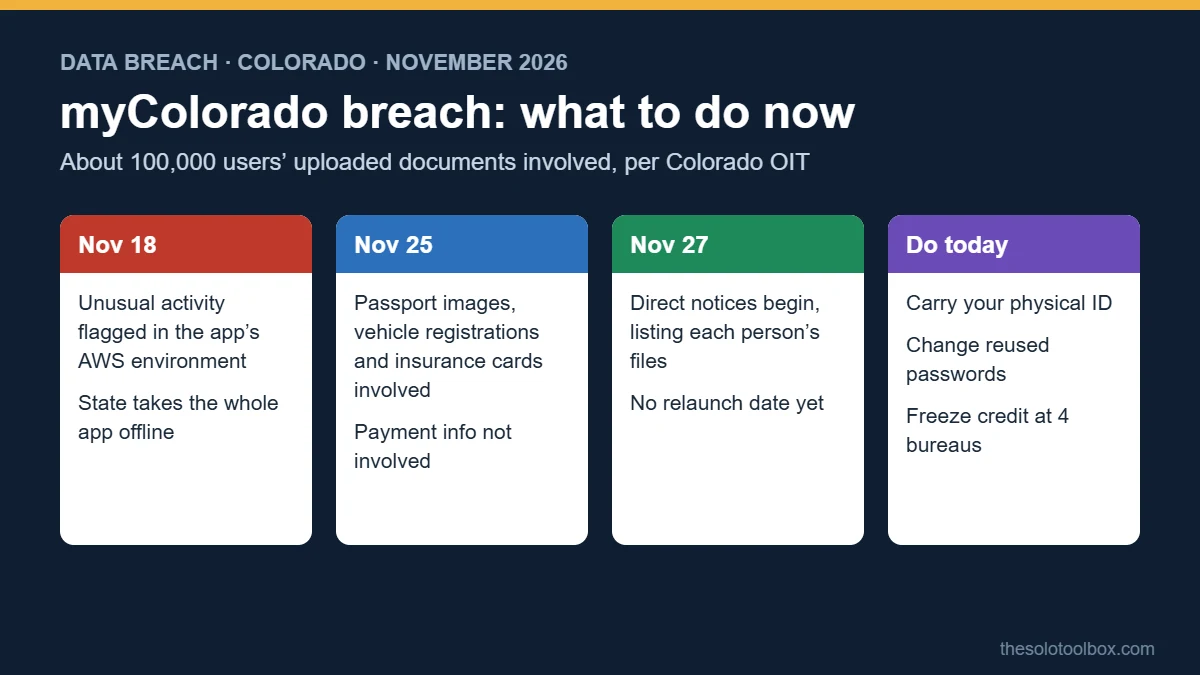
Colorado’s Office of Information Technology (OIT) says an attacker accessed files in the myColorado app, and about 100,000 users’ documents were involved, mostly uploaded images and PDFs of passports, vehicle registrations and insurance cards. Payment information was not involved. If you used the app’s document storage, change any reused passwords, freeze your credit and watch for a direct notice that OIT expects to start sending on November 27, 2026.
This guide covers the timeline, what each exposed document can be used for, how to get through airports and DMV tasks while the app is down, and how to tell a real breach notice from a fake one.
Before you start
- Who this is for: anyone who has used the myColorado app, especially people who stored documents in its myCards and Documents section.
- What you need: your physical Colorado driver license or ID, access to your email and bank accounts, and time to set up credit freezes online.
- How we checked this: on November 26, 2026 we read OIT’s November 23 and November 25 press releases, Colorado DMV’s digital wallet pages, and reporting from Denver7 and The Record. OIT’s investigation is still open, so numbers may change.
What happened in the myColorado breach
Late on Wednesday, November 18, 2026, automated threat detection in the state’s Amazon Web Services environment flagged unusual usage in the myColorado app. OIT’s security team found what appeared to be unauthorized activity and shut the entire app down to contain it. The app has been offline since.
On November 23, OIT said the incident might involve 50,000 to 150,000 people out of roughly 2.1 million app users. Its November 25 update narrowed that to about 100,000 and said the estimate will be refined as staff match accessed files to individual accounts. OIT has not named the attacker or said how they got in.
What data was exposed
OIT says the incident “primarily” involved the myCards and Documents area, where users upload their own files. That wording leaves room for other data, so treat the notice you receive as the final word for your account.
| Data | Involved? | What someone could do with it |
|---|---|---|
| Passport images and PDFs | Yes | Attempt identity checks on sites that accept a photo of an ID, or add credibility to a scam call |
| Vehicle registrations | Yes | Your name, address, plate and VIN, useful for fake DMV, toll or warranty messages |
| Insurance cards | Yes | Policy number and insurer name, useful for fake claim or renewal calls |
| Other uploaded files | Possibly | Depends on what you stored. Your notice should list each file |
| Payment information | No, per OIT | No direct card risk from this incident, but still check statements |
What to do right now
- Carry your physical license. OIT asks everyone to use a physical driver license or state ID for identity checks until the app returns.
- Change reused passwords. If your myColorado password or email matches any other account, change those accounts first, starting with email, banking and your mobile carrier. Use a unique password for each one, ideally from a password manager.
- Turn on two-step verification. Use an authenticator app or a passkey rather than text-message codes where the service allows it. Our guide to turning on two-step verification for Google and Microsoft accounts walks through the two accounts most people should secure first.
- Freeze your credit at all four bureaus. OIT specifically lists Equifax, Experian, TransUnion and Innovis. A freeze is free, does not affect your score, and stops new accounts from being opened in your name until you lift it. Each bureau has its own freeze page, and requests made online or by phone must be applied within one business day.
- Check bank and card activity. Payment data was not involved, but if you see a charge you don’t recognize, call the number on the back of your card, not a number from an email or text.
- Keep records. Save screenshots, emails, texts, phone numbers and transaction records of anything suspicious. You’ll need them for reports to your bank, police or the FTC at IdentityTheft.gov.
If your passport image was in the breach
A photo of a passport is not the passport itself. It cannot be used to board a plane or cross a border, but it holds your full name, date of birth, passport number and photo, which is enough for some online services that verify identity from an uploaded image.
Be careful before reporting the passport as lost or stolen. Form DS-64 is for a passport book or card that is physically missing, and a passport reported that way is invalidated and can’t be used again, even if you find it. We could not find State Department guidance specific to a leaked image, so if your notice lists a passport file, contact the National Passport Information Center before you cancel a valid passport, especially with travel coming up.
If your vehicle registration or insurance card was exposed
These documents give a scammer real details to quote back to you: your plate, VIN, address, insurer and policy number. Expect calls or texts about “expiring” registrations, unpaid tolls or lapsed coverage. Renew registrations only through the Colorado DMV website, and call your insurer using the number printed on your card or policy, not one from a message.
How to use your ID while myColorado is offline
The state has suggested three workarounds:
- Use another digital wallet. Colorado DMV supports adding a Colorado driver license or ID to Apple Wallet, Google Wallet and Samsung Wallet. OIT says users who planned to use their Mobile Driver License for air travel can add it to another DMV-approved wallet instead.
- Know your airport fallback. If you don’t have a REAL ID-compliant license or a passport with you, TSA ConfirmID is an option for a $45 fee.
- Go direct to state websites. Driver license and vehicle registration renewals still work through the Colorado DMV website and other agency portals.
How to spot a fake myColorado breach notice
Breach notices are a favorite phishing lure because people expect them. OIT says real notifications will identify the specific documents or files involved for each person. A message that only says “your data may have been exposed” and pushes you to a link is a red flag.
- OIT has not said the notice will ask you to pay for anything, sign in through a link or send copies of your ID. Treat any of those requests as suspicious.
- Check the sender against the addresses and announcements on myColorado.gov or oit.colorado.gov before you act.
- Don’t call a phone number from the message. Look up the number on the state’s own site.
If a breach-themed message has already landed in your inbox, our guide on how to check whether your email was in a data breach shows how to see what else is out there about your address.
Frequently asked questions
Is the myColorado app back online?
Not as of November 25, 2026. OIT said it is running security tests on changes to the app and has not given a relaunch date. Check myColorado.gov for the current status.
Was my driver license data stolen in the myColorado breach?
OIT says the incident primarily involved files users uploaded to the myCards and Documents section, such as passport images, vehicle registrations and insurance cards. It has not said the Mobile Driver License itself was copied. The notice each affected person receives is supposed to list the exact files involved.
Do I have to pay for credit monitoring after the myColorado breach?
No. A credit freeze at Equifax, Experian, TransUnion and Innovis is free by federal law and does more to block new accounts than monitoring does. If OIT offers free monitoring in its notice, you can add it, but you don’t need to buy it.
Will I be notified if my data was in the myColorado breach?
OIT says it is matching the accessed documents to individual users and expects to start sending direct notifications on Friday, November 27, 2026. Each notice should name the specific documents or files involved for that person.
What to do next
Start with the credit freezes today; they cost nothing and you can lift them whenever you need a credit check. Then watch your email and mail from November 27 for OIT’s notice, and compare the files it lists with the sections above. If a password you used on myColorado shows up somewhere else, our checklist for what to do when your passwords are stolen covers the order to change things.
Related guides
Sources
- Colorado OIT: Status update on myColorado cybersecurity incident investigation (November 25, 2026)
- Colorado OIT: myColorado mobile app temporarily unavailable (November 23, 2026)
- Denver7: myColorado app breach affected passport, registration and insurance data (November 25, 2026)
- The Record: Colorado says cyberattack took down myColorado app
- Colorado DMV: Colorado ID in Google Wallet
- USAGov: How to place or lift a security freeze on your credit report
Last checked: November 26, 2026. If something here is out of date, let us know.