Pixel Not Connecting to Work or School Wi-Fi After November Update
The Solo Toolbox · Software Help for One-Person Businesses
If your Pixel stopped joining your office or campus Wi-Fi right after the November 2026 update, you’re running into a known bug that Google hasn’t fixed yet. It hits WPA2- and WPA3-Enterprise networks that sign you in with PEAP and MSCHAPv2, including many eduroam setups, and mostly those whose sign-in server is Microsoft’s Windows Network Policy Server (NPS). Forgetting the network, changing certificate settings and factory resetting don’t fix it. Until Google ships a patch, the options are mobile data, a guest or password-only network, or holding off on the update if your phone hasn’t installed it.
This guide explains how to tell if you have this bug, what people have found causes it, what’s worth trying, and what IT teams can do in the meantime.
Before you start
- Applies to: Pixel 6a through Pixel 11 series on the November 2026 update (build CP4A.261105.040.A1, or .D1 on the Pixel 11 series), joining enterprise Wi-Fi that uses a username and password.
- Not affected: home Wi-Fi and other networks that use a single shared password.
- Check your build: Settings > About phone > Build number.
- How we checked this: on November 23, 2026 we read Google Issue Tracker reports 585624836 and 572438311, the Pixel Community thread marked as a trending issue, and Android Authority’s November 13 report. Google hasn’t confirmed the cause or given a fix date.
Pixel work Wi-Fi not connecting? Check the symptoms
- The network worked on the same Pixel before the November update.
- The phone tries to connect for 20 to 30 seconds, then shows Saved, Connection failure or Can’t connect.
- The network’s EAP method is PEAP with MSCHAPV2 as Phase 2 authentication.
- iPhones, laptops and Pixels still on the October build connect to the same network with the same account.
- If you can ask IT: the Windows NPS log shows event 6274, Reason Code 1, with the EAP Type field empty.
Reports started on November 11 and have kept coming. The Pixel Community thread has been flagged as a trending issue, and the main Issue Tracker report has more than 160 “+1” votes, with university and school IT staff describing dozens to hundreds of affected devices a day. Reports name the Pixel 7, 7a, 7 Pro, 8, 8 Pro, 9, 9a, 10, 10 Pro, 10 Pro XL, 10a, 11, 11 Pro and 11 Pro XL.
What’s causing it
Google hasn’t said. The most detailed explanation comes from administrators who captured the sign-in traffic on their servers and posted it to Google’s Issue Tracker:
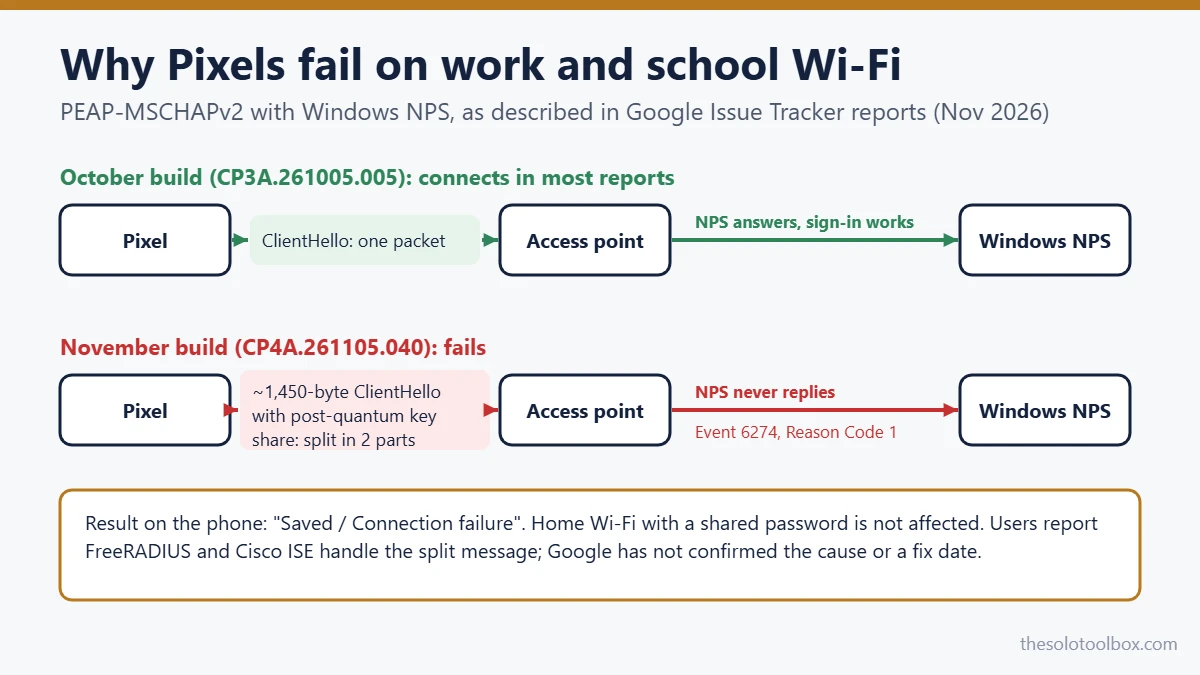
- When a Pixel starts a PEAP sign-in, it sends a TLS “ClientHello” message to the network’s authentication server.
- On the November build, that message includes a post-quantum key share (X25519MLKEM768). That adds 1,216 bytes and brings the message to about 1,450 bytes.
- That’s too big for one EAP packet, so the phone splits it into two pieces.
- Windows NPS doesn’t answer a split ClientHello. It logs event 6274 and drops the attempt, and the phone eventually gives up.
Phones on the October build send a ClientHello of a few hundred bytes, which fits in one packet. Commenters report that FreeRADIUS and Cisco ISE handle the split message correctly, which fits with most failures involving NPS, though at least one administrator reports the same failure with Radiator. A few people say Pixels on the October build also fail, so there may be more than one fault.
Fixes people tried that don’t work
Affected users and administrators report that none of these restore the connection on the November build:
- forgetting and re-adding the network, including with geteduroam profiles;
- switching CA certificate between Use system certificates, an installed certificate and Trust on First Use;
- changing Minimum TLS version or leaving Anonymous identity blank;
- turning off MAC randomization (Privacy > Use device MAC);
- Reset Bluetooth & Wi-Fi under Settings > System > Reset options;
- a factory reset, which one user said worked for about a week and others said didn’t help at all.
Skip the factory reset in particular. It erases your phone and, by reported experience, leaves you on the same build with the same problem. If you do decide to reset for another reason, back up your Android phone first.
What you can do until Google fixes it
- If you haven’t installed the update, wait. Go to Settings > System > Software updates > System update. If the November update is downloaded and waiting for a restart, don’t restart from that screen while you depend on work or school Wi-Fi. Pixel updates can’t be uninstalled, and going back to October means flashing an older factory image, which wipes the phone.
- Use another network. Ask IT whether there’s a guest network or a separate network with a shared password. Otherwise use mobile data, and if your laptop needs a connection too, share it through Settings > Network & internet > Hotspot & tethering.
- Report it. Send feedback from the Pixel (search Settings for “feedback”) and mention your build number. If you have a Google account, star Issue Tracker report 585624836 rather than posting another “+1” comment.
- Tell IT what you’re seeing. Point them to the issue number and the NPS event 6274 detail so they don’t spend time on certificate changes that won’t help.
For IT administrators
- Check NPS logs for event 6274, Reason Code 1, EAP Type blank, from Pixel devices on CP4A.261105.040.x.
- An administrator reported that EAP-TLS (certificate-based sign-in) still works, because the problem shows up with MSCHAPv2-based methods.
- Commenters say FreeRADIUS and Cisco ISE answer the split ClientHello correctly. Moving off NPS is a big change for a phone bug, so most teams are using a pre-shared key or guest network as a stopgap.
- Advise staff and students who haven’t updated to delay the restart.
When will Google fix it?
There’s no date. A Google employee on the Issue Tracker report wrote on November 17 that the issue had been passed to the development team; it’s marked Assigned at priority P3. A closely related report from the Android 17 QPR2 beta, 572438311, was marked Fixed by Google on October 16 with a note to watch for future releases. Users say that fix appeared in the Android 17 QPR3 Beta 3 build but not in the November stable release, and are asking Google to include it in a monthly update.
If it isn’t backported, it may not reach stable Pixels until Android 17 QPR3, which users expect around March 2027 based on Google’s usual schedule. The Android Beta program might fix it sooner, but that’s a poor trade for most people: leaving the beta before the stable release arrives wipes the phone, and many workplaces don’t allow beta builds. Our November 2026 Pixel update guide lists what else changed in this build, and we’ll note it there if December’s update fixes Wi-Fi.
FAQ
Why won’t my Pixel connect to eduroam after the November update?
Many eduroam networks use PEAP with MSCHAPv2, and Pixels on the November 2026 build (CP4A.261105.040) are failing that sign-in, particularly against Windows NPS servers. Google is investigating and hasn’t released a fix.
Will a factory reset fix Pixel enterprise Wi-Fi?
Reports say no. One user said it worked for about a week; others said it made no difference. A reset keeps you on the same build, so the same sign-in failure returns.
Can I uninstall the November Pixel update?
No. Pixel system updates can’t be uninstalled. Going back to the October build means flashing a factory image, which erases the phone.
Is my home Wi-Fi affected?
No. Home networks that use one shared password (WPA2 or WPA3 Personal) don’t use the PEAP sign-in that fails here.
What to do next
Check your build number under Settings > About phone. If it starts with CP4A.261105.040 and your work or school network fails, switch to mobile data or a guest network, send Google feedback, and let IT know about the Issue Tracker report. If you haven’t installed the update yet, wait for a fix before restarting. The Android November 2026 security update guide explains what security fixes you’re holding off on.
Related guides
Sources
- Google Issue Tracker 585624836: November update breaks PEAP enterprise Wi-Fi with Windows NPS (opened November 13, 2026)
- Google Issue Tracker 572438311: WPA-Enterprise (PEAP/MSCHAPv2) stalls during TLS handshake (marked Fixed October 16, 2026)
- Google Pixel Community: Pixel 8 Wi-Fi connection issues after latest security update (November 11, 2026)
- Android Authority: Pixel users report workplace and school Wi-Fi connectivity issues after November update (November 13, 2026)
Last checked: November 23, 2026. If something here is out of date, let us know.