PAN-OS Fragnesia Exploited: Which Builds Fix CVE-2026-46300
The Solo Toolbox · Software Help for One-Person Businesses
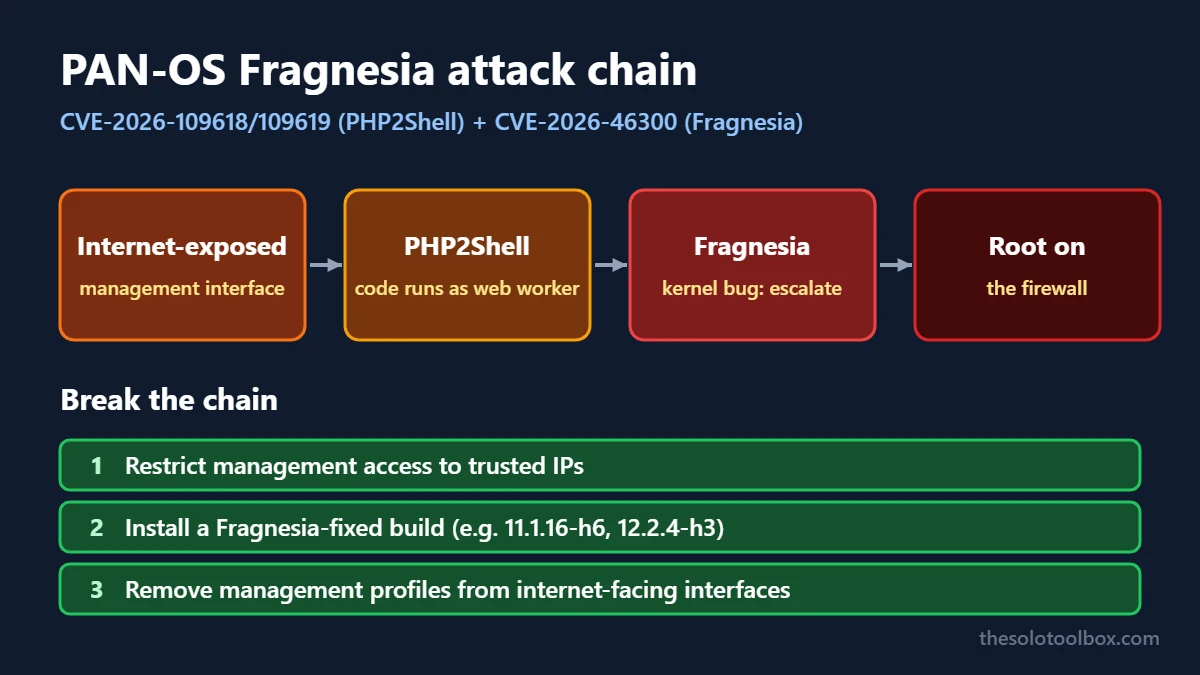
Palo Alto Networks confirmed on November 24, 2026 that attackers are exploiting Fragnesia (CVE-2026-46300), a Linux kernel root-escalation bug, against PAN-OS firewalls whose management interface is reachable from the internet. Attackers get in first through the PHP2Shell flaws (CVE-2026-109618 and CVE-2026-109619), then use Fragnesia to become root. If your firewall already runs a build that fixes PHP2Shell, Palo Alto says you’re protected from this chain; you should still install a Fragnesia-fixed build and lock the management interface to trusted IP addresses.
Below: how the chain works, a table of the exact fixed builds for each PAN-OS release, how to check your version, and how to restrict management access.
Before you start
- Who this is for: firewall and network admins running PA-Series or VM-Series firewalls or Panorama, and MSPs who manage them for clients.
- Time needed: 5 minutes to check versions and management access; a maintenance window for the upgrade and reboot.
- You’ll need: admin access to the web interface or CLI, and a current configuration backup (Device > Setup > Operations > Export named configuration snapshot).
- How we checked this: on November 26, 2026 we read Palo Alto Networks bulletin PAN-SA-2026-0015 and advisory CVE-2026-109618, plus BleepingComputer’s November 25 report on the attacks. We have not tested the exploit chain.
What Fragnesia and PHP2Shell are
PHP2Shell is the name for two critical PHP bugs, CVE-2026-109618 and CVE-2026-109619, in how PHP handles certain fatal and out-of-memory errors. On PAN-OS they affect only the management web interface (the HTTPS web UI and XML API), or a dataplane interface that has a management profile attached. An unauthenticated attacker who can reach that interface can run code as the PHP web worker. Palo Alto rates it 9.2 (critical) and published the advisory on October 21, 2026.
Fragnesia, CVE-2026-46300, is a Linux kernel bug in the XFRM ESP-in-TCP code. It lets a local, low-privileged user escalate to root. On its own it needs a foothold on the device, which is exactly what PHP2Shell provides.
BleepingComputer reports that CISA warned on October 28 that the two were being chained to drop PHP web shells and run commands as root on Linux servers. Palo Alto’s November 24 bulletin confirms the same chain is now aimed at firewalls.
Who is at risk
According to Palo Alto, every exploitation attempt it has seen involved a PAN-OS device with its management interface exposed to the public internet. It says the only known way to exploit Fragnesia on PAN-OS is to exploit PHP2Shell first through that exposed interface, and it isn’t aware of another route.
| Your situation | Risk | What to do |
|---|---|---|
| Management interface (or a dataplane interface with a management profile) reachable from the internet, PHP2Shell not patched | Highest: the full chain works | Upgrade immediately and restrict access |
| Internet-exposed, but on a PHP2Shell-fixed build | Protected from the known chain | Restrict access now, install a Fragnesia fix soon |
| Management limited to trusted internal IPs | Significantly reduced | Upgrade at your next maintenance window |
The PHP2Shell advisory says GlobalProtect portals and gateways, Clientless VPN and Captive Portal are not affected. Cloud NGFW and Prisma Access are listed as unaffected.
Fixed PAN-OS builds
Each release train has several hotfix (-h) streams. Find the stream your firewall is on and compare the hotfix number. Any later build in the same stream is also fixed.
| Release | PHP2Shell fixed in | Fragnesia fixed in |
|---|---|---|
| PAN-OS 12.2 | 12.2.4-h1 | 12.2.4-h3 |
| PAN-OS 12.1 | 12.1.4-h13, 12.1.7-h11, 12.1.10-h3 | 12.1.4-h15, 12.1.7-h15, 12.1.10-h6 |
| PAN-OS 11.2 | 11.2.4-h23, 11.2.7-h23, 11.2.10-h16, 11.2.13-h4, 11.2.16-h1 | 11.2.4-h25, 11.2.7-h25, 11.2.10-h19, 11.2.13-h6, 11.2.16-h3 |
| PAN-OS 11.1 | 11.1.4-h38, 11.1.6-h40, 11.1.7-h12, 11.1.10-h36, 11.1.13-h16, 11.1.16-h4 | 11.1.4-h40, 11.1.6-h42, 11.1.7-h14, 11.1.10-h38, 11.1.13-h18, 11.1.16-h6 |
| PAN-OS 10.2 | 10.2.7-h39, 10.2.10-h42, 10.2.13-h27, 10.2.16-h12, 10.2.18-h13 | 10.2.7-h41, 10.2.10-h45, 10.2.13-h29, 10.2.16-h14, 10.2.18-h15 |
Installing the Fragnesia build covers both problems, since it is newer than the PHP2Shell build in every stream. One wrinkle from the PHP2Shell advisory: 11.2.10-h16 fixes PHP only, while 11.2.10-h17 also fixes a separate brotli library bug. If you’re on 11.2.10, go to 11.2.10-h19 and both are covered. Older, unsupported PAN-OS versions get no fix; Palo Alto says to move to a supported fixed release.
How to check your PAN-OS version
- In the web interface, open the Dashboard tab. The General Information widget shows Software Version.
- Or in the CLI, run
show system infoand read thesw-versionline. - For many firewalls, Panorama’s Panorama > Managed Devices > Summary view lists the software version of each device.
PHP2Shell also applies to Panorama (virtual and M-Series), so check Panorama’s own version too. The Fragnesia bulletin refers to PAN-OS generally and doesn’t break Panorama out separately.
How to install the fix
- Export a configuration backup and confirm you have console or out-of-band access in case the device doesn’t come back cleanly.
- Go to Device > Software and click Check Now.
- Find the fixed build for your stream from the table, click Download, then Install.
- Reboot when prompted, then confirm the new version on the Dashboard.
- For HA pairs, upgrade the passive peer first, fail over, then upgrade the other peer, as you would for any PAN-OS upgrade.
Some hotfix builds require a specific base image to be downloaded first; the Software page will tell you if one is missing.
Restrict the management interface
This is the single biggest risk reducer, and Palo Alto recommends it even after patching.
- Go to Device > Setup > Interfaces and click Management.
- Under Permitted IP Addresses, add only your admin subnets or jump host, then click OK.
- Go to Network > Network Profiles > Interface Mgmt and check which profiles allow HTTPS, HTTP or SSH. Note which dataplane interfaces use them under Network > Interfaces.
- Remove those profiles from internet-facing interfaces, or add permitted IP addresses to the profile.
- Commit the change, then test from an outside network that the login page no longer loads.
If you have a Threat Prevention subscription, the PHP2Shell advisory lists Threat IDs (starting with 543004) that block the PHP attacks, but only when management traffic passes through a dataplane port with decryption and threat prevention enabled. For most sites, restricting access is simpler and more reliable.
If your interface was exposed
Palo Alto hasn’t published indicators of compromise in the Fragnesia bulletin. If your management interface was reachable from the internet while running a pre-PHP2Shell-fix build, treat the device as possibly compromised: review admin accounts and recent configuration changes under Monitor > Logs > Configuration and System, rotate admin passwords and API keys, and open a case with Palo Alto support for guidance on checking the device.
Frequently asked questions
I patched PHP2Shell in October. Do I need to do anything?
Palo Alto says a PHP2Shell-fixed build protects you from the known chain. It still recommends upgrading to a Fragnesia-fixed build at your next maintenance window, and restricting management access if it’s exposed.
Is GlobalProtect affected?
Not by PHP2Shell, according to the advisory. The issue is limited to the management web interface and dataplane interfaces with a management profile.
Does Fragnesia affect regular Linux servers too?
Yes, it’s a Linux kernel bug, and CISA’s October warning was about Linux servers. Patch those through your distribution’s kernel updates; this guide covers only the PAN-OS fixes.
What to do next
Check every firewall and Panorama against the table, schedule the Fragnesia build, and lock the management interface to trusted addresses today. If you also run web servers on PHP, our PHP2Shell patch check covers the PHP versions that fix it. For other network gear in your estate, see our GL.iNet router hack guide, and if your environment ties into Azure, the steps in our secret rotation guide apply to any keys stored on an exposed device.
Related guides
Sources
- Palo Alto Networks: PAN-SA-2026-0015, OSS CVEs Fixed in PAN-OS (Fragnesia, CVE-2026-46300), published November 24, 2026
- Palo Alto Networks: CVE-2026-109618, Impact of Critical Vulnerabilities in PHP on Palo Alto Networks Products
- Palo Alto Networks: Administrative access best practices
- BleepingComputer: Palo Alto Networks warns of Fragnesia flaw exploited in PAN-OS attacks (November 25, 2026)
Last checked: November 26, 2026. If something here is out of date, let us know.