Cleverbridge Data Breach: What to Do If Your Card Was Exposed

The Solo Toolbox · Software Help for One-Person Businesses
Cleverbridge, the company that runs checkout and subscription billing for many software and SaaS brands, says a third party copied payment card data stored on its platform. Notices sent from November 20, 2026 list the card number, expiry date and CVV/CVC security code, which together cover most of what an online checkout asks for. If you received a notice, call your card issuer and ask for a replacement card with a new number. If you buy software online and aren’t sure whether you’re affected, search your statements and email for “Cleverbridge” first.
Below: what Cleverbridge has confirmed so far, how to tell whether you bought through it, the steps to take today, and how to spot the breach-themed phishing that usually follows.
Before you start
- You’ll need: your card or banking app, and the email account you use for software purchases.
- Applies to: anyone who has bought or renewed software, a subscription or another digital product through a checkout run by Cleverbridge.
- How we checked this: on November 22, 2026 we read Cleverbridge’s “Incident Update & FAQs” page, its help article on Cleverbridge charges, and BleepingComputer’s report from the same day, which quotes an individual breach notice. Cleverbridge has not said how many people are affected, which merchants’ customers are involved, or how the attackers got in, so parts of this guide may change.
What Cleverbridge has confirmed
| Date | What happened |
|---|---|
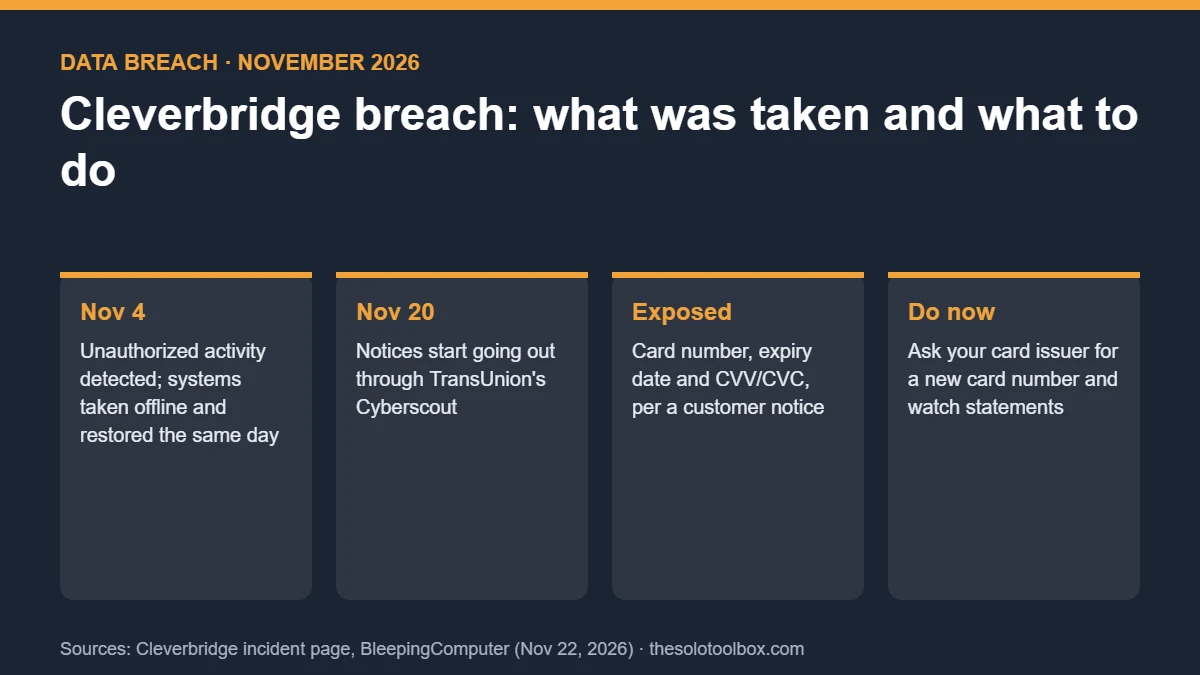
| November 4, 2026 | Cleverbridge detects unauthorized activity, takes affected systems offline and brings them back online the same day |
| After November 4 | Its investigation finds that a third party copied payment card data stored on the platform |
| November 20, 2026 | Notifications to affected people begin, sent with help from TransUnion’s Cyberscout |
| November 22, 2026 | BleepingComputer publishes a customer notice that lists card number, expiry date and CVV/CVC |
Cleverbridge says this was not ransomware and none of its systems were encrypted. It has told data protection authorities, law enforcement, the card networks and its payment partners.
Its public page is vaguer than the letters. It says the data “may include payment card details used to make a purchase through Cleverbridge” and points people to their own notice. The notice BleepingComputer saw is specific: card number, expiry date and security code were copied, while name, contact details and billing details were not. It identifies the affected card by its last four digits.
Why the stolen CVV matters
The three-digit code is the check that’s meant to prove you have the physical card. With the number, expiry date and CVV, a criminal can attempt online purchases. Merchants that check the billing address may decline those attempts, since the address wasn’t taken, but not every merchant runs that check. BleepingComputer asked Cleverbridge why security codes were accessible at all and had no answer at the time of publication.
Did you buy through Cleverbridge?
Cleverbridge sells on behalf of software companies, so the charge on your statement shows Cleverbridge rather than the brand whose product you bought. Its help page says a Cleverbridge charge is most likely a new software purchase or a subscription renewal, and that it sends a confirmation email for every charge.
- Search your email for “cleverbridge” to find order confirmations and renewal receipts.
- Search your card, bank and PayPal history for “Cleverbridge”. If you have software that renews yearly, check the charges around its renewal date as well.
- Look for a breach notice from Cleverbridge or TransUnion’s Cyberscout, including in your spam folder. Cleverbridge says notices sent through Cyberscout on its behalf are legitimate.
Cleverbridge lists Red Hat, SUSE, Tenable, Veeam, Jamf, Sony and Parallels among its clients, but it hasn’t said which merchants’ customers were in the stolen data. Don’t assume you’re safe because your software brand isn’t on that list, or affected because it is.
What to do now
- Call your card issuer. Use the number on the back of the card, say the card was used in the Cleverbridge breach, and ask for a replacement with a new number. The replacement has a new number and security code, so the copied details stop working.
- List your subscriptions before the new card arrives. Note everything billed to the old card, including software renewals that go through Cleverbridge itself, so you can update each one and avoid failed payments.
- Review your recent statements. Dispute anything you don’t recognize. Look for small charges too, since a low-value purchase is a common way to test whether a stolen card works.
- Turn on transaction alerts. Most banking apps can send a push notification for every card purchase or for “card not present” (online) charges.
- Use the monitoring offer, but only from the letter. Cleverbridge says it has offered credit or identity monitoring where available. Sign up using the code and instructions in your notice, not through a link in an unexpected email.
- Move faster if it’s a debit card. Fraud on a debit card takes money straight from your bank account, and getting it back can take days while the bank investigates.
Watch for breach-themed phishing
Breach news is reliable bait. Cleverbridge says it will never ask for your card details, passwords or security codes by email, phone or text message. Treat these as red flags:
- An email asking you to “confirm” or “re-verify” your card to keep a subscription active.
- A link to a page that asks for your full card number and CVV.
- A call or text offering a refund for the breach if you share card or bank details.
Texts about the breach follow the same pattern as the fake package delivery texts we’ve covered before: urgency, a short link and a request for payment details. If you want to see which other breaches your email address has turned up in, our guide to checking whether your email was in a data breach lists free tools that do it.
What we still don’t know
- How many cardholders are affected.
- Which software companies’ customers are in the stolen data.
- How the attackers got in and how long they had access before November 4.
- Whether the stored card data was encrypted, and why security codes were stored.
For a separate incident this month, the vendor breach that exposed Chase, Visa and Mastercard customer information involved a different vendor.
Frequently asked questions
Is the Cleverbridge breach email real?
A notice from Cleverbridge or from TransUnion’s Cyberscout on its behalf can be genuine, according to Cleverbridge. A real notice shouldn’t ask you to enter card details, so don’t type payment information into any page linked from an email.
Were my name and address stolen?
The notice BleepingComputer published says no: only the card number, expiry date and security code were copied. Cleverbridge’s public page doesn’t list fields, so check your own letter.
Do I need a new card if I didn’t get a notice?
Cleverbridge says it is notifying the people affected. If you’ve bought through it and would rather not wait, asking your issuer for a replacement is a reasonable precaution.
Were my software accounts hacked?
Nothing Cleverbridge has disclosed says accounts at the software companies were accessed. The incident, as described so far, involves payment card data stored on Cleverbridge’s platform.
What to do next
Call your card issuer today, then update every subscription on the new card as it arrives. If your bank offers virtual card numbers, use a separate one for software subscriptions, so the next merchant breach exposes a number you can delete in a few taps.
Related guides
Sources
- Cleverbridge: Incident Update & FAQs
- Cleverbridge Help: What is this charge from Cleverbridge on my card, bank statement, or PayPal account?
- BleepingComputer: Cleverbridge warns hackers stole credit card numbers, CVVs in data breach (November 22, 2026)
Last checked: November 22, 2026. If something here is out of date, let us know.