Instagram on Apple TV: how to get the new app and what works
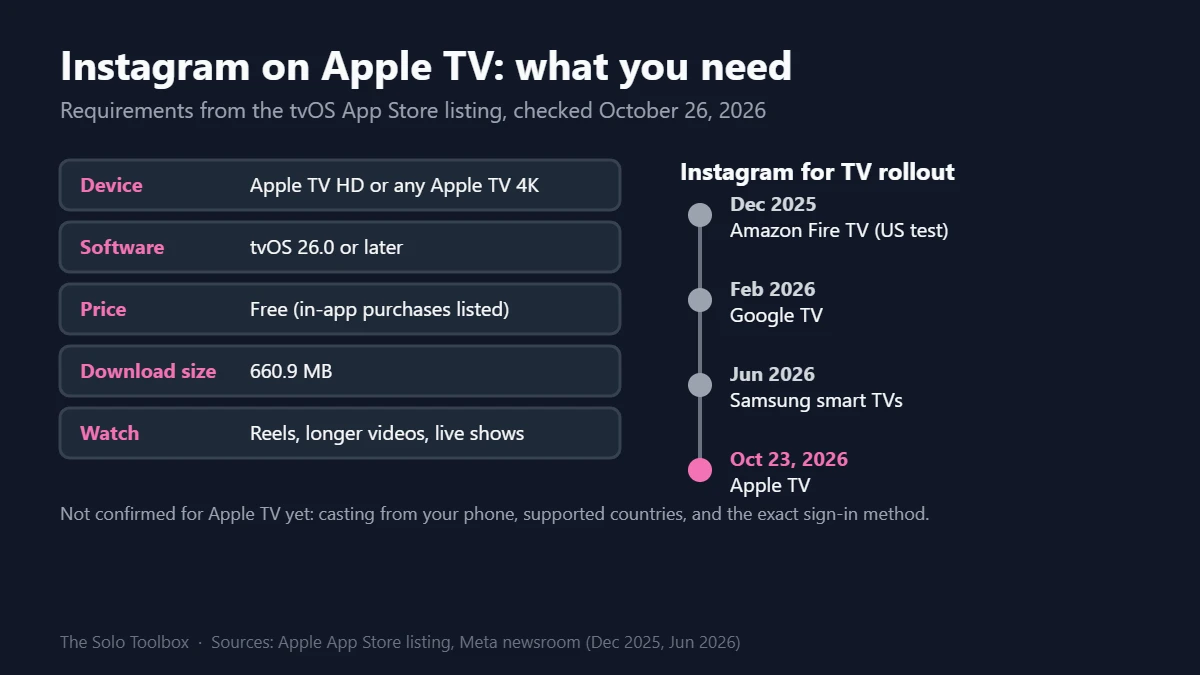
Instagram now has an official Apple TV app. Open the App Store on your Apple TV, search for Instagram and select Get. It’s free, but it needs tvOS 26.0 or later (Apple TV HD or any Apple TV 4K), and plays Reels, longer videos and live shows on the big screen.
Below: how to check your Apple TV is ready, installing and signing in, what the app can and can’t do yet, and the privacy settings worth changing before the whole household starts watching your feed.
Before you start
- You’ll need: An Apple TV HD or Apple TV 4K on tvOS 26.0 or later, plus your Instagram login
- Time: About five minutes, longer if tvOS needs updating
- Before you start: If several people share the TV, decide whether to use your main account or a separate TV-only one
What’s new: Instagram’s TV app reaches Apple TV
The Apple TV version showed up in the App Store around October 23, 2026, as version 66.0, and outlets widely reported it on October 25. However, Meta hasn’t published a separate announcement for it. Meanwhile, the store listing describes three things to watch: Reels, longer videos and live shows, plus picking up where you left off across devices.
In other words, Apple TV is the fourth platform for Instagram’s TV app. Meta started with a US test on Amazon Fire TV in December 2025, added Google TV in February 2026 and Samsung smart TVs from 2020 onward in June 2026. Next up, Instagram says the TV app will prioritize Features, its new 90-minute horizontal videos, although Android Central reports that will take some time.
Step 1: Check your Apple TV is on tvOS 26
- On the Apple TV, open Settings > General > About and check the tvOS version.
- If it’s below 26.0, go to Settings > System > Software Updates and select Update Software.
- Then leave the box plugged in until it restarts on its own.
Unfortunately, the third-generation Apple TV and older models can’t run tvOS 26, so the app won’t appear for them. As a result, casting from your phone is your only option there, and Meta has only confirmed casting for Google TV and Fire TV.
Step 2: Install Instagram and sign in
- Open the App Store on the Apple TV and select Search.
- Type Instagram and pick the app published by Instagram, Inc.
- Select Get. Note that the download is about 660.9 MB.
- Finally, open the app and follow the sign-in prompts on screen.
So far, neither Meta nor the App Store listing explains the Apple TV sign-in method. On Fire TV and Google TV, Meta says you can set up the TV app from Settings and activity in the Instagram phone app, add up to five accounts per TV, or create a separate Instagram for TV account that isn’t linked to your profile. Expect something similar, although we couldn’t confirm it for Apple TV.
Also, if you type a password on the TV, make sure two-step verification is on first. Our guide to turning on two-step verification covers Google and Microsoft; Instagram’s version is under Accounts Center > Password and security in the phone app.
What works on Apple TV, and what’s missing
| Feature | Apple TV | Notes |
|---|---|---|
| Reels | Yes | Listed in the App Store description |
| Longer videos and live shows | Yes | Listed; Meta said in June these formats were coming “soon” on other TVs |
| Resume across devices | Yes | Listed; Meta hasn’t said which devices sync |
| Cast from your phone | Not confirmed | Meta confirmed casting only for Google TV and Fire TV |
| Posting, Stories, messages | Not listed | The listing describes viewing only |
| Supported countries | Not published | The app is in the US App Store; Meta hasn’t listed regions |
In-app purchases in the listing are Instagram badges ($0.99 and $4.99) and Meta Verified Standard ($14.99). That said, you don’t need either to watch.
Privacy and family settings to check
- Shared screens show your recommendations. Anyone on the couch sees the Reels Instagram picks for you. For that reason, a separate TV account keeps your main feed out of it.
- Teen Accounts follow you to the TV. Meta says time on Instagram for TV counts toward a teen’s daily limit, Sleep mode still applies, and content follows the 13+ rating used on phones. Meta documents that for the Fire TV and Google TV versions, while the Apple TV listing carries a 13+ rating.
- The TV itself may be watching too. Many smart TVs use automatic content recognition (ACR) to log what’s on screen, including what plays through an HDMI box. Our guide to turning off ACR on a smart TV shows where the setting hides.
FAQ
Is the Instagram Apple TV app free?
Yes. The App Store lists it as free with optional in-app purchases for badges and Meta Verified.
Does Instagram work on the Apple TV HD?
Yes, as long as you’ve updated it to tvOS 26.0 or later. Older third-generation boxes can’t install it.
Why can’t I find Instagram in the Apple TV App Store?
The two usual reasons are an older tvOS version and region. First, update to tvOS 26. If it still doesn’t appear, your country’s App Store may not have it yet; Meta hasn’t published a list.
Can I post or reply to messages from the TV?
No. The listing only describes watching, so use the phone app for posting, Stories and DMs.
Before your first sign-in
First, check your tvOS version under Settings > General > About. If you share the TV, set up a separate account before the first sign-in so your recommendations stay on your phone.
Related guides
Sources
Checked on October 26, 2026. Requirements, size and in-app purchases come from the Apple TV App Store listing. Meta has not published an Apple TV announcement, so sign-in steps, casting and country availability are unconfirmed; account details come from Meta’s posts about the Fire TV and Google TV versions.
- Apple App Store: Instagram for Apple TV listing
- MacRumors: Instagram launches Apple TV app (Oct 25, 2026)
- Meta: Instagram for TV (Dec 2025, updated Feb 2026)
- Meta: Instagram for TV gets bigger (June 2026)
- Digital Trends: Instagram Reels on Apple TV (Oct 25, 2026)