How to Cancel a ChatGPT Subscription on Web, iPhone or Android
The Solo Toolbox · Software Help for One-Person Businesses
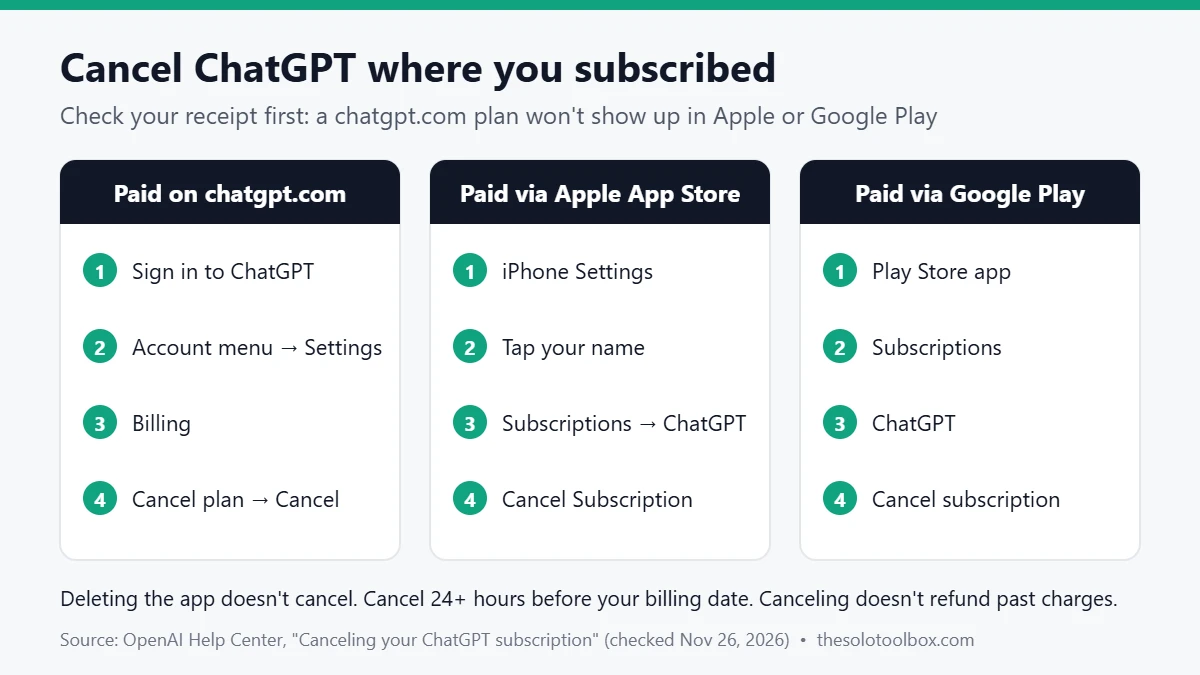
To cancel a ChatGPT subscription, cancel it where you paid for it. If you subscribed on chatgpt.com, go to Settings > Billing and select Cancel under Cancel plan. If you subscribed in the iPhone app, cancel in your Apple subscriptions; if you subscribed on Android, cancel in Google Play. Deleting the ChatGPT app doesn’t stop the charges.
That split is exactly what a German consumer group took OpenAI to court over on November 26, 2026. This guide covers every cancellation route, what to do if you can’t sign in, when a refund is possible, and what the lawsuit is about.
Before you start
- Find your receipt first. It shows whether OpenAI, Apple or Google billed you. A chatgpt.com plan won’t appear in your Apple or Google Play subscriptions, and vice versa.
- Timing: cancel at least 24 hours before your next billing date, or the next charge may already go through.
- How we checked this: on November 26, 2026 we followed OpenAI’s Help Center articles “Canceling your ChatGPT subscription” and “How do I request a refund for my ChatGPT subscription?” (both updated within the past week), and read ComputerBase’s report on the Verbraucherzentrale Brandenburg lawsuit. Menu names can shift between app versions.
Which cancellation route applies to you
| Where you subscribed | Where to cancel | Who handles refunds |
|---|---|---|
| chatgpt.com (web or desktop) | ChatGPT Settings > Billing | OpenAI Support |
| iPhone or iPad app | Apple subscriptions in iOS Settings | Apple |
| Android app | Google Play subscriptions | OpenAI Support |
| ChatGPT Business (self-service) | Workspace settings > Billing | OpenAI Support |
OpenAI’s self-service steps don’t cover Enterprise or Edu plans. If you’re on one of those, ask your workspace admin.
Cancel on chatgpt.com
- Sign in to ChatGPT at chatgpt.com.
- Open your account menu and select Settings.
- Select Billing.
- Under Cancel plan, select Cancel.
If the billing controls are missing, OpenAI suggests signing in to the same account in a different browser and trying again. According to ComputerBase, which tested the process, you can’t start a web subscription’s cancellation from the ChatGPT smartphone app.
Cancel on iPhone or iPad
- Open the Settings app.
- Tap your name at the top.
- Tap Subscriptions.
- Tap ChatGPT.
- Tap Cancel Subscription and confirm.
If there’s no Cancel Subscription button and an expiration date is shown, the subscription is already canceled. Apple may show you a discounted offer before you confirm; our guide to Apple’s retention offers explains what accepting one means.
Cancel on Android
Sign in with the Google account you used to subscribe, then either:
- In the Play Store app: open Subscriptions, select ChatGPT, then Cancel subscription and follow the prompts.
- On the web: go to play.google.com/store/account/subscriptions, select Manage next to ChatGPT, then Cancel subscription. Pick a reason if asked and select Continue.
If ChatGPT isn’t listed, check the other Google accounts on your phone.
Cancel ChatGPT Business
- Sign in to ChatGPT as a workspace owner.
- Open your account menu and select Workspace settings.
- Select Billing, then Manage plan.
- Select Cancel subscription.
If your workspace also gives you access to OpenAI’s Ads Manager, OpenAI warns that deactivating the workspace may cut that access without pausing campaigns or ad charges. Pause campaigns first.
If you can’t sign in
For a plan billed directly by OpenAI, Support can cancel it without deleting your account. You’ll need the email on the account or subscription plus any two of these: the last four digits of the card, the card’s expiration date, the billing address, or the date of the most recent charge. Never send your full card number.
For Apple or Google Play plans, you have to recover the Apple or Google account used to subscribe; OpenAI can’t cancel those.
Will you get a refund?
Canceling stops future renewals and keeps paid features until the end of the current billing period. It doesn’t refund anything by itself. OpenAI’s policy says payments are generally non-refundable, with a few exceptions:
- Unused plan, within 7 days: a discretionary refund may be available for the current billing period if you haven’t used it substantially and don’t have an active payment dispute.
- Billing errors or unauthorized charges that OpenAI verifies.
- Your local consumer rights, which still apply.
Forgetting to cancel or simply not liking the service doesn’t qualify on its own after 7 days. For web and Google Play plans, request a refund through the chat widget at help.openai.com while signed in to the account that was charged. For Apple plans, ask Apple. OpenAI says approved refunds take 5 to 7 business days on its end, plus your bank’s processing time.
Why a German consumer group is suing OpenAI
Verbraucherzentrale Brandenburg filed suit against OpenAI on November 26, 2026, ComputerBase reports. Its argument: German law requires that a subscription signed up for online in a few clicks can be canceled just as easily, and OpenAI’s cancellation options don’t meet the legal requirements for a cancellation button. The group first sent OpenAI a formal warning in July 2026; OpenAI didn’t sign a binding cease-and-desist declaration, so the case went to court.
The suit also targets a clause letting OpenAI change prices “as needed.” The group says it’s invalid because it doesn’t tie increases to actual cost rises. No court has ruled yet, and nothing changes for subscribers outside Germany for now. If you live in Germany, OpenAI’s help page already links to a cancellation form that works without signing in.
Check that it worked
- Look for the cancellation confirmation and the end date of your access on the platform that billed you.
- On iPhone, the subscription should show an expiration date instead of a renewal date.
- If you see two charges, you may have separate subscriptions on different ChatGPT, Apple or Google accounts. Cancel each one where it was bought.
FAQ
Does deleting my ChatGPT account cancel the subscription?
It cancels plans billed directly by OpenAI. It doesn’t cancel an Apple subscription, and you should check Google Play too. Cancel in the store before deleting the account.
Do I lose ChatGPT Plus immediately after canceling?
No. Paid features stay until the end of the current billing period, unless you’re granted a refund, which normally ends that access sooner.
I canceled but got charged again. Why?
Most often the cancellation came less than 24 hours before the billing date, or there’s a second subscription on another account or platform.
What to do next
Canceling doesn’t delete your account or chat history; you drop to the free plan. If you used ChatGPT on shared or work computers, sign out there too with our guide to logging out of ChatGPT and Claude on all devices covers that. If you’re staying on the free plan, you can also turn off personalized ads in ChatGPT.
Related guides
Sources
- OpenAI Help Center: Canceling your ChatGPT subscription
- OpenAI Help Center: How do I request a refund for my ChatGPT subscription?
- ComputerBase: Verbraucherzentrale klagt: ChatGPT-Abo schnell abgeschlossen, aber schwer gekündigt (November 26, 2026, in German)
Last checked: November 26, 2026. If something here is out of date, let us know.