ChatGPT Outage November 21: What Happened and How to Keep Working
The Solo Toolbox · Software Help for One-Person Businesses
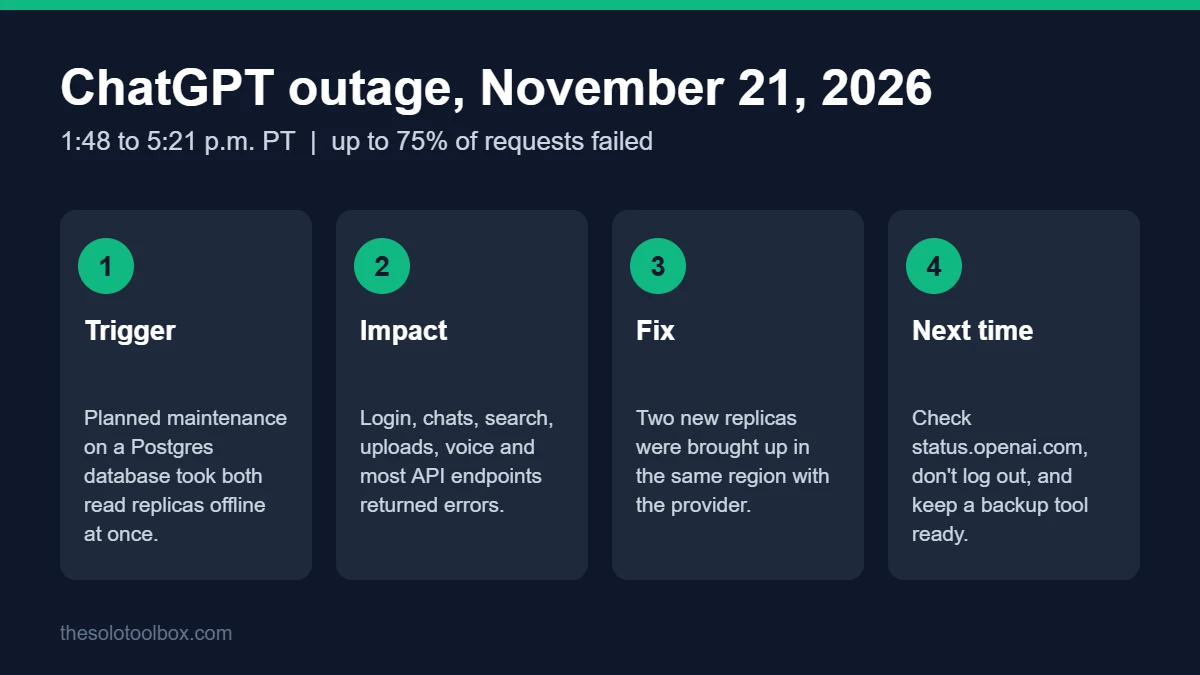
ChatGPT and the OpenAI API went down for about three and a half hours on Saturday, November 21, 2026, from 1:48 p.m. to 5:21 p.m. Pacific time (4:48 to 8:21 p.m. Eastern). At the worst point, three out of four requests failed for both free and paid users. OpenAI’s post-incident write-up blames routine maintenance on a Postgres database that knocked out both of its read replicas at the same time, which broke logins and internal authentication across the service.
This article covers what failed, why it took so long to fix, what OpenAI says it is changing, and a short plan for the next time ChatGPT stops answering in the middle of your work.
Before you start
- You’ll need: nothing to fix this outage; it is over. The checklist further down is for the next one.
- Applies to: ChatGPT users on any plan, plus developers who call the OpenAI API.
- How we checked this: on November 23, 2026 we read reporting by AI Weekly, AI Intel Desk and others that quotes OpenAI’s post-incident write-up on its status page. We did not read the write-up directly, and the reports cite two different incident links, so treat exact wording as secondhand.
What went down
| Detail | What was reported |
|---|---|
| Date and time | Saturday, November 21, 2026, 1:48 p.m. to 5:21 p.m. PT (21:48 to 01:21 UTC) |
| Peak failure rate | About 75% of requests, on free and paid ChatGPT |
| ChatGPT features hit | Login, conversations, search, file uploads, voice mode |
| API endpoints hit | Chat Completions, Embeddings, Images, Audio, Realtime, Batch, Fine-tuning, Moderations, Files |
| Cause | Maintenance on a Postgres database service took both read replicas offline together |
Because those replicas served the service that handles user sign-in and service-to-service authentication, the failure spread to almost everything. ChatGPT didn’t need to lose its models to stop working; it lost the ability to confirm who was asking.
Why it took three and a half hours
According to the write-up as reported, OpenAI first tried to bring the existing replicas back, which didn’t work. Attempts to stand up replacements in other regions also failed. Service returned only after OpenAI and its database provider brought two new replicas online in the same region. The provider has not been named.
What OpenAI says it is changing
- Done: a pause on similar database maintenance until further notice, retuned connection settings, and a feature flag that can shift a percentage of traffic away from the replicas. OpenAI also tested sending all queries to the primary database.
- Planned: a review step before maintenance, spare standby capacity during maintenance windows, automated handling of replica lag, and a wider review of redundancy in its infrastructure.
None of the reports mention lost chat history or exposed data. The incident was about availability, not security.
How to tell if ChatGPT is down or it’s just you
- Open status.openai.com. OpenAI posts incidents there, broken down by ChatGPT, API and other products. It sometimes lags real reports by several minutes.
- Try a second network or device. If ChatGPT works on your phone over mobile data but not on your laptop, the problem is local.
- Check an outside tracker. Our guide to checking if a website is down lists tools that show user reports in real time.
- Read the error. A single “Something went wrong” message on one chat is often a local or session issue; our ChatGPT error fix guide covers those.
What to do the next time ChatGPT goes down
If you use the ChatGPT app
- Don’t sign out. When authentication is the broken part, signing out can leave you stuck at the login screen even after chats start working again.
- Copy long prompts before you hit send. A failed request can drop what you typed. Keep drafts in a notes app during an incident.
- Keep one backup assistant signed in. Claude, Gemini or Copilot can take over a draft for a few hours. Don’t paste client data into a tool you haven’t checked the privacy settings of.
- Export what you rely on. In ChatGPT, Settings > Data controls > Export data emails you a copy of your chats, so key work isn’t locked inside one service.
If you build on the OpenAI API
- Retry with backoff, not in a loop. Hammering the API during an incident adds load and burns your rate limits. Wait longer after each failure and cap the number of retries.
- Add a fallback model or provider for features users depend on, and test the switch before you need it.
- Subscribe to status updates. Use the subscribe option on status.openai.com so incident notices reach you before your users complain.
Frequently asked questions
Is ChatGPT working again?
Yes. Service recovered on the evening of November 21, Pacific time, and ChatGPT was operating normally on November 22, according to reports. Check status.openai.com for anything newer.
Was this a hack?
Nothing reported suggests that. OpenAI attributes it to planned database maintenance that failed, not to an attack.
Will paid users get a refund or credit?
OpenAI has not announced credits for this outage in anything we read. ChatGPT consumer plans don’t advertise an uptime guarantee; enterprise contracts may have their own terms.
What to do next
Take ten minutes this week to set up the basics: subscribe to status.openai.com alerts, start a ChatGPT data export, and make sure you can sign in to one other assistant. If you run an app on the API, check that your retry logic has a ceiling.
Related guides
Sources
- OpenAI status page
- AI Weekly: OpenAI: Postgres replica failure peaked API, ChatGPT errors at 75% (November 22, 2026)
- AI Intel Desk: OpenAI’s Saturday Outage Failed 75% of ChatGPT Requests for More Than Three Hours (November 22, 2026)
- Emergent: ChatGPT Hit 75% Failure Rate During 3.5 Hour Outage (November 22, 2026)
Last checked: November 23, 2026. If something here is out of date, let us know.