How to Set Up Sonos Presets in the Sonos App
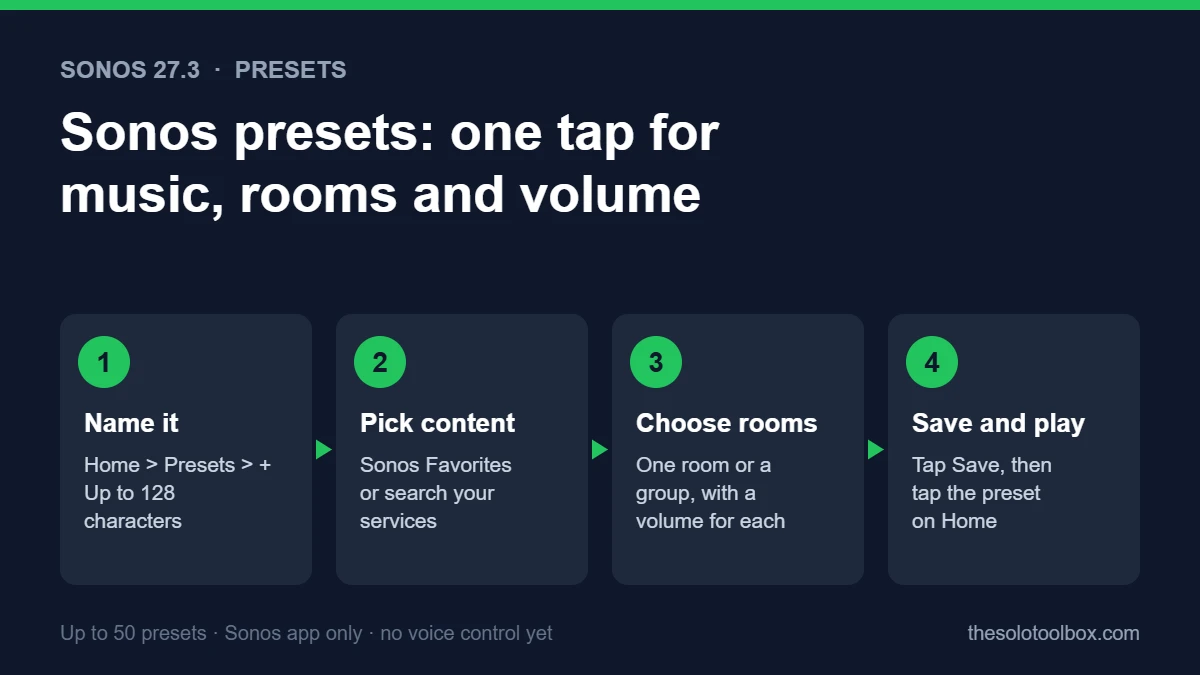
Sonos presets let you save a playlist or station, the rooms it should play in and the volume for each room, then start all of it with one tap from the Home screen. To make one, update the Sonos app, open Home, find the Presets section and tap +. Presets arrived in the Sonos 27.3 update on November 3, 2026, for iOS and Android.
This guide covers both ways to create a preset, how to edit and delete them, and the limits Sonos lists, including the one that will matter most to many people: presets don’t work with voice commands yet.
Before you start
- Applies to: the Sonos app for iPhone, iPad and Android, version 91.00.41 on iOS or 91.00.33 on Android (Sonos 27.3)
- You need: a Sonos account, at least one Sonos speaker, and a music service or Sonos Favorites to pick content from
- Not supported: voice commands and the Sonos web app, according to Sonos
- Time needed: about two minutes per preset
What Sonos presets do
A preset bundles three things you would otherwise set by hand each time:
- Content: a playlist or station from Sonos Favorites, or anything you find through the app’s search across your connected services, with optional shuffle
- Rooms: one room, or several rooms that play together as a group
- Volume: a separate level for each room
A “Morning” preset could play a news station in the kitchen at a low volume, while a “Dinner” preset could group the kitchen and living room and start a jazz playlist at a moderate level. Before presets, that took several steps: pick music, group rooms, then adjust each volume slider.
Update the Sonos app first
Presets need the Sonos 27.3 app. Sonos lists the versions as 91.00.41 on iOS and 91.00.33 on Android, with player software 98.0-82170 for current speakers. Sonos says app releases roll out “over the course of several days, and in some instances, weeks,” so the update may not show up for you yet.
- Open the App Store or Google Play and search for Sonos.
- Tap Update if it’s available.
- On iPhone, if the update doesn’t appear, open the App Store, tap your account picture, and pull down on the page to refresh the list of pending updates. Sonos staff suggest this on the Sonos Community.
How to create a preset from the Home screen
- Open the Sonos app and go to the Home screen.
- Find the Presets section and tap +. If you have no presets yet, you can tap Create a preset instead.
- Type a name in the Name field. Sonos allows up to 128 characters, but a short name such as “Kitchen news” is easier to scan on the Home screen.
- Tap Content and choose what to play. Your Sonos Favorites playlists and stations show up in a list, or use the search bar to find something in your services. Tap the shuffle button if you want shuffled playback.
- Tap Rooms and select one or more rooms. Selecting several rooms makes them play as a group.
- Set the volume for each room you picked.
- Tap Save in the top-right corner.
How to save what is playing now as a preset
If the right music is already playing in the right rooms, you can save that setup directly:
- Open the Sonos app and go to the System tab.
- Find the room or group that is playing.
- Tap the … (more) icon.
- Tap Save as preset.
Sonos says you can choose My current queue to keep the queue as a Sonos Playlist for use in the preset. That’s useful if you built the queue by hand and don’t want to lose it.
How to play, edit or delete a preset
| Task | Where to do it |
|---|---|
| Play a preset | Tap it in the Presets section of the Home screen. Pause with the normal playback controls |
| Edit a preset | Press and hold the preset on the Home screen (or tap Presets), then change Name, Content or Rooms |
| Delete a preset | Open the preset’s edit screen and tap Delete preset |
| Use it on another phone | Sign in to the Sonos app with the same Sonos account. Pull down to refresh if a new preset hasn’t appeared |
One behavior to know before you build a group preset: if some of the preset’s rooms are already playing something else, Sonos says the preset starts in the rooms you chose, and other rooms in that existing group keep playing their current music.
Limits and what presets can’t do yet
- 50 presets maximum. Delete one to add another once you reach the cap.
- No voice control. Sonos says “voice commands and the Sonos web app do not support presets at this time.” That includes Sonos Voice Control, and Sonos doesn’t mention Alexa or other assistants as supported.
- App only. You start presets from the Sonos app. Sonos doesn’t mention home screen widgets, speaker buttons or scheduled alarms for presets.
- Saved to your account. Presets sync through your Sonos account, so everyone who signs in with that account sees the same list.
Sonos also says its upcoming Sonos 27voice assistant will open for US-English early access sign-ups soon. Nothing Sonos has published says whether 27voice will be able to start presets.
Other changes in the Sonos 27.3 update
- Reorder favorites: edit the Featured section in Sonos Favorites to arrange saved content in the order you want.
- Swipe to skip: swipe on Now Playing or the mini player to skip tracks.
- System Health (iOS only): a new section in the Help Center with self-help information for spotting problems with your system.
- Rearrange services (Android only): change the order of your connected music services.
- Spotify volume: Sonos says Spotify volume levels are now more consistent with other services, whether you use the Sonos app or Spotify’s own controls.
If you also have Google speakers in the house, our guide to Google Home Speaker data usage covers how to check what those devices send over your network.
FAQ
Why don’t I see Presets in my Sonos app?
You most likely don’t have version 27.3 yet. Sonos rolls updates out over days or weeks. Check the App Store or Google Play for an update, and on iPhone, refresh your pending updates list.
Can I start a Sonos preset with Alexa or Sonos Voice Control?
No. Sonos says voice commands don’t support presets at this time.
Can a preset include more than one room?
Yes. Pick several rooms under Rooms, and they play together as a group, each at the volume you set.
Can I use presets with Spotify or Apple Music?
Presets can use any content you reach through Sonos Favorites or the app’s search across your connected services. Sonos doesn’t publish a list of supported services for presets, so if a service’s content doesn’t appear, add the playlist to Sonos Favorites first.
What to do next
Update the app, then set up one preset for the routine you repeat most often, such as morning radio in the kitchen. Run it a few times and fine-tune each room’s volume from the preset’s edit screen. If you use Spotify for podcasts on your speakers, our guide to Spotify podcast memberships explains how paid shows work in the Spotify app.
Sources
Checked on November 4, 2026. Steps and limits come from Sonos’s Presets support article, and version numbers and other update details come from Sonos’s November 3 release post on the Sonos Community. We didn’t have the 27.3 update on a Sonos system when we wrote this, so the screen labels are quoted from Sonos’s documentation rather than from our own test.
- Sonos Support: Presets
- Sonos Community: New Sonos 27 app and player updates (November 3, 2026)
- Sonos Support: Sonos app release notes