Drupal CVE-2026-132165: How to Patch the Exploited Installer Flaw
The Solo Toolbox · Software Help for One-Person Businesses
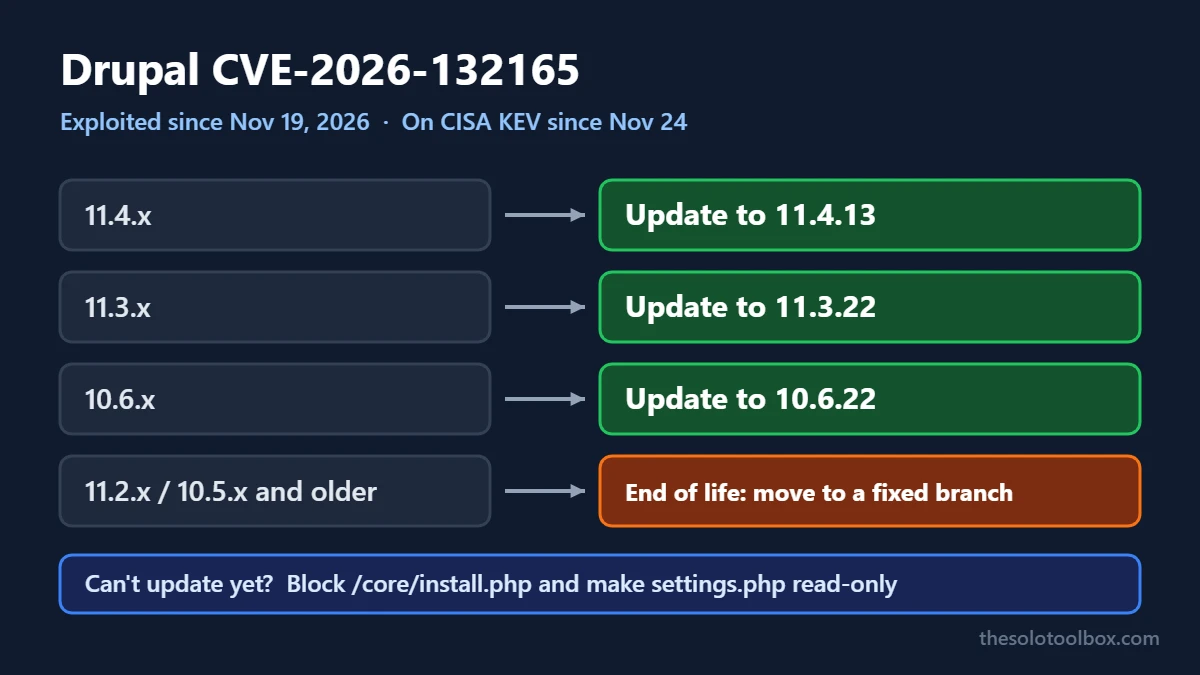
If you run a Drupal site, update core now: Drupal 11.4.13, 11.3.22 or 10.6.22 fix CVE-2026-132165, a remote code execution flaw in the Drupal installer that attackers have been using on live sites since November 19, 2026. CISA added it to its Known Exploited Vulnerabilities catalog on November 24. If you can’t update today, block access to /core/install.php at the web server and make settings.php read-only.
This guide covers which versions are affected, how to check yours, the update commands for Composer-based sites, the temporary workaround, and what to look for if your site sat unpatched after November 19.
Before you start
- Who this is for: anyone who runs or maintains a Drupal 10 or 11 site, including agencies and freelancers who look after client sites.
- Time needed: 10 to 20 minutes for a Composer update and database update on a typical site; a few minutes for the temporary block.
- You’ll need: SSH or hosting panel access, Composer and Drush (or your host’s update tool), and a fresh backup of the database and files.
- How we checked this: on November 26, 2026 we read Drupal security advisory SA-CORE-2026-017 (including its exploitation update), CISA’s November 24 KEV alert and BleepingComputer’s November 25 report. We have not reproduced the exploit.
What CVE-2026-132165 is
Drupal core ships with install.php, the script that runs the first-time setup. According to the Drupal Security Team, under specific conditions an anonymous visitor can use that installer to try to reinstall Drupal on a site that is already running. A successful attempt can hand the attacker the site or let them run code on the server.
The advisory, SA-CORE-2026-017, was published on November 18, 2026 and rates the bug Highly critical (20/25). It was found by Anthropic’s OSS Scanner. On a later update, the Security Team said it had received a report of exploitation on live sites as early as November 19, 19:00 UTC, about a day after the fix shipped.
CISA listed the CVE in its Known Exploited Vulnerabilities catalog on November 24. BleepingComputer reports the deadline for U.S. federal civilian agencies is November 27. That deadline only binds federal agencies, but it is a fair signal of how urgent this is for everyone else.
Which Drupal versions are affected
The advisory lists affected versions as anything below 10.6.22, 11.0.0 up to (not including) 11.3.22, and 11.4.0 up to 11.4.13.
| You run | Update to | Notes |
|---|---|---|
| Drupal 11.4.x | 11.4.13 | Supported branch |
| Drupal 11.3.x | 11.3.22 | Supported branch |
| Drupal 11.2.x or older 11.x | 11.3.22 or 11.4.13 | End of life, no security fix for your branch |
| Drupal 10.6.x | 10.6.22 | Supported branch |
| Drupal 10.5.x or older 10.x | 10.6.22 (or move to 11) | End of life |
| Drupal 8 or 9 | A supported release | End of life; plan a migration |
Sites protected by the paid Drupal Steward web application firewall are covered against the known attack paths, but the Security Team still says to upgrade in case other paths turn up.
How to check your Drupal version
- Sign in as an administrator and go to Reports > Status report (
/admin/reports/status). The Drupal version is listed near the top. - Or, from the site root over SSH, run
drush statusand look for the Drupal version line. - On a Composer-managed site you can also run
composer show drupal/coreand read the versions line.
If you manage several sites, check each one. Multisite installs share one codebase, so updating core once covers every site in it.
How to update Drupal core with Composer
Take a backup of the database and the files directory first. Then, from the project root (the folder with composer.json):
- Put the site in maintenance mode:
drush state:set system.maintenance_mode 1 - Update core packages:
composer update "drupal/core-*" --with-all-dependencies - Confirm the new version:
composer show drupal/coreshould report 11.4.13, 11.3.22 or 10.6.22 (or later). - Run database updates:
drush updatedb - Rebuild caches:
drush cache:rebuild - Take the site out of maintenance mode:
drush state:set system.maintenance_mode 0
If your composer.json pins core to an exact older version, the update command won’t move it. Change the constraint (for example to ^11.4.13) and run it again. On managed hosting that updates core for you, check the dashboard shows the fixed version rather than assuming the host has done it.
Can’t update today? Block the installer
The advisory recommends securing the installer after installation whether or not you’ve patched. Two steps cut off the attack paths it describes.
1. Deny requests to /core/install.php
On nginx, add this inside the site’s server block and reload nginx:
location = /core/install.php {
    deny all;
}
On Apache 2.4, add this to the virtual host configuration and reload Apache:
<LocationMatch "^/core/install\.php">
    Require all denied
</LocationMatch>
Prefer the server config over Drupal’s own .htaccess: on Composer projects the core scaffold plugin can rewrite .htaccess during updates and drop your change. Test it by opening https://yoursite.example/core/install.php in a private window; you should get a 403 error.
2. Make settings.php read-only
The advisory says some, but not all, exploit paths fail if the web server can’t write to or change permissions on settings.php. On Linux, from the Drupal web root:
chmod 444 sites/default/settings.php
chmod 555 sites/default
Also make sure the files are owned by your deploy user, not the web server user, otherwise PHP could change the permissions back. The Status report page warns if either is still writable.
Check whether your site was hit
Drupal hasn’t published indicators of compromise, so treat these as basic checks, not a full investigation. They matter most for sites that were still unpatched after November 19.
- Search web server access logs for requests to
/core/install.phpsince November 18. Legitimate traffic to that path on a live site should be close to zero. - Open People (
/admin/people) and look for administrator accounts you don’t recognise. - Check the modification time of
sites/default/settings.php; a change you didn’t make is a red flag. - Look for new
.phpfiles insites/default/files, which should hold uploads, not code. - If the site was reinstalled or looks reset to a fresh install, restore from a backup taken before November 19, patch, then rotate the database password and any API keys stored in settings.
If you find signs of compromise on a client site, tell the client and their host before you clean up, so logs aren’t lost.
Frequently asked questions
Is Drupal 7 affected?
The advisory covers Drupal 10 and 11 releases and says Drupal 8 and 9 are end of life. It doesn’t list Drupal 7. Drupal 7 itself reached end of life in January 2025, so it gets no core security fixes from the project either way.
Do I still need to block install.php after updating?
It’s good practice. The Security Team recommends securing the installer after installation in addition to upgrading, and a live site has no reason to serve it.
Does Drupal Steward mean I can skip the update?
No. Steward blocks known attack paths. The advisory still tells Steward customers to upgrade soon in case new ones are found.
What to do next
Update every Drupal site you’re responsible for to 11.4.13, 11.3.22 or 10.6.22, then block /core/install.php at the server. If the same server also runs WordPress, check it against the PHP bugs in our Ghostscript Upload2Shell guide and our PHP2Shell patch check. Running nginx in front? Make sure it isn’t one of the builds covered in our nginx2root guide.
Related guides
Sources
- Drupal.org: SA-CORE-2026-017, Drupal core, Highly critical, Remote code execution (CVE-2026-132165)
- CISA: CISA Adds Three Known Exploited Vulnerabilities to Catalog (November 24, 2026)
- CISA Known Exploited Vulnerabilities Catalog
- BleepingComputer: Hackers now exploit critical Drupal RCE flaw to hijack sites (November 25, 2026)
Last checked: November 26, 2026. If something here is out of date, let us know.