How to Install the Ladybird Browser Alpha on Mac and Linux
The Solo Toolbox · Software Help for One-Person Businesses
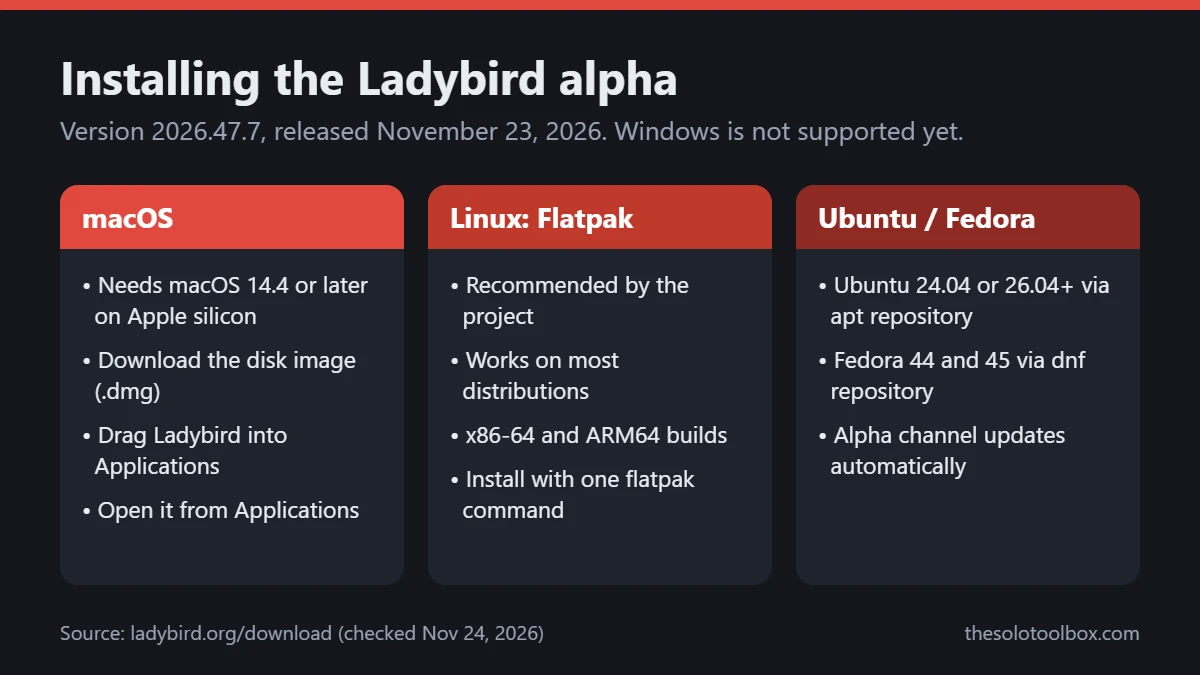
To install the Ladybird browser alpha, go to ladybird.org/download. On a Mac with Apple silicon and macOS 14.4 or later, download the disk image and drag Ladybird into Applications. On Linux, install the Flatpak with one command, or add the project’s apt repository (Ubuntu) or dnf repository (Fedora). There is no Windows version yet.
Ladybird released its first downloadable alpha, version 2026.47.7, on November 23, 2026. Until then the only way to try it was to compile it from source. This guide covers the requirements, the install steps for each system, what works in the alpha, and why it shouldn’t be your main browser yet.
Before you start
- Applies to: macOS 14.4 or later on Apple silicon Macs, and 64-bit Linux on x86-64 or ARM64. Intel Macs and Windows aren’t supported.
- You’ll need: about five minutes and admin rights for the Ubuntu or Fedora repository method.
- How we checked this: on November 24, 2026 we read the Ladybird download page, the alpha announcement by project lead Andreas Kling, the project FAQ and its monthly newsletters. The commands below are copied from the official download page. We didn’t run the alpha through compatibility or security testing ourselves.
What Ladybird is
Ladybird is a web browser built on a new engine written from scratch. It is not a fork of Chromium (used by Chrome, Edge, Brave and Opera), Gecko (Firefox) or WebKit (Safari). The project is run by a US non-profit, the Ladybird Browser Initiative, and says it is funded only by donations and sponsorships, with no default search deals or other ways of making money from users.
The alpha is a rolling channel: installed copies update automatically, so you get fixes as they land instead of waiting for a big release.
Ladybird alpha system requirements
| System | Supported | Install method |
|---|---|---|
| macOS | macOS 14.4 or later, Apple silicon only | Disk image (.dmg) |
| Linux (most distributions) | x86-64 and ARM64 | Flatpak (recommended) |
| Ubuntu | 24.04 and 26.04 or later | apt repository |
| Fedora | Fedora 44 and 45 | dnf repository |
| Windows | Not yet; planned for a later stage | None |
| Android and iOS | Not a current focus | None |
How to install Ladybird on a Mac
- Open ladybird.org/download and select the macOS tab.
- Click Download for macOS. The file is named ladybird-2026.47.7-macOS-arm64.dmg for the first alpha.
- Open the downloaded disk image.
- Drag Ladybird into your Applications folder.
- Open Ladybird from Applications.
To check which Mac you have, open the Apple menu and choose About This Mac. The Chip line shows Apple M1 or later on a supported Mac.
How to install Ladybird on Linux with Flatpak
Flatpak is the method the project recommends because it works on most distributions. If your system has Flatpak set up, run:
flatpak install --user 'https://flatpak.ladybird.org/ladybird.flatpakref'The --user flag installs it for your account only, so you don’t need sudo. Once it finishes, Ladybird appears in your desktop’s app menu.
How to install Ladybird on Ubuntu
On Ubuntu 26.04 or later, add Ladybird’s signing key and repository, then install the package:
sudo wget -qO /etc/apt/keyrings/ladybird.asc 'https://apt.ladybird.org/ladybird.asc'
sudo wget -qO /etc/apt/sources.list.d/ladybird.sources 'https://apt.ladybird.org/ladybird-resolute.sources'
sudo apt update && sudo apt install ladybird
Ubuntu 24.04 uses a different repository file. Select 24.04 under Ubuntu version on the download page to get the matching command rather than editing the one above.
How to install Ladybird on Fedora
On Fedora 44 or 45, add the repository and install:
sudo dnf config-manager addrepo --from-repofile='https://rpm.ladybird.org/ladybird.repo'
sudo dnf install ladybird
Updates then arrive with your normal system updates. To remove it later, run sudo apt remove ladybird or sudo dnf remove ladybird. On a Mac, drag Ladybird from Applications to the Trash.
Should you use Ladybird as your main browser?
Not yet. The announcement says some websites won’t work, the browser will crash sometimes, and the team makes “no promises about security today”. The project FAQ says it “isn’t ready to replace your everyday browser yet”.
A sensible way to use the alpha:
- Keep Chrome, Firefox, Safari or Edge for banking, email, password managers and work accounts.
- Use Ladybird for reading and testing sites where you aren’t signed in.
- Report broken pages from inside the browser. After a crash you can read the crash report and choose whether to send it.
What works in the alpha
According to the project’s monthly newsletters from June to October 2026, recent builds added download management and sandboxing, private browsing and browser profiles, video playback on Twitch and YouTube, session restore, a JavaScript JIT, a new WebAssembly engine and a redesigned interface. Those notes describe the development builds, so expect some rough edges in each area.
Testing your own website in Ladybird
If you run a website, this is the most practical reason to install the alpha now. The announcement asks site owners to try their sites and report what breaks. Ladybird supports WebDriver for automated testing and the Firefox DevTools protocol, so existing test tools that speak those protocols can drive it. Look for layout problems, broken menus and scripts that fail silently, and check that any third-party scripts load as expected; our guide to checking third-party scripts on your website covers what to look for.
Frequently asked questions
Is Ladybird available for Windows?
No. The FAQ says the JavaScript engine is already built and tested on Windows, but the full-time engineers are focused on macOS and Linux, with Windows support planned for a later stage. No date has been given.
Is Ladybird based on Chromium?
No. The engine is new code, not Blink, WebKit or Gecko. It does use common third-party libraries for things like image, audio and video formats and encryption, some of which other browsers also use.
Is Ladybird free?
Yes. It’s free and open source, funded by donations and sponsorships.
Is the Ladybird alpha safe to use?
It comes from the official project, but the developers say plainly that they make no security promises yet and want researchers to try to break it. Treat it as a test browser and don’t sign in to sensitive accounts with it.
What to do next
Install the alpha on a supported machine, open the sites you use most, and report anything that breaks from the browser’s own menu. Keep your current browser as the default, and while you’re there, review what your existing add-ons can access with our guide to checking Chrome extension permissions.
Related guides
Sources
- Ladybird: Ladybird is now in alpha (Andreas Kling, November 23, 2026)
- Ladybird: Download for macOS and Linux
- Ladybird: Frequently asked questions
- This Month in Ladybird: October 2026
Last checked: November 24, 2026. If something here is out of date, let us know.