Kagi Mail vs Gmail: Is the $99 Private Email Worth It?
The Solo Toolbox · Software Help for One-Person Businesses
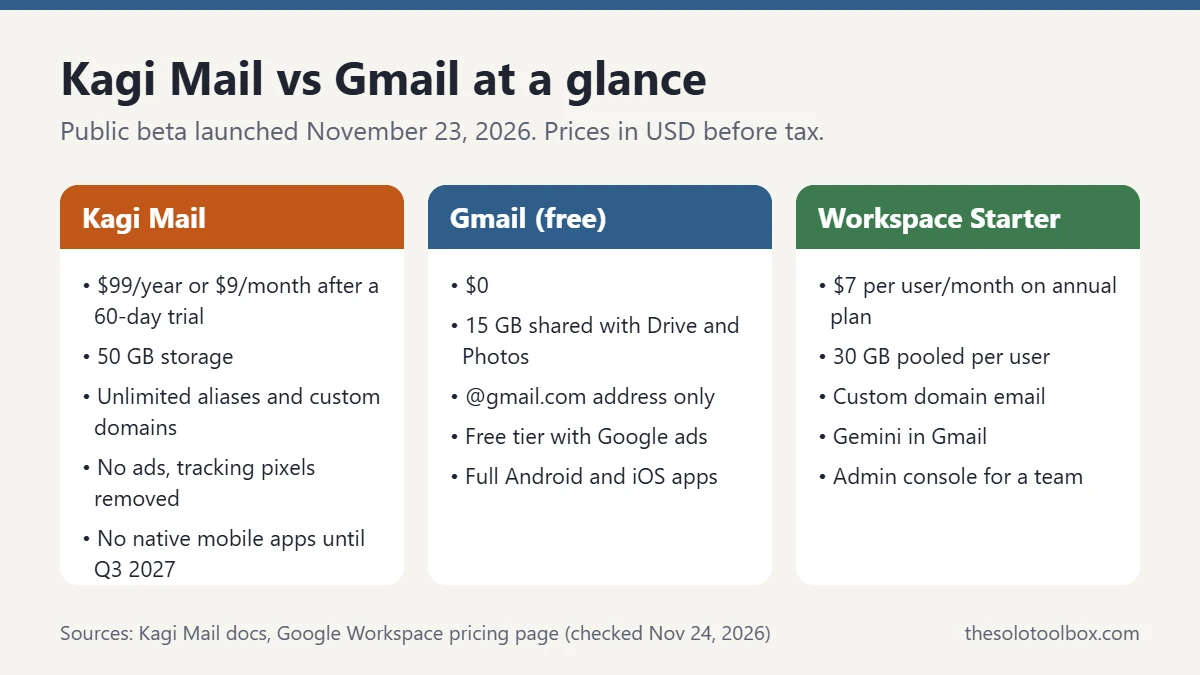
Kagi Mail is worth choosing over Gmail if you want ad-free email on your own domain and can manage without a native phone app until 2027. It costs $99 a year (or $9 a month) after a 60-day free trial and includes 50 GB of storage, unlimited aliases and unlimited custom domains. Free Gmail is still the better fit if you live in its mobile apps or depend on Google Drive, and Google Workspace Business Starter is cheaper per person at $7 a month on an annual plan.
Kagi, the company behind the paid Kagi search engine, opened Kagi Mail to everyone as a public beta on November 23, 2026. This guide compares price, storage, privacy, custom domains and app support, lists what the beta is missing, and shows how to test it alongside Gmail without moving your domain’s mail.
Before you start
- Applies to: anyone deciding between Kagi Mail, a free Gmail account and Google Workspace for personal or one-person business email.
- You’ll need: a Kagi account and a payment card to start the trial. Nothing is charged until the 60 days end.
- How we checked this: on November 24, 2026 we read Kagi’s launch post, the Kagi Mail user guide (including its Plans and Limits and Custom Domains sections) and Google Workspace’s US pricing page. We did not run a long-term test of deliverability or spam filtering, so those aren’t rated here.
What Kagi Mail is
Kagi Mail is a paid email and calendar service with a @kagimail.com address or your own domain. It runs on the open-source Stalwart mail server and supports IMAP, JMAP, SMTP and CalDAV, so you can read it at kagimail.com or in Apple Mail, Thunderbird, Outlook, K-9 Mail, FairEmail or the Gmail app on Android and iOS. On Gmail’s website you can only add it as a “Send mail as” address.
The pitch is the same as Kagi Search: you pay, so there are no ads and no profiling. Tracking pixels are stripped when a message arrives and remote images load through Kagi’s proxy, so senders can’t see when you opened their email or your IP address. Kagi says your mail is never used to train AI models.
Kagi Mail vs Gmail: side-by-side comparison
| Kagi Mail | Gmail (free) | Google Workspace Business Starter | |
|---|---|---|---|
| Price | $99/year or $9/month + tax after a 60-day trial; included in Kagi Ultimate | Free | $7 per user/month on an annual plan (US list price) |
| Storage | 50 GB per account | 15 GB shared with Drive and Photos | 30 GB pooled per user |
| Custom domain | Yes, unlimited domains | No | Yes |
| Aliases | Unlimited | Plus-addressing only | Up to 30 per user, added by an admin |
| Ads | None | Ads in the free tier | No ads |
| Mobile apps | Mobile web or any IMAP/JMAP app; native apps targeted for Q3 2027 | Native Android and iOS apps | Native Android and iOS apps |
| Attachments | 50 MB per file, 75 MB per email | 25 MB, larger files sent as Drive links | 25 MB, larger files sent as Drive links |
| AI features | Optional; one switch in Settings > General turns them all off | Gemini features | Gemini in Gmail |
Google’s prices change often and its pricing page was showing a 50% introductory discount for new customers when we checked. The Workspace figure above is the regular annual-plan price, which works out to $84 per user per year.
Where Kagi Mail is ahead
- Storage for the price: 50 GB for one person, against 15 GB on free Gmail that also has to hold your Drive files and photos.
- Domains and aliases: unlimited custom domains, catch-all addresses and unlimited aliases are included. You can give every website its own address and turn off the one that starts getting spam.
- Sender screening: mail from new senders can be held until you approve it, likely phishing is flagged, and verified senders show their brand logo (BIMI).
- No lock-in: if you cancel, you can send and receive for 60 days and then read and export for four more months.
- Rules without AI: besides plain-language rules, Kagi Mail supports Sieve filters, which run without any AI involved.
What’s missing in the beta
Kagi lists these gaps in its launch post, with target dates:
| Feature | Target |
|---|---|
| Contacts and address book | Q1 2027 |
| Full Kagi Assistant integration | Q1 2027 |
| Native mobile apps | Q3 2027 |
| Shared mailboxes | “Coming soon”, no date |
Two more limits matter for small businesses. Each Kagi account holds one mailbox, so every person on your domain needs their own Kagi Mail account. And sign-in to import from Gmail uses an app password, because OAuth isn’t supported yet; your Google account needs 2-Step Verification turned on before Google will let you create one.
Who should switch, and who should stay
Switch, or at least try it, if
- You run a one-person business on your own domain and want email that isn’t funded by advertising.
- You already pay for Kagi Ultimate, which includes Kagi Mail at no extra cost.
- You use a desktop mail app or Apple Mail on your phone, so the missing native app doesn’t affect you.
Stay with Gmail or Workspace if
- Your clients share Google Docs and Drive folders with you and you want them in one account.
- You need shared inboxes such as support@ for several people today.
- Cost per person is the deciding factor: Workspace Business Starter is $15 a year cheaper per user at list price and includes Meet, Drive and Docs.
How to try Kagi Mail without moving your domain
The low-risk way to test is to keep your domain’s mail where it is and let Kagi Mail pull a copy of your Gmail.
- Go to kagimail.com, sign in with your Kagi account or create one, and pick a @kagimail.com username (at least five characters).
- Click Start trial in the banner, or Start free trial under Kagi Mail plan in Settings > General. Until you do, you can only email Kagi support and yourself.
- In your Google account, create an app password for Kagi Mail.
- In Kagi Mail, go to Settings > Import & Export, click Import email, choose Gmail and connect it with the app password.
- Turn on the folders you want. Kagi Mail files Gmail mail by its labels, sends unlabeled mail to Archive, and keeps checking for new mail every few minutes.
- Use it for a few weeks. Only if you decide to stay, add your domain under Settings > Domains and update its MX, SPF, DKIM and DMARC records as Kagi Mail lists them.
Changing your MX record is the step that actually moves your domain’s incoming mail, so leave it until the end. If you haven’t set up authentication records before, read our guide to SPF, DKIM and DMARC first.
Frequently asked questions
Is Kagi Mail free?
No. There’s a 60-day free trial, then it costs $99 a year or $9 a month plus sales tax. It’s included in the Kagi Ultimate plan.
Is Kagi Mail end-to-end encrypted?
Kagi’s launch post and user guide describe privacy protections such as tracker removal and image proxying, but neither describes end-to-end encryption of stored mail. If you need that, compare it with Proton Mail or Tuta before deciding.
Can I keep using the Gmail app with Kagi Mail?
Yes, on Android and iOS. The Gmail apps can add Kagi Mail as an IMAP account using an app-specific password created in Settings > External Clients.
Can I bring my own domain from Google Workspace?
Yes. Add it under Settings > Domains, verify it with the TXT record Kagi Mail shows, then switch the MX and other DNS records. Mail stops reaching Workspace once the MX change takes effect, which usually happens within minutes but can take up to 24 hours.
What to do next
If you’re curious, start the trial with a @kagimail.com address and import your Gmail, then decide before day 60. Before you change any DNS, export a full copy of your Google data with our Google Takeout backup guide. If your main goal is simply a professional address, our guide to getting an email address on your own domain compares the other options.
Related guides
Sources
- Kagi Blog: Kagi Mail is here (Public Beta), November 23, 2026
- Kagi Docs: Using Kagi Mail (Plans and Limits, Custom Domains, Importing Your Mail)
- Google Workspace: plans and pricing
Last checked: November 24, 2026. If something here is out of date, let us know.