iPhone Duo inner screen cracked? What to do first
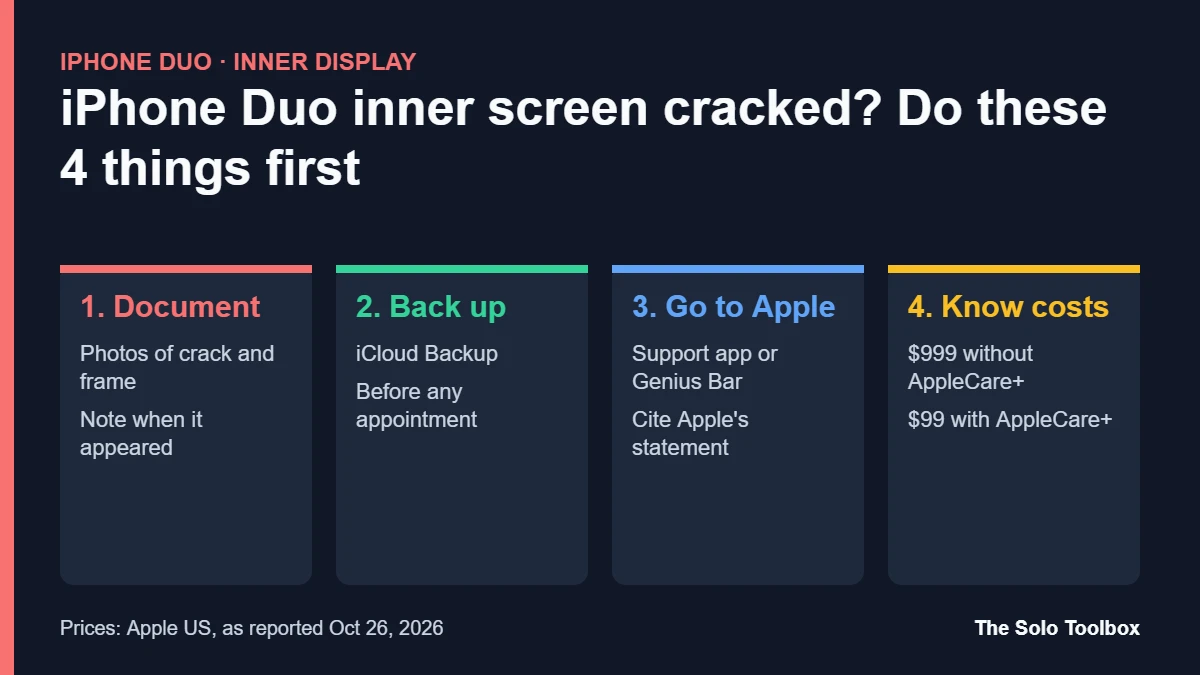
If your iPhone Duo screen cracked along the hinge without a drop, contact AppleCare and ask for a replacement: Apple has confirmed it is “aware of an issue impacting the inner display on a small number of iPhone Duo units” and says affected owners can get one. Before you hand the phone over, photograph the damage, back it up and write down when the crack appeared, because at least one owner says Apple blamed a drop and charged for the repair.
Below you’ll find what owners are reporting, what Apple has said, what a repair costs if Apple calls it accidental damage, and how to keep your claim simple. We checked the details on October 27, 2026 against 9to5Mac, MacRumors, iFixit’s teardown, Apple’s warranty page and published repair prices. Apple hasn’t named a cause, so treat anything about the hinge as a theory.
Before you start
- You’ll need: Your Apple Account password, the receipt or order number, and the phone’s serial number (Settings > General > About)
- Time: About 10 minutes to document and back up, plus the support appointment
- Watch out: Don’t try to fix or peel anything on the inner display. Visible tampering makes a free replacement harder to argue for
What owners with a cracked iPhone Duo screen are reporting
The iPhone Duo went on sale on Friday, October 23, 2026, starting at $1,999. By Sunday, 9to5Mac had collected about ten separate reports, many from the r/iPhoneDuo subreddit, with the same failure pattern:
- The inner display cracks down the center line, where the hinge folds.
- A horizontal row of pixels stays stuck white, or a green line appears across the right side and grows over time.
- Some phones cracked within hours of unboxing. A couple reportedly cracked during first setup.
- Several owners say the hinge felt stiff or resisted just before the crack, sometimes with an audible snap.
No one outside Apple knows how many iPhone Duo screens have cracked. 9to5Mac estimates that Apple has shipped hundreds of thousands of units, which would make the reported cases a small share, but that’s the outlet’s estimate, not an Apple figure. AppleInsider also found that Apple Stores weren’t seeing a flood of broken displays in launch week.
What Apple has said
In a statement to 9to5Mac on October 26, Apple said it is aware of the inner display issue on “a small number” of units, that it shows up relatively soon after purchase, and that affected customers can contact AppleCare for a replacement. Apple did not explain the cause or say whether production has changed.
iFixit’s teardown offers clues but no verdict. It mapped the reported breaks to one spot near the central hinge support, where several edges meet under the thin display, and suggested a hinge part that’s meant to retract as the phone closes may not be doing so. It also listed pressure, a trapped particle, repeated bending and a plain manufacturing defect as possible causes, and noted that a wiring fault can look like a crack. Separately, iFixit’s dust test got particles into the hinge and made it crunch, so grit is another way to damage the panel. Apple hasn’t confirmed any of it.
What to do if your iPhone Duo screen cracked
- Stop folding it repeatedly. Owners describe the line spreading over time. Leave the phone open or closed and use the outer display for now.
- Photograph the damage. Take close, well-lit photos of the crack and of the outer frame and corners. Clean corners help show there was no drop.
- Write down the timeline. Note the delivery date, when the crack appeared and what you were doing (opening, closing, setup). Keep it short and factual.
- Back up the phone. Go to Settings > [your name] > iCloud > iCloud Backup and tap Back Up Now while on Wi-Fi. A replacement usually means a new device, so you’ll restore from this backup.
- Contact Apple, not just your carrier. Use the Apple Support app, support.apple.com/contact or a Genius Bar booking. Say the inner display cracked along the hinge during normal use and that Apple has acknowledged the issue on a small number of units.
- Ask for a replacement under warranty. Apple’s one-year Limited Warranty covers manufacturing defects. If a technician calls it accidental damage, ask politely for a second review and show your photos and timeline.
Where you bought it matters for speed. According to 9to5Mac, most owners who went to an Apple Store walked out with a straight replacement, while carrier customers often waited because stores lacked stock. Apple’s warranty applies to the device itself, so you can go to Apple even if you bought through a carrier.
What a cracked iPhone Duo screen costs to fix if it’s ruled accidental
If Apple decides the crack wasn’t a defect, the bill depends on AppleCare+. These are Apple’s US prices for iPhone Duo as reported by SlashGear on October 26:
| Repair | Without AppleCare+ | With AppleCare+ |
|---|---|---|
| Inner display | $999 | $99 |
| Outer display | $379 | $29 |
| Back glass | $199 | $29 |
| Other accidental damage | $1,499 | $99 |
AppleCare+ for the iPhone Duo costs $19.99 a month, $199.99 a year or $399 for two years paid up front. You can usually add it within 60 days of purchase in the US, but Apple may inspect the phone first, and it won’t accept a phone that’s already cracked. Check the current window at checkcoverage.apple.com with your serial number.
Should you return it instead?
If the phone came from Apple and you’re inside Apple’s 14-day US return window, a return is an option if you’d rather wait for later production runs. Carriers and other retailers set their own return periods, and some charge restocking fees, so check your receipt before you decide. A replacement keeps your order and data path simple; a refund gives you time to see whether Apple changes anything.
Can you prevent a cracked iPhone Duo screen?
Apple has not published any folding or care guidance for the iPhone Duo. Some owners on social media suggest not pressing the center of the inner display when closing the phone. It costs nothing to try, but there’s no evidence it prevents the failure, which appears to come from inside the hinge rather than from how you handle the phone. Avoid adding third-party films to the inner display until Apple says what’s safe to use.
Software won’t fix a cracked panel, but it’s still worth updating once the phone works: iOS 27.2, released October 26, added Apple Pencil (USB-C) support for the Duo. Our iOS 27.2 guide covers what else changed. If you’re weighing a smaller Apple device instead, our iPad mini 2026 vs iPad mini A17 Pro comparison breaks down this week’s other launch.
FAQ
Is a cracked iPhone Duo screen covered by warranty?
Apple says affected customers can contact AppleCare for a replacement, and its Limited Warranty covers manufacturing defects for one year. Apple decides each case after inspection, so bring photos and a timeline.
Does Apple know what causes it?
Apple hasn’t said. iFixit’s teardown points to stress near the central hinge support, possibly from a part that doesn’t retract as the phone closes, but that remains a theory.
Will my data survive a replacement?
Only if you back it up. Apple typically replaces the whole unit, so run an iCloud backup or a computer backup before the appointment.
Should I wait to buy an iPhone Duo?
If you don’t need one now, waiting a few weeks lets you see whether Apple changes production or publishes guidance. If you buy now, adding AppleCare+ caps an inner display repair at $99.
What to do today
If your Duo is cracked, back it up today and book an Apple Store appointment rather than starting with your carrier. If it’s fine, check your coverage at checkcoverage.apple.com and decide on AppleCare+ before the enrollment window closes.
Related guides
Sources
- 9to5Mac: Apple responds to reports of iPhone Duo’s inner display cracking (Oct 26, 2026)
- 9to5Mac: iPhone Duo inner displays cracking reports (Oct 25, 2026)
- 9to5Google: iPhone Duo screens are breaking (Oct 26, 2026)
- SlashGear: iPhone Duo repair costs with and without AppleCare+ (Oct 26, 2026)
- iFixit: How the iPhone Duo’s repair prices compare
- Apple Support: iPhone repair and warranty