What Is Shirudo? OpenAI and Cisco’s Linux Exploit Shields Explained
The Solo Toolbox · Software Help for One-Person Businesses
Shirudo is a free, open-source Linux runtime from OpenAI and Cisco, announced on November 23, 2026, that loads small signed “shields” into a running system to block a known exploit path until the real patch is installed. It doesn’t replace patching, and it isn’t something you can add to an ordinary Ubuntu server today: the project calls itself pre-release, and production machines need a kernel with Shirudo’s own patches plus a TPM 2.0 chip.
This guide explains what Shirudo does, how a shield gets from idea to running system, what it can’t protect against, and how to try it safely in a test VM.
Before you start
- Who this is for: developers, sysadmins and one-person hosting or SaaS operators who run Linux servers and want to know whether Shirudo is worth tracking.
- What you need to try it: a Linux machine (x86-64 or arm64) with KVM, or a Mac running a Lima VM. No production server required.
- How we checked this: on November 24, 2026 we read OpenAI’s announcement, Isovalent’s launch post by Thomas Graf and Liz Rice, the Shirudo README on GitHub and the official quickstart and docs home page (both updated November 24). We did not run Shirudo ourselves; commands below are copied from the official quickstart.
What Shirudo is
Shirudo (Japanese for “shield”) is an eBPF-based security platform for Linux. eBPF lets small, verified programs run inside the kernel without loading a kernel module. Shirudo uses that to attach a temporary block to the exact code path an exploit needs, on a live system, without restarting the service.
The problem it targets is the gap between disclosure and patch. OpenAI’s announcement notes that testing and rolling out a fix can take days or weeks, and the usual stopgap, switching off the affected feature, often breaks legitimate traffic too. A shield is meant to stop only the malicious input.
Shirudo grew out of Tetragon, the eBPF security project Isovalent open-sourced in 2022. Isovalent, now part of Cisco, describes Shirudo as a rewrite of Tetragon “for the agentic era”. Cisco’s Live Protect product is built on Tetragon.
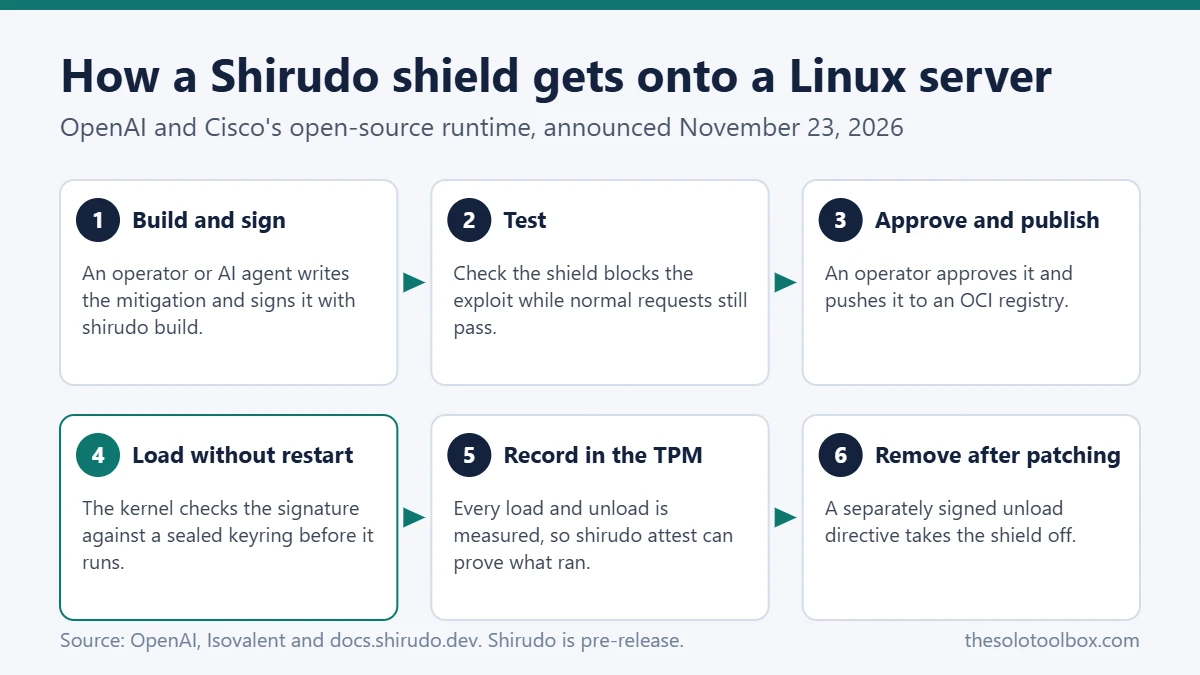
How a shield works, step by step
The official docs call the deliverable a “upatch”; OpenAI and Isovalent call it a shield. They’re the same thing: a signed package containing eBPF code or, for Java services, bytecode.
- Build: an operator (or an AI agent working for one) writes the mitigation and builds it with
shirudo build, signing it with the operator’s key. - Test: the team checks that the shield blocks the exploit and lets normal requests through. OpenAI says you can watch a proposed shield’s effect before enforcing it.
- Approve and publish: an operator approves the shield and pushes it to an OCI registry, the same kind of registry used for container images.
- Load: the target machine pulls it and runs
shirudo upatch load. The kernel checks the signature against a sealed keyring and refuses anything unsigned. - Record: every load and unload is measured into the machine’s TPM, so you can prove later which shields were running with
shirudo attest. - Remove: once the real patch is in, a separately signed unload directive removes the shield. A mismatched directive is refused with
payload_mismatch.
There’s no always-running daemon on the target or the operator’s machine. Shirudo starts from the initrd at boot and is driven by a one-shot CLI, and loaded shields are reloaded automatically after a reboot.
The Java4Shell test OpenAI published
OpenAI’s example is a controlled test against Elasticsearch 9.5.5 vulnerable to Java4Shell. A shield generated with Codex added an input check to Java’s Base64 decoder (java.util.Base64$Decoder.decode0) inside the running Elasticsearch process. The malicious input was rejected and the service kept running without a restart. Isovalent’s write-up shows the shield’s log line rejecting a crafted 65-character string, and says the mitigation “appears to be effective”.
That is a vendor demo of one bug, not an independent test. Nobody outside OpenAI, Cisco and Isovalent has published results yet.
What Shirudo can’t do
The docs are direct about the limits:
- It trusts the kernel. A kernel bug that gives an attacker code execution sits below Shirudo, so a shield can’t stop it. It can only remove attack surface or block a known path until a fixed kernel is deployed.
- It doesn’t understand what a shield does. Shirudo checks that only signed shields run and that every change is recorded. A badly written shield that blocks valid traffic will still load if it’s signed.
- It isn’t a scanner. You still need to know you’re vulnerable. Shirudo applies a fix; it doesn’t find the problem.
- It needs specific hardware and kernels. Production targets need the signed-loader kernel ABI, Shirudo’s kernel patches and TPM 2.0. The README gives no stock-distro kernel version that works out of the box.
Shirudo vs. patching vs. WAF rules
| Shirudo shield | Vendor patch | WAF or firewall rule | |
|---|---|---|---|
| Where it acts | Inside the running process or kernel path | Replaces the vulnerable code | Before traffic reaches the app |
| Restart needed | No | Usually | No |
| Stops internal or non-HTTP attacks | Yes, if the shield covers that path | Yes | No |
| Permanent fix | No, temporary | Yes | No |
| Ready for production today | No, pre-release | Yes | Yes |
How to try Shirudo in a test VM
The quickstart builds Shirudo from source, boots a protected Ubuntu test VM and takes one harmless test shield through its full life: sign, load, verify with the TPM, unload. The test shield attaches to do_nanosleep() and does nothing, so it’s safe to experiment with.
Requirements on the host: Linux on x86-64 or arm64 with read/write access to /dev/kvm, ulimit -l set to unlimited (no root needed), clang and LLVM 23 with the BPF target, OpenSSL 3.5 or later, libelf, zlib, libcurl 7.75 or later, tpm2-tss, LuaJIT, plus QEMU, swtpm and tpm2-tools for the VM. Mac users are pointed to a Lima VM.
From a clone of the GitHub repository, the quickstart’s main commands are:
- Fetch the test kernel and build:
testing/vm/kernel-artifact.sh fetch, thenmakeandmake shirudo-build. - Add the tools to your path:
export PATH="$PWD:$PWD/tools/shirudo-build:$PATH". - Start and enter the VM:
make -C testing vm VM_NAME=quickstart, thenmake -C testing vm-ssh VM_NAME=quickstart. - Inside the VM, check its state with
shirudo status, load the test shield withshirudo upatch load basic.upatchand confirm withshirudo upatch list. - Clean up afterwards with
make -C testing vm-stop VM_NAME=quickstartandmake -C testing vm-clean VM_NAME=quickstart.
The full quickstart also covers building and signing your own shield, creating the unload directive and verifying TPM evidence. Isovalent also runs a browser-based lab if you don’t have a KVM host.
Should you use Shirudo now?
For a production server, no. Keep patching the normal way: update packages as soon as fixes land, and use a WAF rule or switch off the affected feature as the stopgap. Our guides to patching nginx for nginx2root and updating APT on Debian and Ubuntu show that routine.
Shirudo is worth watching if you run Java services, maintain your own servers, or build tooling for others. OpenAI says the goal is to publish tested shields alongside vulnerability disclosures, which would change the first 48 hours after a bug goes public. Until stock distro kernels support it, that stays a plan rather than something you can install.
FAQ
Is Shirudo free?
Yes. The code is under the BSD 2-Clause license, with the in-kernel BPF programs dual-licensed BSD and GPL.
Does Shirudo send my data to OpenAI?
Nothing in the docs says so. Targets pull shields from an OCI registry you choose and push telemetry to OpenTelemetry collectors you configure. Using Codex or another AI model to write shields is a separate, optional step.
Can Shirudo protect against kernel exploits?
Only partly. It can block a known path to a kernel bug until you install a fixed kernel, but it trusts the kernel itself and can’t stop an attacker who already has kernel code execution.
Does it work on Windows or macOS servers?
No. Shirudo is Linux-only. The docs list x86-64 and arm64, with riscv64 validation still pending.
What to do next
If you run Linux servers, keep patching on your normal schedule and bookmark the Shirudo docs to check for a release with stock-kernel support. If you want hands-on time, run the quickstart in a throwaway VM, not on a server that hosts client sites. For a recent example of why the patch gap matters, see our guide to the Linux kernel CVE-2026-98432.
Related guides
Sources
- OpenAI: OpenAI and Cisco introduce Shirudo (November 23, 2026)
- Isovalent: Cisco and OpenAI launch Shirudo, by Thomas Graf and Liz Rice (November 23, 2026)
- Shirudo docs: VM quickstart
- Shirudo docs: overview
- shirudo-dev/shirudo on GitHub
Last checked: November 24, 2026. If something here is out of date, let us know.