X Parental Controls: How to Link Your Teen’s Account
The Solo Toolbox · Software Help for One-Person Businesses
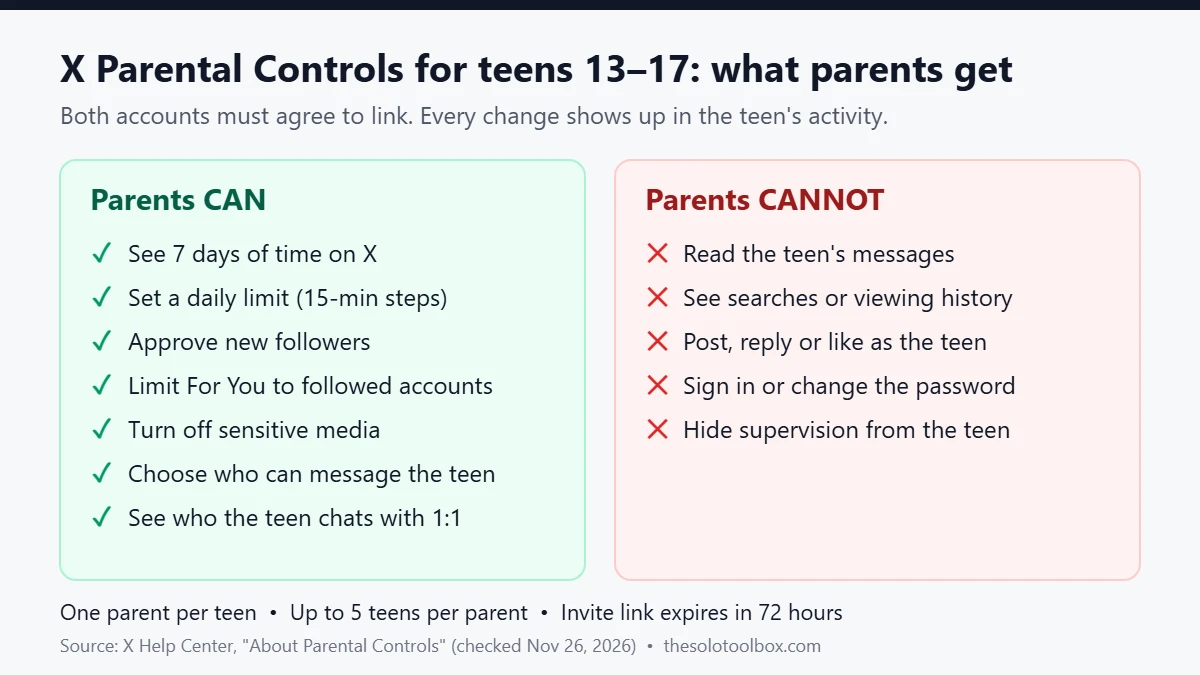
X parental controls let a parent or guardian link their X account to a teen’s account (ages 13 to 17) and then set a daily time limit, approve new followers, filter what shows up in For You, and choose who can message the teen. The parent starts the link with a QR code or invite link, and the teen has to accept it. Parents can’t read the teen’s messages or see their searches.
X’s Safety team announced the feature on November 25, 2026. This guide walks through linking the accounts, what each setting does, and where the controls stop.
Before you start
- Who can use it: a parent or guardian aged 18 or older and a teen aged 13 to 17. X goes by the birth date on each account.
- What you need: your X account and your teen, with their phone, at the same time. Both accounts need a birth date, and X may ask either of you for a selfie check or ID verification.
- How we checked this: on November 26, 2026 we read X’s Help Center page “About Parental Controls” and coverage of the November 25 announcement from Digital Trends and TechBriefly. We haven’t linked a test account. X’s help page doesn’t say where Parental Controls sits in the app’s menus, so we can’t give an exact tap-by-tap path to it.
What X added on November 25
Until now, X had no supervision tools of its own. Teen accounts already defaulted to a protected mode that restricts sensitive media and blocks targeted advertising, according to X. Parental Controls sits on top of that and gives an adult a set of switches the teen can see but can’t change.
The launch comes as X faces regulatory pressure. In the same week, the attorneys general of Oregon and Virginia sued X and other Musk companies over sexual deepfakes made with Grok, and Ireland’s media regulator has been investigating X’s age checks since September.
How to link your account to your teen’s
Supervision only starts when both of you agree. The steps from X’s Help Center:
- Check that both accounts have a birth date. If yours is missing, add it before you open Parental Controls.
- On your account, open Parental Controls and tap Get started. X shows a QR code and a link.
- Your teen scans the QR code with their phone camera, or opens the link on the device where they’re signed in to X.
- Your teen sees who is asking and what you will and won’t be able to do, then taps Link accounts or Decline.
- Once they accept, the link appears in the teen’s activity log and you can start changing settings.
The invite expires 72 hours after you create it. Creating a new invite cancels the old one, so if your teen says the link doesn’t work, make sure they’re using the most recent one.
Which settings you can control
| Setting | What it does |
|---|---|
| Time on X | Shows the teen’s use over the last 7 days and lets you set a daily limit |
| What the teen sees | Limits For You recommendations and videos to accounts the teen follows; turns off sensitive media |
| New followers | Requires your approval for each new follower and makes the account protected |
| Restricted words | Hides words you choose from the teen’s posts and videos |
| Who can message | Messages from people the teen follows, from verified accounts, or from anyone |
| Privacy settings | Protects the account, controls photo tagging, discoverability by email or phone number, and location on posts |
| Adults in chats | Lists the accounts the teen has one-to-one chats with, without the messages |
| Activity | A log of every settings change and every approved or denied request |
For a younger teen, the settings with the most effect on who can reach them are Who can message (set to people they follow), New followers approval, and the location and discoverability switches under Privacy settings.
How the daily time limit works
- You set it in 15-minute steps.
- When the teen reaches it, X locks for the rest of the day and shows a message saying when it resets.
- It resets at midnight in the teen’s local time, not yours, which matters if they’re travelling or at school in another time zone.
- If you raise or remove the limit, the teen gets access back right away.
Follower approval: one catch
Turning on follower approval also protects the teen’s account, because only protected accounts can approve followers. Requests then show up in your Parental Controls for you to approve or deny.
If you later turn approval off, the account stays protected. The teen just starts handling follow requests themselves. To make the account public again, the teen would have to unprotect it.
What parents can’t see or do
X built the feature so the teen keeps ownership of the account. A parent or guardian can’t:
- Read the teen’s messages (now called XChat)
- See what the teen searches for or which posts and videos they view
- Post, reply, like or send messages as the teen
- Sign in to the teen’s account or change its password
Supervision isn’t hidden. The teen sees who supervises them, their own screen time, which settings are locked, and the same change log you see.
Limits to know before you rely on it
- It depends on the birth date. X decides who counts as a teen from the birth date on the account, so a teen who signed up with an adult birth date can’t be supervised.
- The teen has to say yes. They can decline the invite. Once linked, they can ask to end supervision, but you decide.
- One supervisor per teen. A teen can be linked to only one parent or guardian at a time. You can supervise up to five teens.
- It ends at 18. X says supervision ends automatically when the teen becomes an adult. Settings stay as last set until the teen changes them.
- It covers X only. The help page doesn’t mention Grok. Device-level tools such as Screen Time on iPhone or Family Link on Android still matter.
FAQ
Can I read my teen’s DMs with X parental controls?
No. You can see which accounts your teen has one-to-one chats with, but not what’s in them.
Can two parents supervise the same teen?
No. A teen can be linked to one parent or guardian at a time.
What happens if I end supervision?
The accounts unlink and the teen can change the settings you controlled. The teen keeps their account, posts and followers, and the settings stay where you left them until the teen changes them.
Does my teen get notified when I change a setting?
Every change is recorded in the activity tab, which the teen can open at any time.
What to do next
Sit down with your teen, agree on a daily limit and who can message them, then send the invite while you’re together so it doesn’t expire. Other platforms are adding similar tools: see how to use Pinterest parental controls to limit AI content. If your teen also uses AI chat apps, read what the Character.AI auction on December 1 means for their chats. Buying gifts for younger kids? Check New York’s AI toy ban first.
Related guides
Sources
- X Help Center: About Parental Controls
- Digital Trends: X is finally getting robust parental controls to keep teens safe (November 2026)
- TechBriefly: X rolls out parental controls for teen accounts (November 26, 2026)
Last checked: November 26, 2026. If something here is out of date, let us know.