
How to get a professional email address on your own domain (and what changed in 2026)
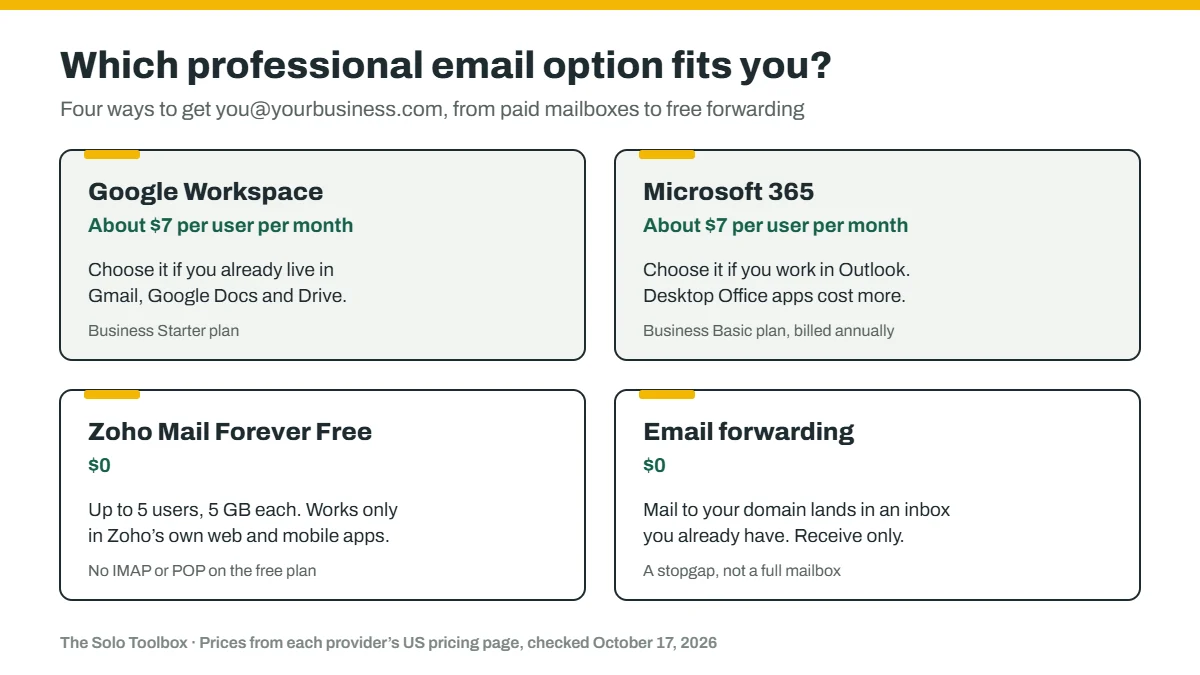
For most freelancers and one-person businesses, the simplest dependable way to get an address like you@yourbusiness.com is a paid mailbox from Google Workspace or Microsoft 365, at about $7 a month. If you need it to be free, Zoho Mail’s free plan works, with real limits. One thing to know before you follow an older guide: the popular “free custom email with Gmail” setups depend on Gmail features that Google is phasing out between 2026 and 2027.
Before you start
- You’ll need: a domain you own (or are about to buy) and access to its DNS settings.
- Time: 30 to 60 minutes, plus up to 48 hours for DNS changes to take effect.
- How we checked this: prices and limits come from each provider’s own pages, checked October 17, 2026. We haven’t tested every service hands-on, and prices change often, so confirm the price before you buy.
Which option fits you
- You already live in Gmail and Google Docs: Google Workspace Business Starter. You keep the Gmail interface, now with your own domain.
- You work in Outlook, Word and Excel: Microsoft 365. Business Basic covers email; you need Business Standard or higher for the desktop Office apps.
- You need $0 and can work in a web browser: Zoho Mail’s Forever Free plan, as long as you don’t need to connect it to another email app.
- You just want mail to your domain to land in your existing inbox: email forwarding. It’s free but receive-only, so it’s a stopgap rather than a full solution.
Your options compared
| Option | Price (US) | What you get | Limits to know |
|---|---|---|---|
| Google Workspace Business Starter | $7.00 per user per month (Google shows a promotional $3.50 from Oct 30, 2026 to Jan 30, 2027); 14-day trial | Gmail with your own domain | 30 GB of pooled storage per user |
| Microsoft 365 Business Basic | $7.00 per user per month with Teams, or $5.40 without; billed annually | Outlook with your own domain, plus web and mobile Office apps | No desktop Office apps on this plan |
| Zoho Mail Forever Free | $0 | Email on one domain for up to 5 users | 5 GB per user; no IMAP, POP or ActiveSync, so you use Zoho’s own web and mobile apps; only available in some of Zoho’s data centers |
| Your web host’s email (for example Hostinger) | Often bundled or cheap. Hostinger shows Business Email from $0.39 per mailbox per month on a 48-month prepaid term, renewing at $1.59 | A mailbox on your domain from the company that hosts your website | Small included plans: Hostinger’s 1-year trial with hosting has 1 GB and 100 messages a day, and ends if your hosting does |
| Email forwarding (for example Cloudflare Email Routing) | Free | Mail sent to your domain is forwarded to an inbox you already have | Receive only, no sending. Cloudflare’s version requires Cloudflare to manage your domain’s DNS |
Prices are from each provider’s pricing page on October 17, 2026, before tax. Long prepaid terms and promotional prices make the first bill lower than the renewal, so compare the renewal price too.
The Gmail changes that break old “free” setups
For years, a common free trick was to forward your domain’s mail into a personal Gmail account, then use Gmail’s “Send mail as” to reply from your business address. Gmail also offered to fetch mail from other accounts. Google is removing the pieces that made this work:
- Fetching mail from other accounts (POP) and Gmailify are being removed. According to Google, new users can’t set them up after early 2026, and existing users can keep them until January 2027. Google suggests forwarding instead, or adding the other account to the Gmail mobile app.
- “Send mail as” for third-party addresses ends in January 2027. Google’s examples are Yahoo and Outlook.com addresses, and it says Google Workspace aliases aren’t affected.
What Google’s page doesn’t say is whether an address on your own domain, hosted somewhere other than Google, counts as “third-party.” Until Google clarifies, don’t build your business email on Send-as in a free Gmail account. If you want Gmail with your own domain, Google Workspace is the supported route.
How to set it up
The steps are the same whichever paid or free provider you pick. Each provider’s setup wizard walks you through its exact values.
- Sign up and add your domain. Start the plan or trial and enter the domain you own.
- Verify that you own the domain. The provider gives you a TXT record to add in your domain’s DNS settings.
- Point your mail to the new provider. Replace your domain’s MX records with the ones the provider gives you. Remove any old MX records you’re no longer using, so mail doesn’t split between two places.
- Set up SPF, DKIM and DMARC so your mail isn’t flagged as spam. We cover each step in why your emails land in clients’ spam folders.
- Test both directions. Send a message from your new address to a personal account and reply to it. Then check the result in Gmail’s “Show original” view, as described in that guide.
If you’re moving from an older mailbox, ask the new provider about its import tool before you change the MX records, so your old messages come with you.
Free trials and bundled email
Many web hosts include a mailbox with a hosting plan or a domain purchase, and it’s a reasonable way to start. Read the terms before you print the address on business cards. Hostinger, for example, says its email trial bundled with hosting lasts one year, includes 1 GB of storage and 100 messages a day, and ends early if the hosting plan expires. A trial can’t be restarted once it’s cancelled. Put a reminder in your calendar a month before any trial ends, so you can upgrade or move without losing mail.
If it doesn’t work
- No mail arrives after you change the MX records: DNS changes can take up to 48 hours. Check that the old MX records are gone, and that you edited DNS at the company your domain’s nameservers actually point to.
- Cloudflare Email Routing won’t turn on: it requires Cloudflare to manage your domain’s DNS, and it won’t enable while other MX records exist on the domain.
- You can receive but your messages land in spam: your SPF, DKIM or DMARC records are missing or wrong. Work through our email authentication guide.
- Zoho won’t connect to Outlook or Apple Mail: the Forever Free plan doesn’t include IMAP or POP. Use Zoho’s own apps, or upgrade to a paid plan.
Sources
- Google Workspace pricing
- Microsoft 365 business plans compared
- Zoho Mail pricing
- Hostinger Business Email
- Hostinger: parameters and limits of Hostinger Email
- Cloudflare Email Routing documentation
- Google: changes to Gmailify and POP in Gmail
- Google: send emails from a different address
Last checked: October 17, 2026. Email prices and Gmail’s features are changing quickly. If something here no longer matches what you see, let us know.
